⚠️ Affiliate Disclosure: This post contains Amazon affiliate links. If you purchase through our links, we may earn a small commission at no extra cost to you. We only recommend kits we have researched and verified against live Amazon listings. Prices change constantly, so we deliberately don’t print them here. Always tap through and confirm the current price and variant on Amazon before buying.
Ultimate Buying Guide
🤖 Best Obstacle Avoidance Robot Kits for Beginners, Students & Makers
8 obstacle avoidance robot kits ranked, from a servo-swept ultrasonic Arduino car to a mecanum robot that fuses two infrared sensors with sonar, a classroom coding robot and a Raspberry Pi car that dodges obstacles with a camera, with real specs, honest verdicts and verified Amazon links.
✅ 8 Kits Reviewed
✅ Verified Amazon ASINs
✅ Arduino · ESP32 · Raspberry Pi
✅ Honest Pros & Cons
An obstacle avoidance robot is the first project where a robot stops following instructions and starts reacting to the world. A line follower is told exactly where to go by a strip of tape. An obstacle avoider is not: it has to measure the distance to whatever is in front of it, decide whether that distance is safe, choose a direction to escape in, and do all of that fast enough that it does not bury its bumper in a chair leg. That is the beginning of real autonomous navigation, and everything from a robot vacuum to a drone’s collision-avoidance layer runs the same basic loop.
The hardware that loop runs on has changed a lot. The classic build is a HC-SR04 ultrasonic sensor bolted to a small servo so the robot can sweep its head left and right before committing to a turn. A modern kit might instead give you two infrared proximity modules plus sonar so the robot senses its diagonals as well as straight ahead, a mecanum chassis that can slide sideways out of trouble instead of reversing, or a camera and OpenCV that identify what the obstacle actually is. This guide ranks 8 obstacle avoidance robot kits across Arduino, ESP32, micro:bit-class coding platforms and Raspberry Pi, and tells you which one matches how you want to learn.
💡 Reality check before you buy: Almost none of these are sold as “obstacle avoidance robots”. They are multi-mode robot cars where obstacle avoidance is one mode alongside line following, app driving and IR remote control, so read the sensor spec rather than the marketing bullets. Expect the physics to bite: an ultrasonic sensor has a minimum range of roughly 2 to 3 cm, a beam cone around 15 degrees wide, and it goes blind on soft fabric, foam and any surface angled sharply away from it, which is why a robot that dodges a cardboard box will still drive straight into a curtain or a table leg it catches side-on. A single fixed sensor also cannot tell you which way to escape, only that something is there. Finally, check what is missing from the box: several of these kits ship without batteries, and the Raspberry Pi kits do not include the Pi.
🤖 Quick Comparison: All 8 Obstacle Avoidance Robot Kits
| Robot Kit | Brain | Obstacle Sensing | Programming | Best For | Buy |
|---|
| 🥇 ELEGOO Smart Robot Car V4 | UNO R3 + ESP32-WROVER | Ultrasonic on a servo-swept head | Arduino IDE · app | Best Overall | Buy Here → |
| 🏅 SunFounder Zeus Car | UNO R3 compatible + ESP32-CAM | 2 IR proximity modules + ultrasonic | Arduino C++ | Best Omnidirectional Avoidance | Buy Here → |
| 🍓 SunFounder PiCar-X | Raspberry Pi (not included) | Ultrasonic + pan-tilt camera | Python · Blockly | Best Raspberry Pi Kit | Buy Here → |
| 👁️ Hiwonder TurboPi | Raspberry Pi + OpenCV | Ultrasonic + HD vision | Python · ROS2 | Best Vision Avoidance | Buy Here → |
| 🎓 Makeblock mBot2 | CyberPi (ESP32-class) | Ultrasonic Sensor 2 with LED eyes | Scratch · Python (mBlock) | Best for Classrooms | Buy Here → |
| 🔧 Freenove 4WD Car Kit | UNO R3 compatible | Ultrasonic on a rotatable head | Arduino IDE | Best Arduino Builder Kit | Buy Here → |
| 🦉 ELEGOO Owl Robotics Car V2.0 | ELEGOO Nano V4 | Ultrasonic + IR photoelectric | Arduino IDE · app | Best for Younger Builders | Buy Here → |
| 🔰 LAFVIN Smart Robot Car Kit | UNO R3 board included | HC-SR04 on a servo bracket | Arduino IDE | Best Budget First Build | Buy Here → |
Specs come from the current Amazon listings and manufacturer documentation. Several of these kits sell in multiple bundles (with or without a Raspberry Pi, with or without a remote, with or without batteries), so check exactly which variant a listing is selling. We deliberately do not publish prices because they move constantly. Tap through and check the live price yourself.
🔍 What to Look for in an Obstacle Avoidance Robot Kit
📡
Sensor Type
Ultrasonic gives you an actual distance in centimetres, works in the dark and ignores surface colour, but it is slow, has a wide beam and goes deaf on soft material. Infrared proximity modules are fast and cheap but only report near or far, and they are fooled by black objects and bright sunlight. A kit with both, or with a camera, is measurably better at not hitting things.
🔄
Fixed Sensor or a Swept Head
One sensor pointing straight ahead tells you something is there and nothing more, so the robot has to reverse and guess. A sensor on a servo can stop, look left, look right and pick the clearer side, which is the difference between a robot that flails and one that navigates. Several sensors mounted at fixed angles achieve the same thing without the scan delay.
🛞
Chassis and Escape Moves
A differential 2WD or 4WD car escapes by reversing and turning, which needs clear space behind it. A mecanum chassis can strafe sideways out of a gap without turning at all, which makes tight-corridor avoidance far easier to code. Tracks pivot in place and cope with carpet and thresholds that stall small plastic wheels.
🧠
Controller Platform
An Arduino kit gives you the tightest, most predictable loop and C++ skills that transfer everywhere, which is why it is still the default for sensor-based avoidance. ESP32 adds Wi-Fi and a camera feed on top of that loop. A Raspberry Pi earns its place only when the obstacle has to be recognised rather than just detected, or when you want to log and plot the sensor data while the robot drives.
📦
What Is Actually in the Box
This is where these kits differ most. Check for the battery (Freenove and LAFVIN ship without one, and 18650 cells plus a charger add real cost), the controller board (Raspberry Pi kits never include the Pi), whether the remote is in this variant or the more expensive one, and whether the source code is published in editable form rather than locked inside an app.
🏆 Detailed Reviews: All 8 Obstacle Avoidance Robot Kits
🥇 BEST OVERALL
ELEGOO Smart Robot Car Kit V4
⭐ 4.5/5 · Servo-Swept Ultrasonic Avoidance with FPV Camera
Buy on Amazon →

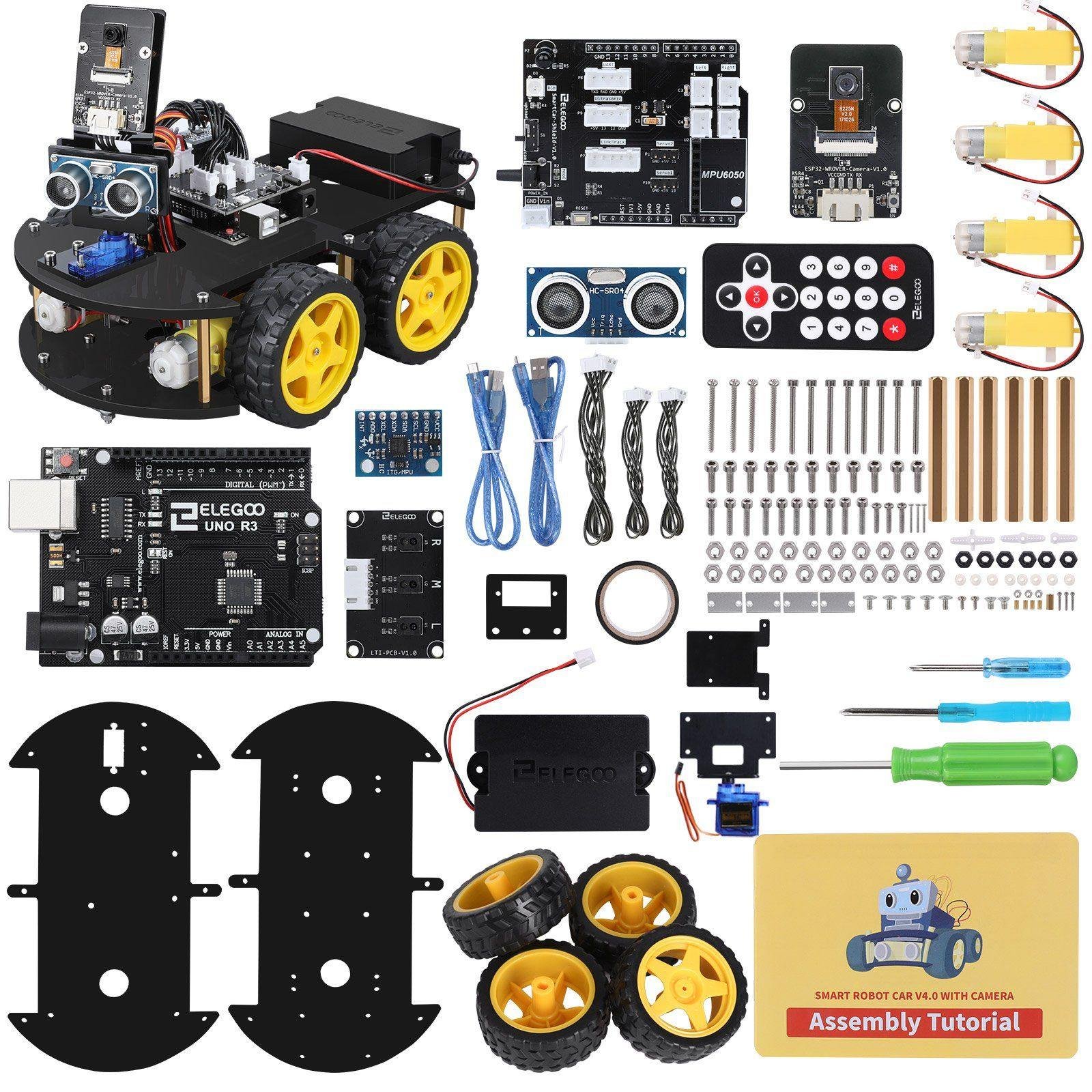
The ELEGOO Smart Robot Car V4 is the kit we would hand to almost anyone who says “I want to build a robot that avoids obstacles”. The front end is the textbook arrangement: an ultrasonic module mounted on a small servo, so the robot can stop, sweep its head through an arc, compare the readings and turn toward the clear side instead of blindly reversing. That is the difference between an avoidance sketch that works and one that gets stuck in a corner, and the code you write here ports to any other Arduino chassis you build later. Underneath sits an UNO R3 board, a TB6612 dual-channel driver and four 1:48 gear motors, and around it ELEGOO has added an ESP32-WROVER Wi-Fi and camera module for FPV driving, an infrared line-tracking module, an IR remote, a rechargeable battery pack with charger and keyed XH2.54 connectors that make miswiring genuinely hard. The documentation is the best in this group, with staged sketches that build up from “read the sensor” to “avoid the obstacle”. With well over 4,400 ratings it is also the most battle-tested kit here, so any problem you hit has already been answered by someone.
✅ Pros- Ultrasonic sensor on a servo, so it scans before it turns
- Rechargeable battery and charger included
- Keyed connectors and excellent staged tutorials
- Camera and Wi-Fi open up a second project later
- Huge user base, so problems are already answered
❌ Cons- Only one ultrasonic sensor, so the scan costs time
- Companion app is basic and reviews on it are mixed
- Acrylic body shows every fingerprint
- Obstacle avoidance is one mode among several, not the focus
🎯 Verdict: The best all-round obstacle avoidance kit. A swept ultrasonic head done properly, with the build quality, battery and documentation to get a first-timer to a robot that dodges things in an afternoon.
👉 Check Price on Amazon →
🏅 BEST OMNIDIRECTIONAL AVOIDANCE
SunFounder Zeus Car
⭐ 3.8/5 · Mecanum Robot That Strafes Around Obstacles
2 IR + Sonar
THREE-POINT SENSING
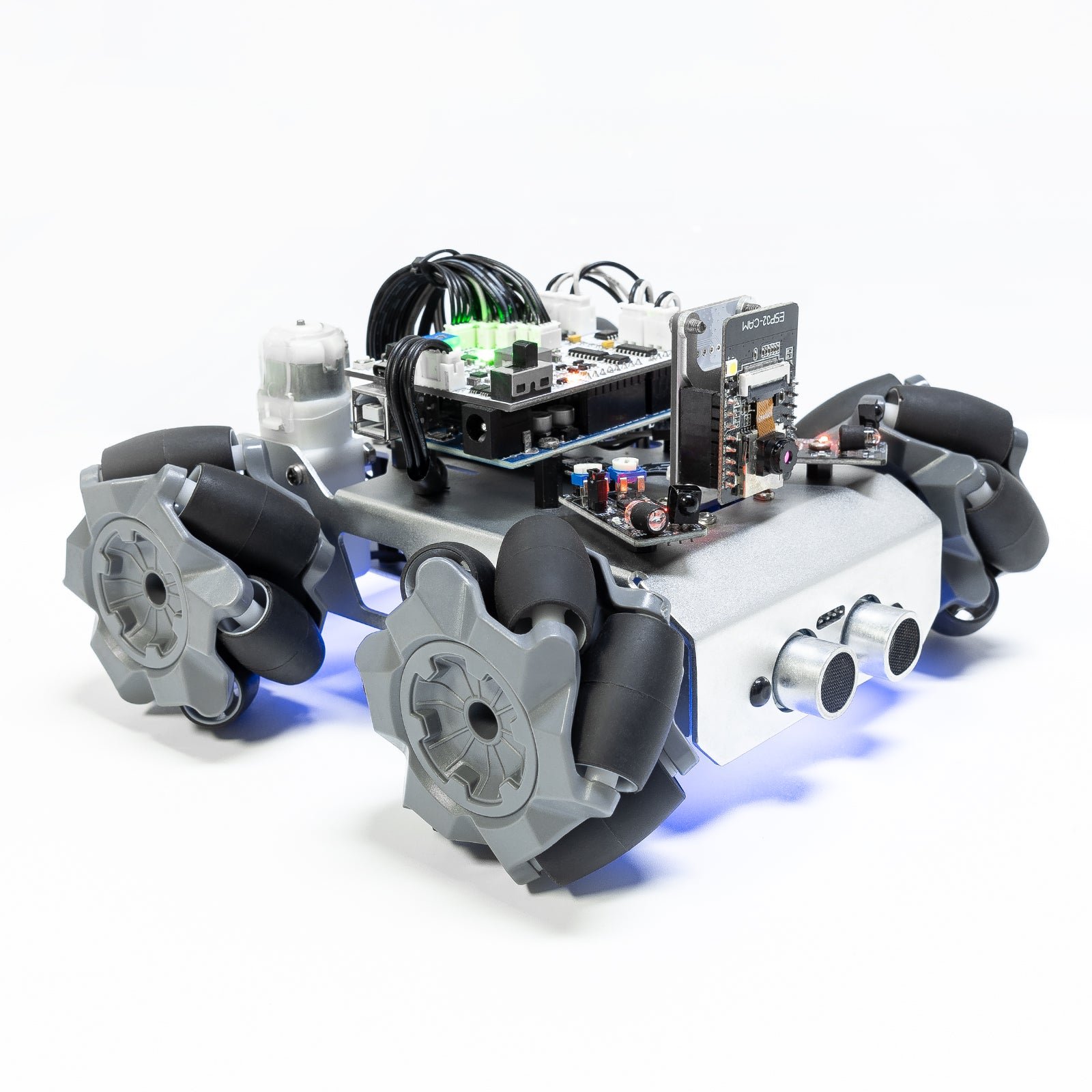
If avoidance itself is the project rather than owning a robot car, the Zeus Car is the most interesting platform here. SunFounder gave it two infrared obstacle-avoidance modules alongside an ultrasonic module, so instead of a single distance reading the robot gets a crude three-point picture of what is in front of it, and it can tell a wall from a table leg to one side. The second half of the idea is the chassis: four 6 cm mecanum wheels on an all-aluminium frame give true 360 degree movement, which means the escape manoeuvre can be a sideways slide rather than a reverse-and-turn. That single capability makes corridor and doorway avoidance dramatically easier to write. It runs on an Arduino UNO R3 compatible mainboard with an ESP32-CAM bolted on for first-person video, adds an 8-channel circular grayscale array underneath so it can also follow a line in any direction, and ships with 18650 cells, an IR remote and RGB lighting. All the source code is published and editable. The build is the long one here, commonly reported at two to three hours.
✅ Pros- Two IR modules plus sonar, not one lonely sensor
- Mecanum wheels let it strafe out of trouble
- All-metal chassis, 18650 cells and camera included
- Full editable Arduino source and good online docs
- Follows a line in any direction thanks to the circular array
❌ Cons- Longest build here, two to three hours is typical
- Reviews are mixed on the app, Wi-Fi setup and camera
- IR remote is repeatedly called the weak part
- Priciest Arduino kit in this guide
- The IR modules need their trimmers dialled in by hand
🎯 Verdict: The best kit for learning avoidance properly. Multiple sensors and an omnidirectional chassis give your algorithm somewhere interesting to go, as long as you accept a long build and a rough-edged app.
👉 Check Price on Amazon →
🍓 BEST RASPBERRY PI KIT · ⭐ 4.1/53. SunFounder PiCar-X
Ultrasonic module · 2-axis pan-tilt camera · Ackermann steering · Python and Blockly · Raspberry Pi not included
Buy Here →
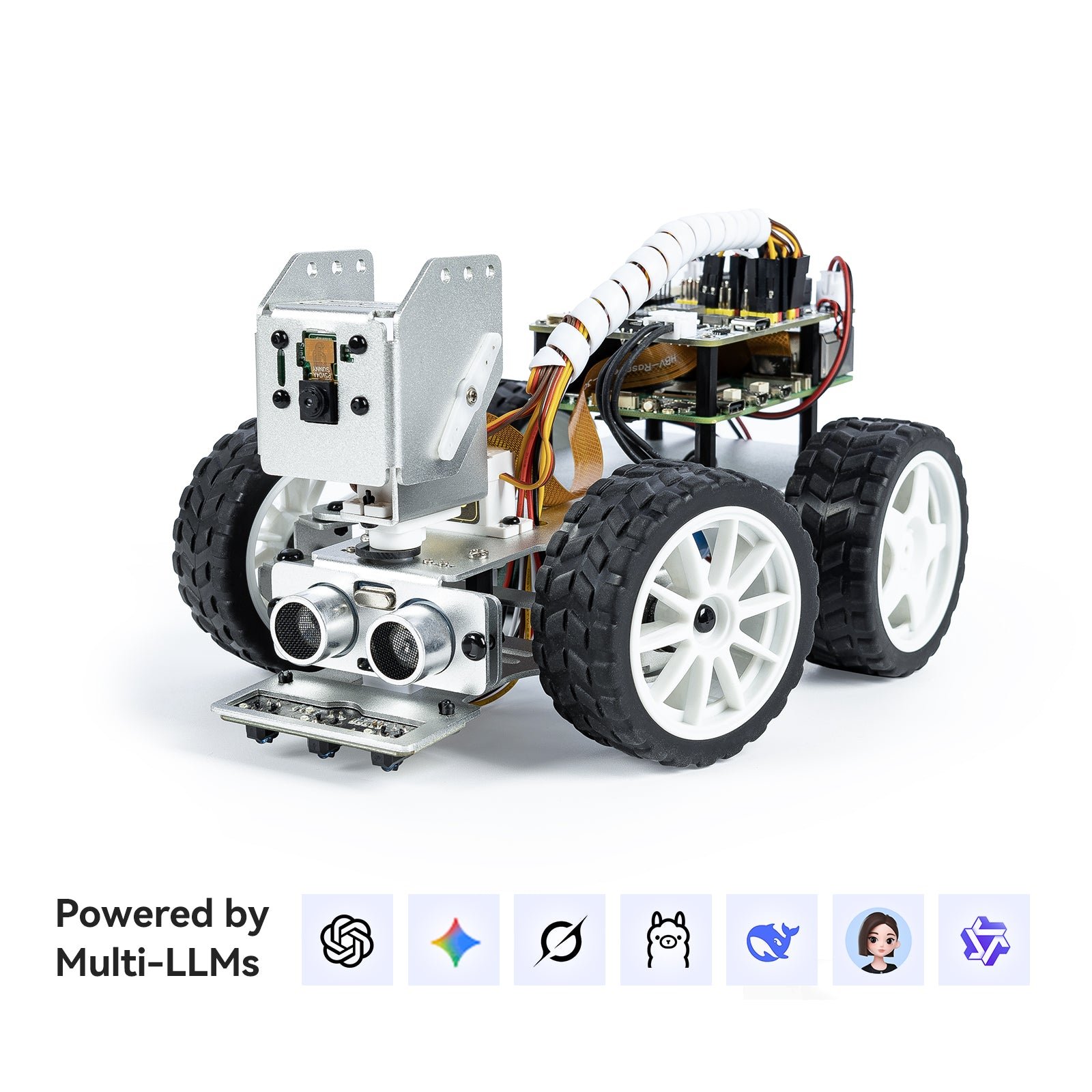
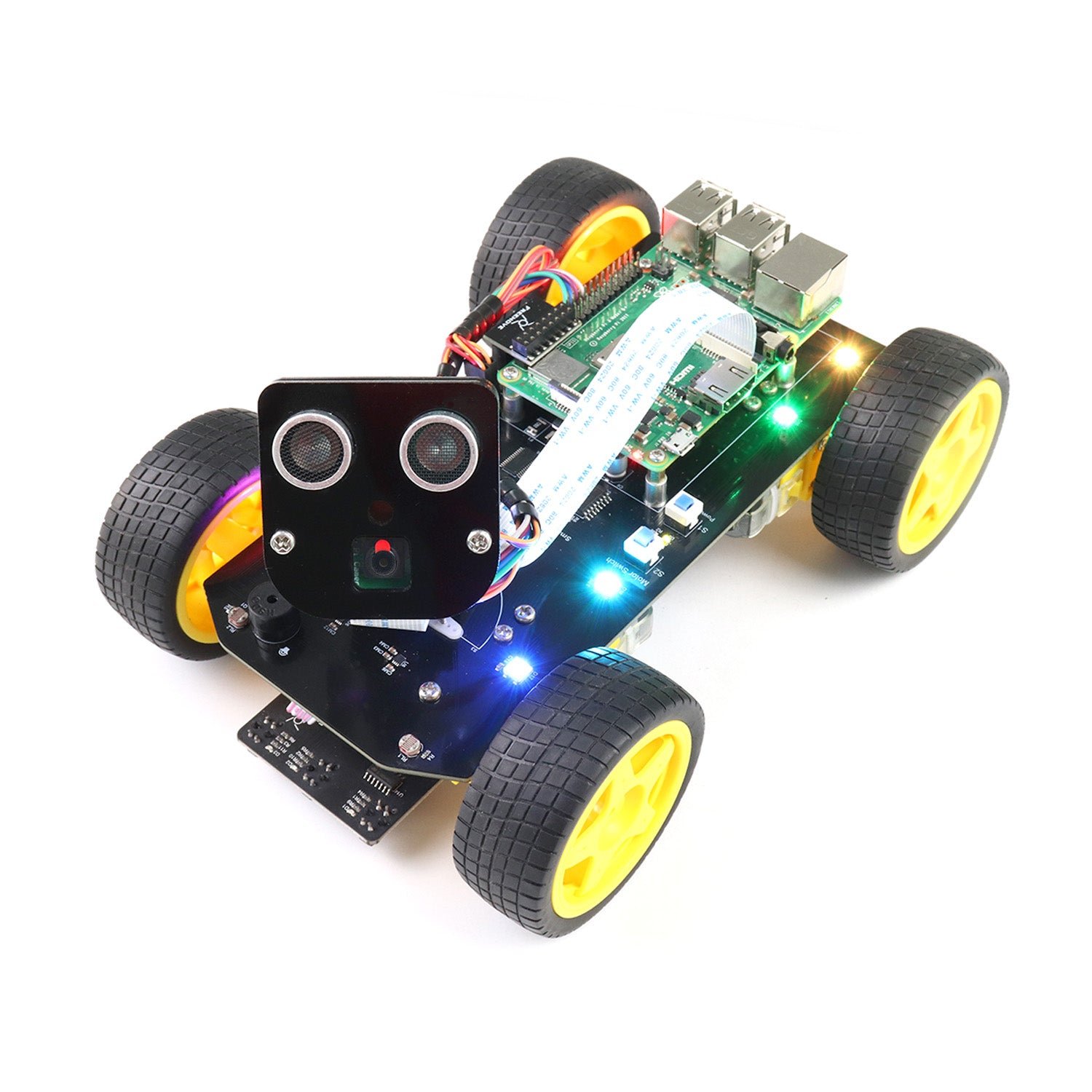
The PiCar-X is the kit to buy if you would rather write the avoidance loop in Python than in C++. SunFounder exposes the ultrasonic module through a clean object API, so the whole behaviour is a readable few lines: read the distance, steer away, drive on. What makes it more than a Python version of everyone else’s car is the front end. It uses Ackermann steering rather than tank turning, so the avoidance manoeuvre has to respect a turning circle the way a real vehicle does, and the ultrasonic sensor sits under a two-axis pan-tilt camera, which means you can graduate from “stop when something is close” to “look at the thing, then decide”. The published tutorials walk through obstacle avoidance, cliff detection and computer vision as separate lessons. It ships with rechargeable cells and a charger, but the Raspberry Pi is not included in the standard bundle, and Ackermann steering does need its servos zeroed carefully during assembly.
✅ Pros: Clean Python API over the ultrasonic sensor; pan-tilt camera adds a vision path; car-like Ackermann steering; excellent step-by-step online docs; batteries and charger included.
❌ Cons: Raspberry Pi sold separately and adds real cost; servo calibration is fiddly; a Pi boots far slower than an Arduino; single forward sensor.
🎯 Verdict: The best Python obstacle avoidance platform. Buy it if you want to prototype navigation logic in a language you can iterate in quickly, and you already have a Pi on the shelf.
👁️ BEST VISION AVOIDANCE · ⭐ 3.8/54. Hiwonder TurboPi
Ultrasonic ranging plus OpenCV vision · 2-DOF HD camera · mecanum wheels · Python and ROS2 · standard kit ships without the Pi
Buy Here →

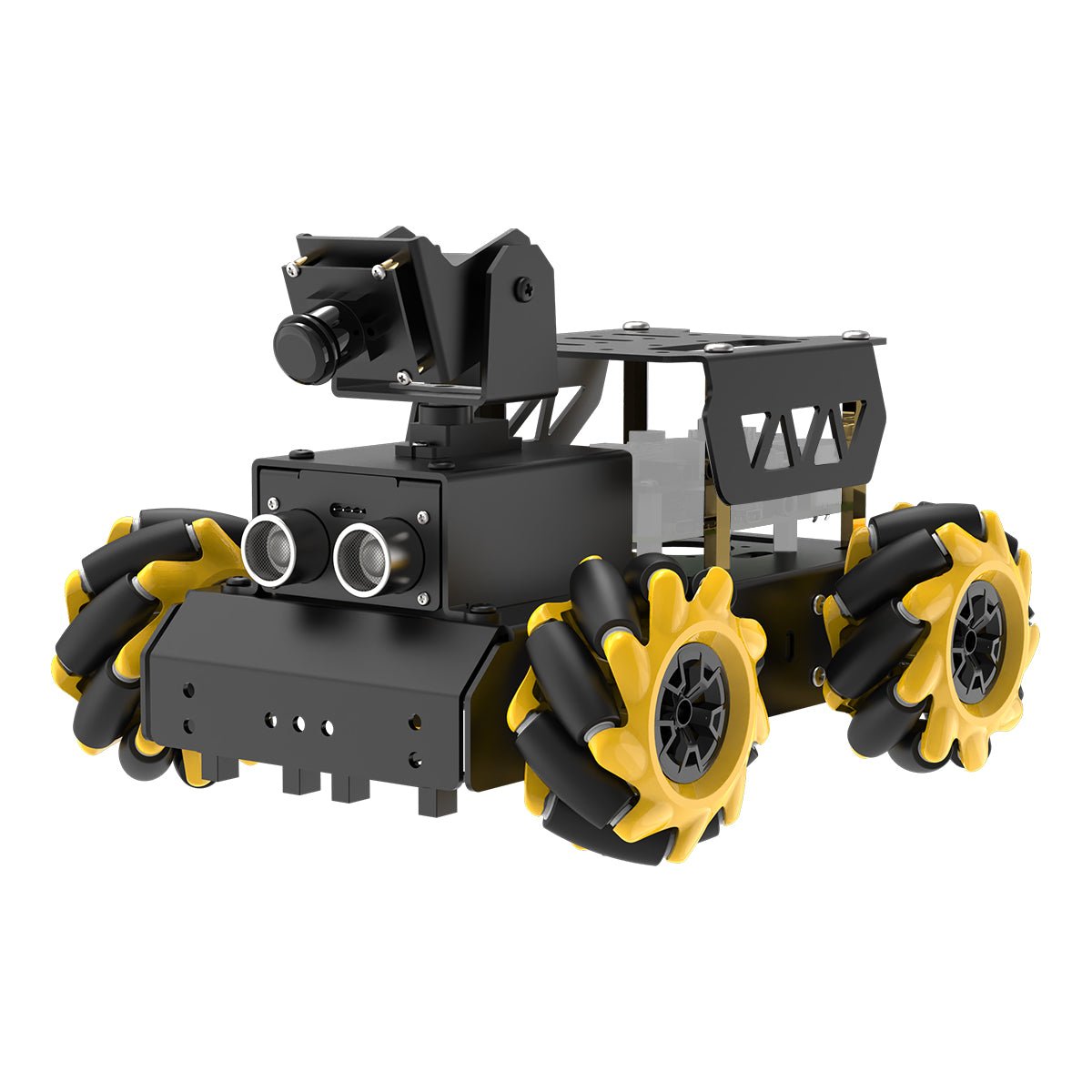
The TurboPi is the only kit here that treats obstacle avoidance as a perception problem rather than a distance problem. It still carries an ultrasonic sensor for hard ranging and collision prevention, but the interesting layer is a 2-DOF pan-tilt HD camera feeding Python and OpenCV, so the same chassis does colour sorting, target tracking, traffic-light recognition, gesture detection and face detection. Pair that with a mecanum wheel chassis and the robot can identify what is in the way and then slide around it. Hiwonder publishes the full Python source, and the platform scales up to ROS2 and large-model voice control on the higher bundles, which makes it a genuine on-ramp to research-style robotics. The trade-offs are real: this is the most expensive kit in the guide, the standard listing ships without a Raspberry Pi, review counts are still small, and stock on the no-Pi variant is frequently thin.
✅ Pros: Ultrasonic ranging plus real computer vision; mecanum chassis strafes around obstacles; open Python source; upgrade path to ROS2; camera on a 2-DOF gimbal.
❌ Cons: Most expensive pick here; Raspberry Pi not included in the standard kit; few Amazon ratings so far; stock is often limited; overkill if you only want sonar avoidance.
🎯 Verdict: Buy it when the real project is computer vision and obstacle avoidance is the first lesson rather than the whole course. For pure sonar dodging it is far more robot than you need.
🎓 BEST FOR CLASSROOMS · ⭐ 4.4/55. Makeblock mBot2
CyberPi controller · Ultrasonic Sensor 2 with LED eyes · encoder motors · Scratch and Python in mBlock · Wi-Fi, Bluetooth and USB
Buy Here →

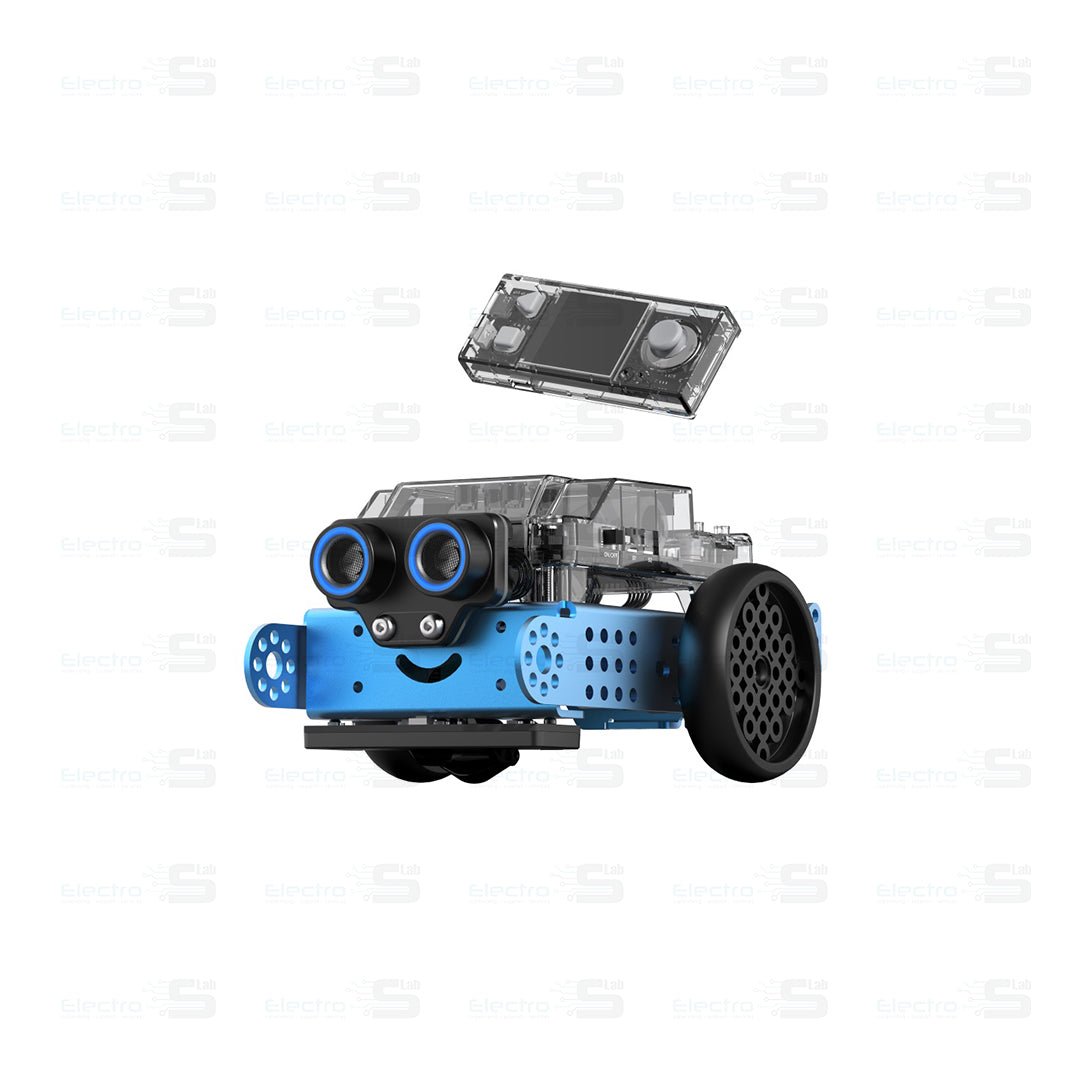
The mBot2 is the kit to buy when the robot has to survive a room full of students. Its Ultrasonic Sensor 2 does the ranging, and because the module has addressable LED “eyes” a class can see the sensor state change as the robot approaches a wall, which turns an invisible threshold value into something you can point at. The CyberPi controller adds a colour screen, speaker, microphone and Wi-Fi, the motors are encoder motors so a commanded turn is actually the turn you asked for, and everything is programmed in mBlock, where the same project toggles between Scratch blocks and Python. Battery life is roughly five hours, it connects over Bluetooth, USB or Wi-Fi, and the metal beam construction takes a beating. The catch is that the mBuild ecosystem is closed compared with an UNO you can rewire at will, and add-on modules cost extra.
✅ Pros: Ultrasonic module with LED feedback makes thresholds visible; Scratch and Python side by side in mBlock; encoder motors turn accurately; about 5 hours per charge; rugged classroom build and a big lesson-plan library.
❌ Cons: Closed Makeblock ecosystem; add-on sensors cost extra; single forward-facing sensor; not the kit for learning raw Arduino C++.
🎯 Verdict: The best obstacle avoidance robot for teaching. It survives a class set, it makes the sensor reading visible, and mBlock takes students from blocks to Python without changing robots.
🔧 BEST ARDUINO BUILDER KIT · ⭐ 4.1/56. Freenove 4WD Car Kit
Rotatable head with ultrasonic sensor · four drive wheels · IR line tracking · app control · batteries not included
Buy Here →

The Freenove 4WD is the enthusiast’s chassis. Four driven wheels and a rotatable head carrying the ultrasonic distance sensor give you exactly the hardware a good avoidance algorithm wants, and Freenove publishes a complete, well-commented codebase plus a step-by-step assembly guide as a download. It is the fastest and grippiest of the cheap Arduino cars here, and because nothing is hidden inside an app you can rewrite any part of the behaviour, add a second sensor, or bolt the whole loop onto a different board. Two honest warnings. First, this variant ships without batteries and without the joystick remote, both of which are separate purchases, so the real cost is higher than the sticker. Second, there is no printed tutorial: the manual and code live behind a download link on the box, which trips up a surprising number of buyers.
✅ Pros: Ultrasonic sensor on a rotatable head; genuine 4WD grip and speed; complete open source code you can rewrite; app control for iOS and Android; strong value on the base kit.
❌ Cons: Batteries not included, so budget for 18650 cells and a charger; remote is a different, pricier listing; documentation is download only; assembly needs more patience than the ELEGOO.
🎯 Verdict: The right kit if you want the cheapest capable 4WD platform and you plan to write your own avoidance code rather than run someone else’s demo.
🦉 BEST FOR YOUNGER BUILDERS · ⭐ 4.3/57. ELEGOO Owl Smart Robotics Car Kit V2.0
ELEGOO Nano V4 · ultrasonic plus IR photoelectric sensors · tracked chassis · 7.4 V pack, about 2 h runtime · Arduino IDE and app
Buy Here →
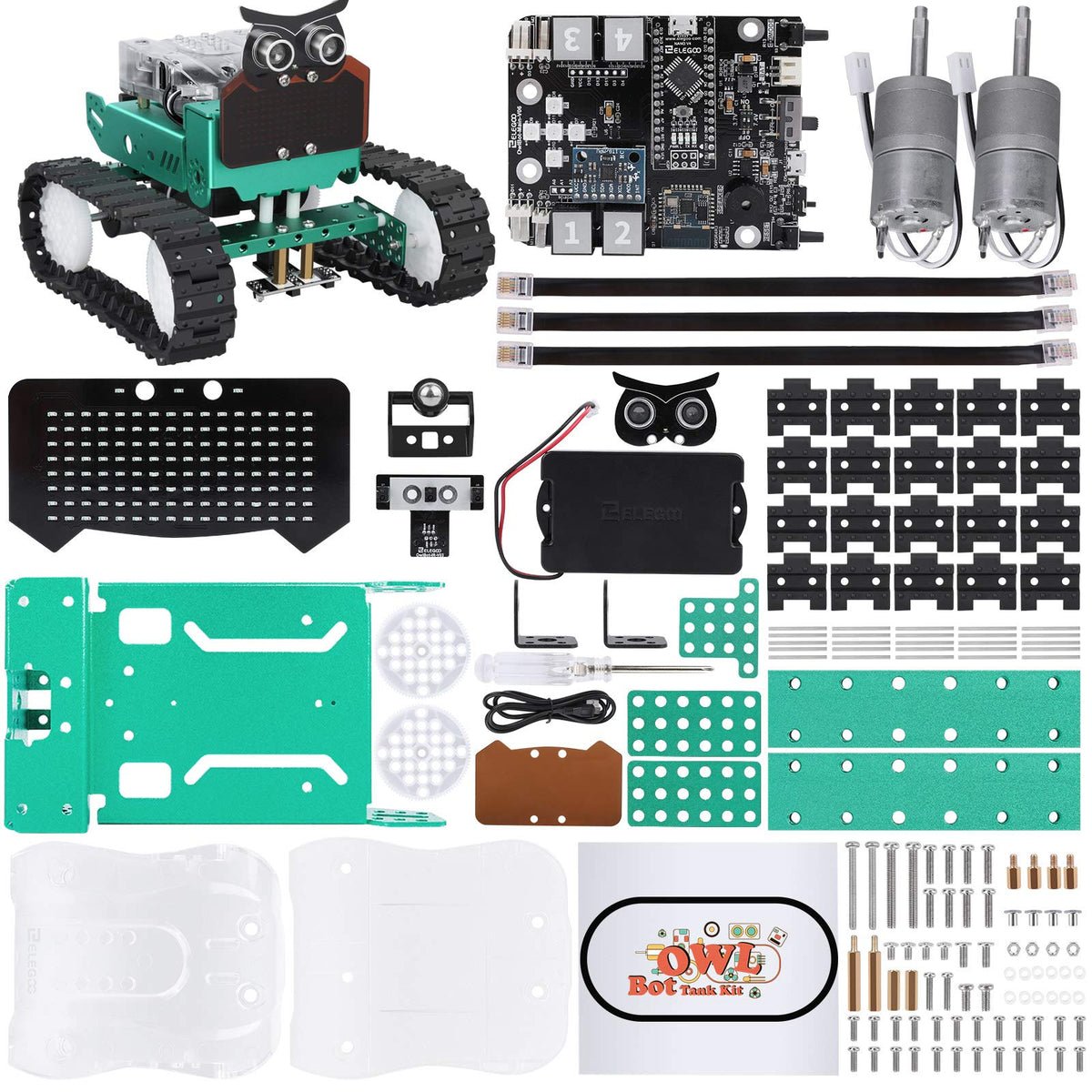
The Owl is ELEGOO’s attempt at making a first robot feel like a character rather than a circuit board on wheels, and it works. It runs an ELEGOO Nano V4 and combines an ultrasonic sensor with infrared photoelectric sensors, so obstacle avoidance and edge detection are both built in out of the box. The tracked chassis is the underrated part: tracks pivot in place and climb over carpet edges and door thresholds that stall the small plastic wheels on cheaper cars, which means fewer “the robot avoided the wall and then got stuck on a rug” moments. There is a face with animated expressions, sound control and an app, and when a young builder is ready to go deeper the same robot opens in the Arduino IDE. Two caveats: at around 1.3 kg and 233 mm long it is bigger than it looks, and it is priced well above the other beginner kits here, so you are paying for the presentation as much as the electronics.
✅ Pros: Ultrasonic and IR photoelectric sensors together; tracks handle carpet and thresholds; rechargeable 7.4 V pack with about 2 hours of runtime; app plus real Arduino IDE path; genuinely appealing to younger builders.
❌ Cons: Expensive for what the electronics are; sensor is fixed, not servo swept; large and heavy for a desk; smaller review base than ELEGOO’s car kits.
🎯 Verdict: The kit that keeps a younger builder engaged past the first afternoon. Buy it for the character and the tracks, not because it is the best value per sensor.
🔰 BEST BUDGET FIRST BUILD · ⭐ 4.1/58. LAFVIN Smart Robot Car Kit
UNO R3 board included · HC-SR04 on a servo bracket · V5.0 sensor shield · IR line tracking and remote · batteries not included
Buy Here →
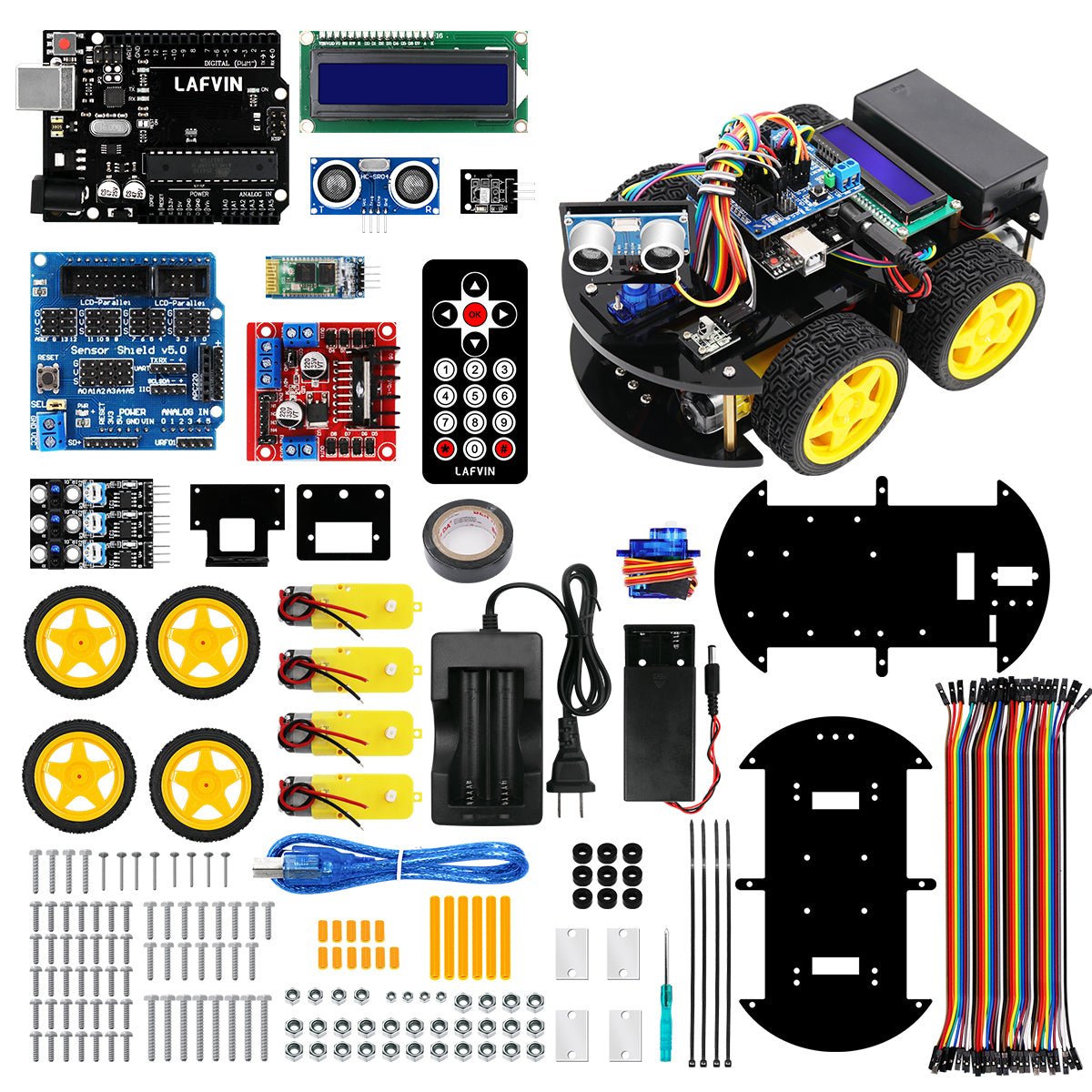
The LAFVIN Smart Robot Car is the cheapest honest way into this project, and honest is the right word: it is the classic reference build with nothing hidden. You get a real UNO R3 board, a V5.0 sensor shield, an HC-SR04 ultrasonic module on a servo bracket, an IR line-tracking module and an IR remote, plus a tutorial with code and staged lessons covering ultrasonic obstacle avoidance, line tracking and remote control. Because every part is a generic module you can find for pocket change, this is also the kit to buy if you expect to break something, or if you want to strip it for parts and rebuild it as your own design later. Do not expect polish: the acrylic and hardware are basic, the wiring is plain DuPont rather than keyed connectors, and batteries are not included, so factor in 18650 cells and a charger. What it does deliver is the complete servo-swept ultrasonic avoidance experience for the least money here.
✅ Pros: UNO R3 board included at the lowest price here; HC-SR04 on a servo so it can scan; all generic parts you can replace cheaply; tutorial with staged lessons and full code; ideal donor platform for a custom build.
❌ Cons: Batteries not included; DuPont wiring is easy to misconnect; basic build quality and no rechargeable pack; no camera or Wi-Fi; documentation is far weaker than ELEGOO’s.
🎯 Verdict: The best first build on a tight budget. You get the full swept-sonar avoidance project with an included UNO, and every part is cheap enough to replace when you inevitably let the smoke out.
🛒 How to Choose the Right Obstacle Avoidance Robot Kit
🤖
Want one kit that does everything?
The ELEGOO Smart Robot Car V4 gives you a servo-swept ultrasonic head plus a camera, line tracking, a rechargeable battery and the best beginner documentation in the group.
🧭
Here to write a real avoidance algorithm?
The SunFounder Zeus Car pairs two infrared modules with sonar and puts it all on mecanum wheels, so your code has more to sense and more ways to escape.
🐍
Want to write it in Python?
The SunFounder PiCar-X wraps the ultrasonic sensor in a clean Python API and adds Ackermann steering and a pan-tilt camera for the next lesson.
👁️
Doing computer vision or ROS2?
The Hiwonder TurboPi combines ultrasonic ranging with OpenCV perception on a mecanum chassis, and scales up to ROS2 on the higher bundles.
🏫
Buying a class set?
The Makeblock mBot2 is rugged, lasts about five hours per charge, and its LED-ringed ultrasonic module makes the sensor threshold visible to a whole room.
⚙️
Want to rewrite everything yourself?
The Freenove 4WD is the cheapest capable four-wheel platform with a rotatable sonar head and a fully open codebase, provided you buy your own cells.
🧒
Buying it for a younger builder?
The ELEGOO Owl V2.0 has a face, tracks that climb over carpet, and both ultrasonic and infrared sensing, with a real Arduino IDE path when curiosity kicks in.
💰
On the tightest budget?
The LAFVIN Smart Robot Car Kit includes the UNO board and an HC-SR04 on a servo bracket, using generic parts you can replace for pocket change.
⚙️ Key Specs Compared: Side by Side
| Spec | ELEGOO V4 | Zeus Car | PiCar-X | TurboPi | mBot2 |
|---|
| Obstacle sensing | Ultrasonic | 2 IR + ultrasonic ⭐ | Ultrasonic | Ultrasonic + camera | Ultrasonic Sensor 2 |
| Scanning method | Servo-swept head ⭐ | Fixed, multi-point | Fixed, under pan-tilt | Fixed + 2-DOF camera | Fixed forward |
| Chassis and escape | 4WD differential | Mecanum, strafes ⭐ | Ackermann steering | Mecanum, strafes ⭐ | 2WD encoder motors |
| Controller | UNO R3 + ESP32 | UNO R3 + ESP32-CAM | Raspberry Pi (separate) | Raspberry Pi + ROS2 ⭐ | CyberPi |
| Programming | Arduino C++ ⭐ | Arduino C++ | Python · Blockly | Python · OpenCV · ROS2 | Scratch · Python |
| Battery included | Yes, rechargeable ⭐ | Yes, 18650 cells ⭐ | Yes, cells and charger | Yes | Yes, about 5 h ⭐ |
| Assembly required | Yes, about 1 to 2 h | Yes, 2 to 3 h | Yes, longer build | Yes | Light assembly ⭐ |
| Best suited to | Most makers ⭐ | Algorithm builders | Python developers | Vision and ROS work | Schools |
Specs come from the current Amazon listings and manufacturer documentation and vary by bundle. ⭐ marks the strongest option in each row for that criterion, not an overall winner. Always confirm the exact variant on the live listing before buying.
❓ Frequently Asked Questions
Ultrasonic or infrared: which sensor is better for obstacle avoidance?
They fail in opposite ways, which is why the best kits carry both. An ultrasonic module such as the HC-SR04 returns an actual distance in centimetres, works in total darkness and does not care what colour the obstacle is, but a single ping takes milliseconds, the beam spreads over roughly 15 degrees so you cannot tell exactly where the object is, and sound is absorbed by fabric and foam or bounced away by any surface angled sharply from the sensor. An infrared proximity module responds almost instantly and costs very little, but it only reports near or far rather than a distance, it under-reads dark and matte objects badly, and direct sunlight blinds it. A third option worth knowing is a time-of-flight sensor such as the VL53L0X, which gives millimetre-accurate distance in a narrow beam and does not care about surface texture. If you can only have one, take ultrasonic. If the kit gives you both, use infrared for the fast reflex and ultrasonic for the measurement.
Why does my robot still crash into things?
Usually one of five reasons. The obstacle is outside the beam, because a single forward sensor sees a narrow cone and a chair leg caught at an angle simply is not in it. The obstacle is too close, since an HC-SR04 has a minimum range of about 2 to 3 cm and returns garbage inside that. The surface is acoustically invisible, which is what curtains, cushions and sound-absorbing foam are. The robot is going too fast for its own loop, so by the time a reading is taken, filtered and acted on, momentum has already closed the gap. Or the code is trusting a single raw reading, when ultrasonic sensors regularly throw wild outliers and need a median or moving-average filter over three to five samples. The practical fixes are to slow down, filter your readings, raise your stop threshold well above the braking distance, and add a second sensor or a servo sweep so the robot knows which way is clear.
Do I need a servo to sweep the sensor, or are fixed sensors enough?
A servo sweep is the cheapest way to turn one sensor into three viewpoints: the robot stops, looks left, looks right, compares the two distances and turns toward the larger one. That is a big upgrade over blind reversing, and it is why the ELEGOO, Freenove and LAFVIN kits all mount the ultrasonic module on a bracket. The cost is time, because the servo needs a couple of hundred milliseconds to settle before each reading, so the robot has to come to a halt to look around. Fixed sensors at different angles flip the trade: you get a continuous picture with no scan delay, which is what lets the Zeus Car keep moving while it decides, but you need more hardware and more calibration. For a first project the servo sweep is easier to reason about. For anything that has to avoid obstacles at speed, multiple fixed sensors win.
Is the DFRobot micro:Maqueen a good obstacle avoidance robot?
It is a genuinely good platform, and it is worth knowing about if you teach with micro:bit. The micro:Maqueen Plus V2 carries an SR04-class ultrasonic module, five line-tracking sensors, N20 all-metal gear motors, RGB ambient lights, an IR receiver and a generous set of expansion ports, and it is one of the few small robots designed to take the HuskyLens AI vision module, which turns it into a vision-based avoider. It programs in MakeCode or Mind+, and the micro:bit board itself is sold separately. The practical problem is availability: at the time of writing the Maqueen listings on Amazon US are either unavailable or referral links to DFRobot’s own store rather than stocked Amazon items, so we have not made it a pick here. If you want that classroom, block-to-Python experience with reliable Amazon stock, the Makeblock mBot2 is the closest equivalent. If you specifically want a micro:bit, buy the Maqueen direct from DFRobot or an education distributor instead.
What do I need besides the kit to get a robot running?
Check three things on the listing before you buy. First, batteries: the ELEGOO, Zeus Car, PiCar-X, TurboPi, Owl and mBot2 include a pack, but the Freenove and LAFVIN kits do not, and 18650 cells plus a charger add real cost. Second, the controller board: the PiCar-X and the standard TurboPi kit do not include the Raspberry Pi, which is often the single largest line in the budget. Third, a test course: you need very little, just a few cardboard boxes and some books on a hard floor, but avoid starting on carpet, which stalls small motors, and avoid curtains and cushions until the code works, because sound-absorbing surfaces are exactly what ultrasonic sensors cannot see. A small screwdriver set and a roll of electrical tape are the only tools most of these builds need.
🏁 Final Verdict: Best Obstacle Avoidance Robot Kit for Every Builder
The right kit for every level, from a first cardboard-box course to an OpenCV perception pipeline:
🥇 Best Overall · ELEGOO Smart Robot Car V4: servo-swept ultrasonic head, camera, battery and the best beginner docs
Buy Here →🏅 Best Omnidirectional Avoidance · SunFounder Zeus Car: two IR modules plus sonar on a mecanum chassis
Buy Here →🍓 Best Raspberry Pi Kit · SunFounder PiCar-X: clean Python API, Ackermann steering and a pan-tilt camera
Buy Here →👁️ Best Vision Avoidance · Hiwonder TurboPi: ultrasonic ranging plus OpenCV perception, at a premium price
Buy Here →🎓 Best for Classrooms · Makeblock mBot2: LED-ringed ultrasonic module, Scratch to Python, about 5 hours per charge
Buy Here →🔧 Best Arduino Builder Kit · Freenove 4WD Car Kit: rotatable sonar head and fully open code, bring your own cells
Buy Here →🦉 Best for Younger Builders · ELEGOO Owl Robotics Car V2.0: ultrasonic and infrared sensing on a tracked chassis with a face
Buy Here →🔰 Best Budget First Build · LAFVIN Smart Robot Car Kit: UNO board included and an HC-SR04 on a servo bracket
Buy Here →There is no single best obstacle avoidance robot kit, only the one that matches how you want to learn. For most people the ELEGOO Smart Robot Car V4 is the right buy: an ultrasonic sensor on a servo so the robot scans before it commits, a rechargeable battery in the box, and documentation that gets a first-timer to a robot dodging cardboard boxes the same day. Step up to the Zeus Car if the algorithm is the point and you want multiple sensors and a chassis that can strafe. Buy the PiCar-X if you would rather write Python than C++, the TurboPi if the project is really computer vision, the mBot2 for a classroom, the Freenove 4WD if you want the cheapest capable platform to rewrite from scratch, the ELEGOO Owl for a younger builder, and the LAFVIN kit if you just want to start cheaply and rebuild it later.
If you want to understand the parts before you commit to a whole kit, our guides to the best ultrasonic distance sensors and the best IR sensors and obstacle avoidance modules cover the individual modules in detail, and the best line follower robot kits guide is the natural companion project. Whichever you pick, pair it with our Arduino, ESP32, STM32 and Raspberry Pi tutorials, build yourself a course out of cardboard boxes, and start tuning your thresholds.
💬 Not sure which obstacle avoidance kit fits your project? Tell us what you are building, whether that is a first Arduino robot, a class set, a maze runner or a vision-based navigator, in the comments below, and we will point you to the right kit.
All Amazon links above use our affiliate tag (microlab05-20). Purchasing through them supports microcontrollerslab.com at no extra cost to you. Prices, bundles and availability change frequently, so always confirm the current listing and variant on Amazon before buying.
| Arduino Components | Amazon Links |
|---|
| Arduino Starter Kit | Buy Now |
| Arduino Development Kit | Buy Now |
| Arduino Smart Robot Car Kit V4 | Buy Now |
| Arduino Sensors Kit | Buy Now |