Recommended Components
The following parts are used in this article, along with a generic electronics kit that is handy for building and testing the circuit.
| Component | How it’s used | Buy on Amazon |
|---|---|---|
| HC-SR505 mini PIR sensor | The HC-SR505 miniature PIR motion sensor this article covers. | Check Price |
| Electronic component assortment kit (1390 pcs) | A handy assortment of resistors, capacitors, LEDs, diodes and transistors for building circuits. | Check Price |
| Digital multimeter (AstroAI) | Measures voltage, current, resistance and checks continuity while you build and debug. | Check Price |
| Breadboard | Solderless base for prototyping the circuit. | Check Price |
| Jumper Wires | Make the connections on the breadboard. | Check Price |
As an Amazon Associate we earn from qualifying purchases. Prices and availability are accurate as of the date/time indicated and are subject to change.
HC-SR505 Pinout
This picture shows the pinout diagram of the PIR motion sensor module.
Pin Description
It consists of three pins which are:- Pin1 is ground.
- Pin2 is an output pin which provides a signal.
- Pin3 (D+) is a power supply pin. Apply +5V at this pin.
Features
- It works within a voltage range of 4.5V to 20V.
- The Quiescent current is less than 60µA.
- It has a maximum sensing distance of 3 meters.
- It provides automatic control along with repeatable triggering by default.
- The sensor consumes very low power.
- The diameter of the sensor lens is 10mm.
- It requires temperature in a range of -20 °C to 80 °C.
- The induction angle is less than 100 degrees.
Equivalent Motion Sensor
HC-SR01Where to use HC-SR505?
It is used in battery-powered automatic electrical devices due to its low power consumption. It is highly reliable, inexpensive and has a small size. You can easily install this sensor inside devices due to its small size. You can use this sensor for detecting motions of objects using infrared light radiations. These infrared technology-based motion sensors are uses in light-activated systems and for security purposes.How to use HC-SR505 PIR motion sensor?
The function of this sensor to detect the object’s movement. It sends High signal at the output of the sensor founds something moving within the sensing distance otherwise send a low signal at the output pin. This HIGH signal lasts for almost 8 signals which are a disadvantage in some applications.Working Principle
The sensor gets automatically triggered when any object comes in the sensing range. Simply connect power supply and ground. Connect the output pin to ground with LED connected in between them. Also, connect a resistor in series with this LED. When the sensor detects an object, the output pin will deliver 3.3V and Led will glow up. On the other hand, if the sensor does not find any moving object, the output pin will remain at 0 volts and the LED will remain in OFF state.Interfacing with Arduino
You can interface it with Arduino. The connections are simple. It has three pins. Connect the ground pin1 to the ground of Arduino and pin 3 to the Arduino’s 5V pin. Pin2 is a signal output. It indicates the presence of an object by sending either HIGH or LOW signal. Connect this pin to any digital pin of Arduino.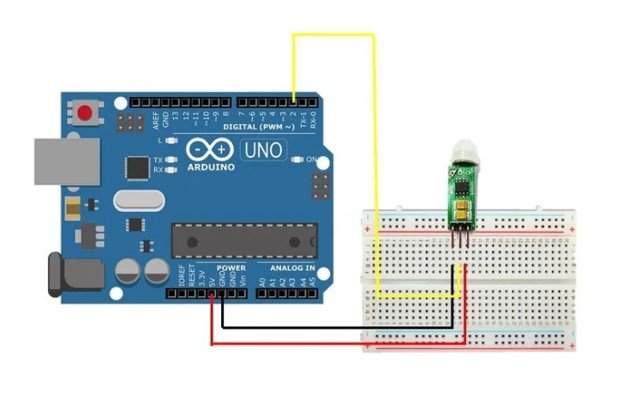 Let us suppose that we have connected pin 2 at digital pin 2. Then upload the given code on Arduino. Connect an LED between the digital pin and signal pin of the module to observe the operation of the module.
Programming
This code will read the sensor output and turn on or off the LED-based on the output. If the sensor detects an object, it will print a message of “Moving Object Detected” on the serial monitor otherwise print “Nothing Detected”.#define PIROUT 2
void setup()
{
begin(9600);
pinMode(PIROUT, INPUT);
}
void loop()
{
If (digitalRead(PIROUT)==HIGH)
{
println("Some body is here");
}
else
{
println("Nothing Detected by PIR Sensor");
}
delay(1000);
}
HC-SR505 Applications- Security purposes
- Automatic sensing of objects
- Induction lamps and toys
- Industrial automation and control
2D Diagram
