⚠️ Affiliate Disclosure: This post contains Amazon affiliate links. If you purchase through our links, we may earn a small commission at no extra cost to you. We only recommend modules we have researched and whose listings we checked live on Amazon. Prices change constantly, so we deliberately do not print them here. Tap through and check the current price on Amazon before you buy.
Ultimate Buying Guide
📟 Best 16×2 and 20×4 LCD Modules for Arduino, ESP32 & Raspberry Pi
8 character LCDs ranked for makers and embedded engineers, from the classic SunFounder I2C 1602 to RGB and Qwiic smart displays, with verified Amazon listings, real specs and honest verdicts.
✅ 8 LCD Modules Reviewed
✅ Verified Amazon ASINs
✅ 16×2 & 20×4 Covered
✅ Honest Pros & Cons
OLEDs and colour TFTs get the attention, but the humble character LCD is still the display that ships in the most real projects. A 16×2 I2C LCD costs less than a coffee, reads clearly in sunlight, needs only four wires and runs on a few lines of code with the LiquidCrystal_I2C library. Need more room for sensor readings, menus or a status page? The 20×4 LCD gives you four lines of twenty characters on the same two-wire bus.
The catch is that most listings look identical while the hardware underneath is not: some use the classic PCF8574 backpack, some integrate the controller, some run natively at 3.3 V and some need a 5 V rail to show anything at all. This guide ranks 8 LCD modules we checked live on Amazon, covering single units, multipacks, RGB backlights and a Qwiic smart display, so you can pick the one that actually fits your board and your project.
💡 Reality check before you buy: Most “16×2 I2C LCD” listings are the same HD44780-compatible glass with a PCF8574 backpack soldered on, so do not expect miracles between brands: build quality, solder joints and backlight evenness are where they differ. Standard blue modules are 5 V parts. They will run from a 3.3 V board’s I2C pins in practice, but the contrast is poor if you power the glass from 3.3 V, and the backpack’s pull-ups go to 5 V, which is outside the official spec of an ESP32 or Pico. Expect to turn the blue contrast potentiometer on the back before you see any text, expect the I2C address to be 0x27 or 0x3F depending on the chip variant, and expect the odd dead unit in a cheap multipack. That is why we lean toward 2 and 3 packs for budget picks.
📋 Quick Comparison of All 8 LCD Modules
| Module | Size | Interface | Supply | Pack | Best For | Buy |
|---|
| 🥇 SunFounder I2C LCD1602 | 16×2 | I2C (PCF8574) | 5V | 1 pc | Best Overall 16×2 | Buy Here → |
| 🏅 SunFounder I2C 2004 | 20×4 | I2C (PCF8574) | 5V | 1 pc | Best 20×4 LCD | Buy Here → |
| 💰 GeeekPi 2-Pack I2C 1602 | 16×2 | I2C (PCF8574) | 5V | 2 pcs | Best Value 16×2 Pack | Buy Here → |
| 📘 Freenove I2C LCD 1602 (New Type) | 16×2 | I2C (integrated) | See listing | 2 pcs | Best for Learning (ESP32 / Pico) | Buy Here → |
| 📦 Hosyond 3pcs I2C 2004 | 20×4 | I2C (PCF8574) | 5V | 3 pcs | Best 20×4 Multipack | Buy Here → |
| 🪙 GeeekPi I2C 2004 | 20×4 | I2C (PCF8574) | 5V | 1 pc + jumpers | Budget Single 20×4 | Buy Here → |
| 🌈 Waveshare LCD1602 RGB | 16×2 | I2C (AiP31068L + PCA9633) | 3.3V / 5V | 1 pc | Best RGB & 3.3V Native | Buy Here → |
| 🧠 SparkFun 16×2 SerLCD RGB (Qwiic) | 16×2 | Serial, I2C, SPI | 3.3 V | 1 pc | Best Premium / Qwiic | Buy Here → |
We do not list prices because Amazon changes them frequently and pack sizes shift the figure. Tap any Buy button to see the live price and confirm the exact variant before ordering.
🔍 What to Look for in a Character LCD Module
📐
16×2 or 20×4?
A 16×2 shows 32 characters and fits a small enclosure. A 20×4 shows 80 characters, enough for a label plus value on every line or a simple menu. The 20×4 is roughly twice the panel area and draws more backlight current, so size it to the information, not the price.
🔌
I2C Backpack Type
Most modules use a PCF8574 I/O expander and work with the standard LiquidCrystal_I2C library. Integrated or RGB controllers (AiP31068L, ATmega328P) need the vendor’s library instead. Check which one you are buying before you copy example code.
⚡
5 V vs 3.3 V Logic
Classic blue modules want 5 V for good contrast. On an ESP32, ESP8266 or Pico, power the LCD from 5 V and either add a level shifter or remove the backpack pull-ups. Waveshare and SparkFun modules are designed for 3.3 V systems out of the box.
📍
I2C Address
PCF8574T backpacks usually answer at 0x27, PCF8574AT at 0x3F. Solder jumpers A0 to A2 let you change it, which is how you run several LCDs on one bus. Always run an I2C scanner sketch first instead of guessing.
💡
Backlight & Contrast
Blue with white text is the most common and easy to read indoors. Yellow-green reads better in sunlight. Make sure there is an accessible contrast pot and a backlight jumper so you can cut power in battery projects.
🏆 Detailed Reviews of All 8 LCD Modules
🥇 BEST OVERALL

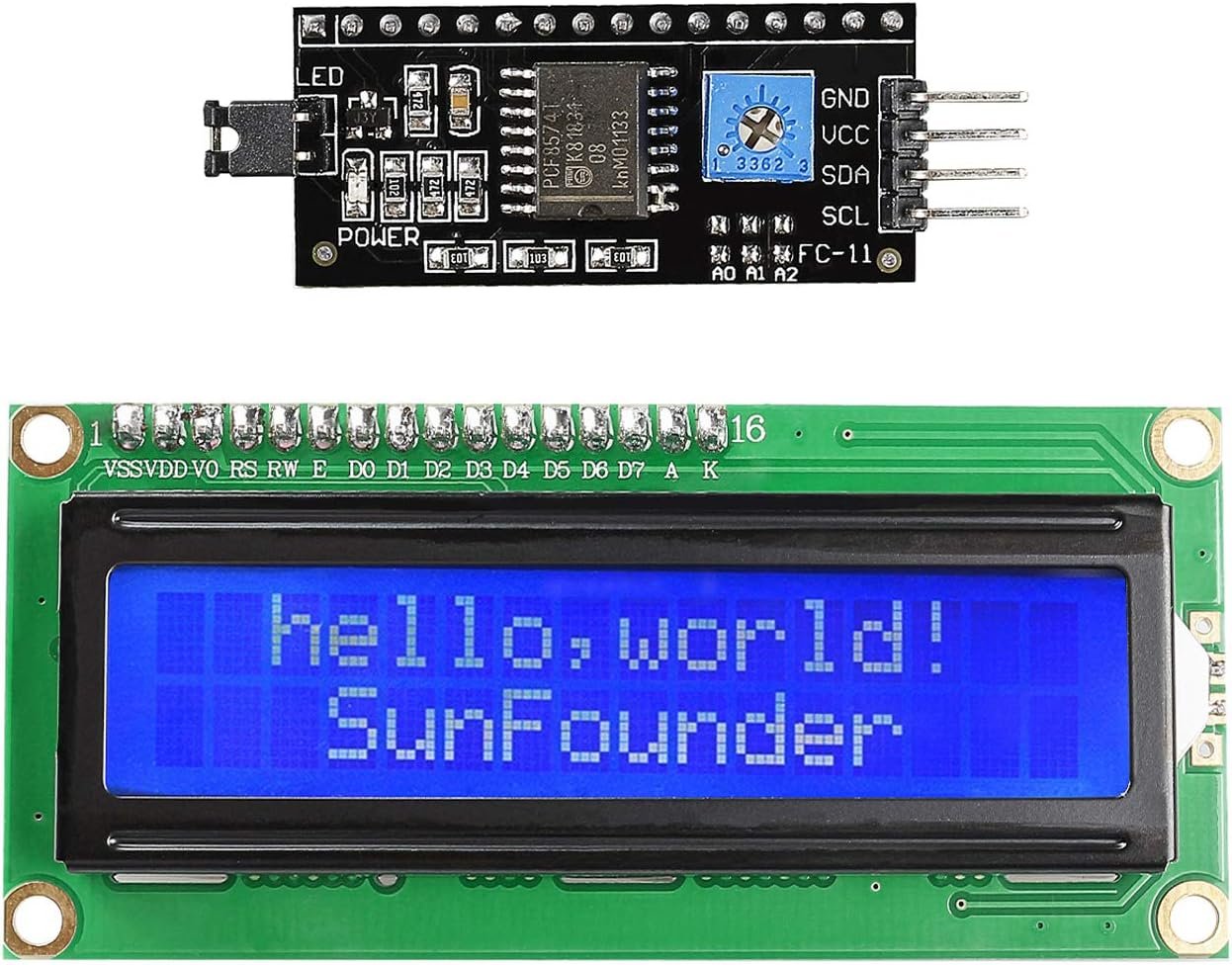
The SunFounder I2C LCD1602 is the module most Arduino tutorials are written against, and that is exactly why it is our top pick. It pairs a standard 16×2 blue panel with a PCF8574 backpack at address 0x27, so the stock LiquidCrystal_I2C library works first time with no address hunting. Only four pins are used (VCC, GND, SDA, SCL), there is a potentiometer on the back for contrast, and SunFounder publishes wiring and code for Arduino and Raspberry Pi. On Amazon it holds about 4.6 stars across several hundred ratings, which for a commodity part signals consistent quality control rather than luck. It is a single unit, so it costs more per display than a multipack, but you are paying for the one that just works.
✅ Pros- Works with LiquidCrystal_I2C out of the box
- Fixed 0x27 address, no guessing
- Good documentation for Arduino and Pi
- Consistent build and backlight
❌ Cons- Single unit, higher cost per display
- 5 V module, needs care on 3.3 V boards
- Blue backlight only
🎯 Verdict: The safest 16×2 I2C LCD to buy. If you just want text on a screen tonight, start here.
👉 Check Price on Amazon →
🏅 BEST 20×4 LCD

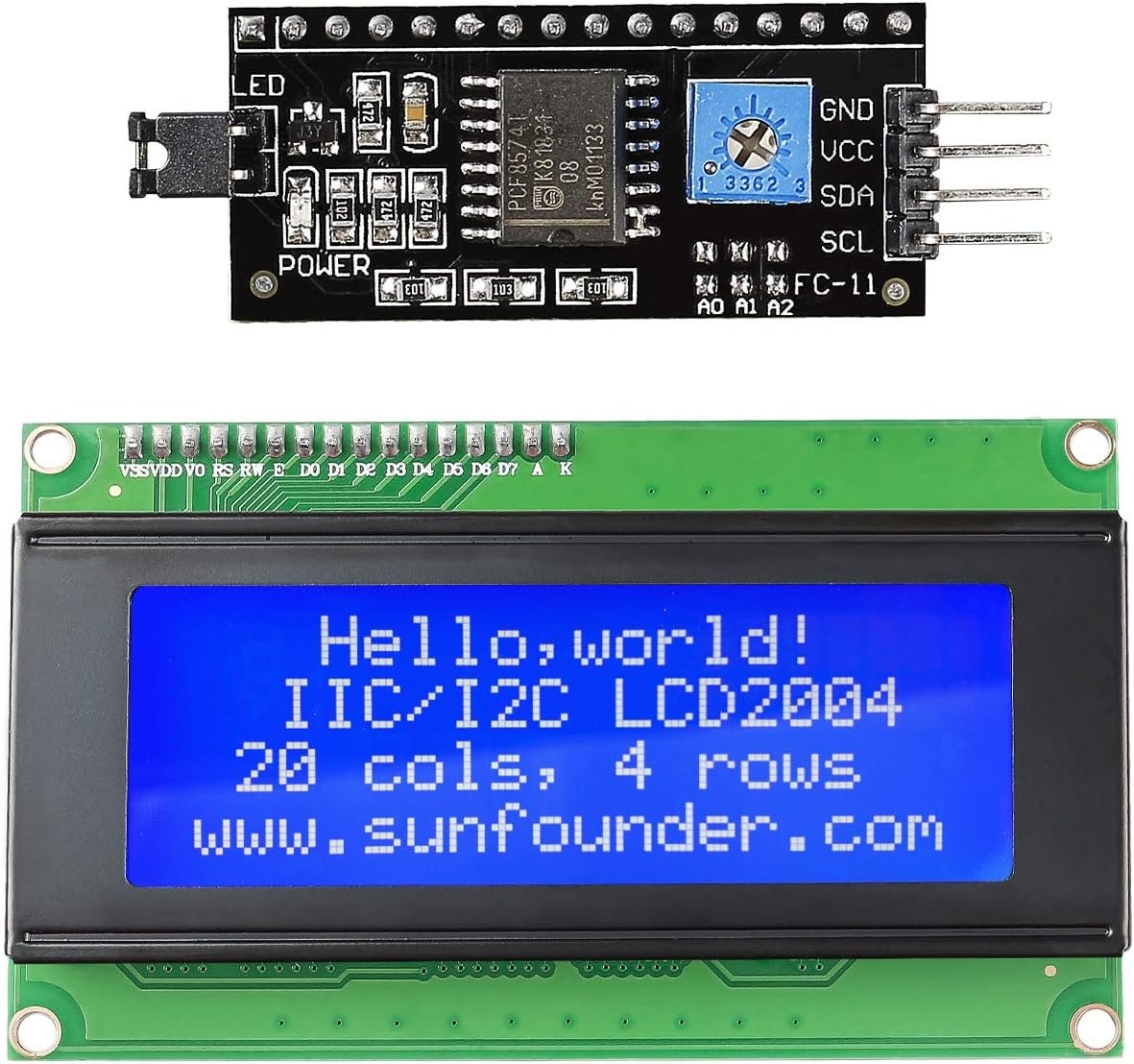
When 32 characters is not enough, the SunFounder I2C 2004 gives you four rows of twenty characters on the same two-wire I2C bus. That is room for a title line plus three live readings, a simple menu with a cursor, or a full date, time and status page for a data logger. The back carries a contrast potentiometer and a backlight jumper you can pull to save power, and SunFounder lists it as compatible with Arduino Uno R3 and Mega. It uses the same PCF8574-style backpack, so the code is identical to the 1602 apart from lcd(0x27, 20, 4). With roughly 4.6 stars from a few hundred Amazon ratings, it is the most proven single 20×4 we found.
✅ Pros- 80 characters of display space
- Same library and wiring as the 1602
- Removable backlight jumper
- Well-reviewed, consistent units
❌ Cons- Larger footprint to fit in enclosures
- Higher backlight current than a 1602
- 5 V logic, level shifting advised on 3.3 V MCUs
🎯 Verdict: The 20×4 LCD to buy for dashboards, menus and data loggers. Pick it over a 1602 whenever your text does not fit.
👉 Check Price on Amazon →
💰 BEST VALUE 16×2 PACK · ⭐ 4.5/53. GeeekPi 2-Pack I2C 1602
16×2 · I2C PCF8574 · 0x27 · 5 V · blue backlight · 80 × 35 × 11 mm · 2 pack
Buy Here →

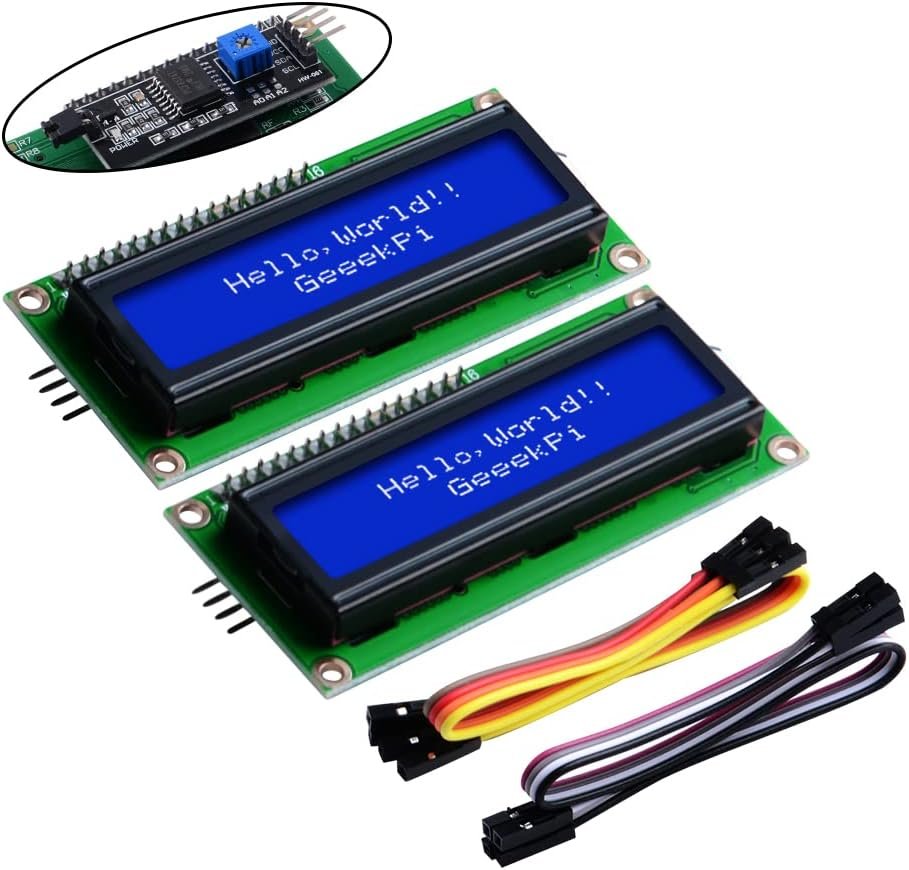
The GeeekPi 2-Pack is the sensible buy if you have more than one project on the go or want a spare for the inevitable reverse-polarity accident. Each module is the familiar 16×2 blue panel with a PCF8574 backpack at 0x27, a contrast and backlight potentiometer, and a 5 V supply requirement, so every LiquidCrystal_I2C example works unchanged. GeeekPi lists compatibility with Arduino, Raspberry Pi, Tinker Board, NanoPi, Banana Pi and STM32, and the module measures about 80 × 35 × 11 mm. It is also one of the best-rated listings in the category at around 4.6 stars from several hundred buyers.
✅ Pros:
Two displays for roughly the price of one premium unit; standard 0x27 address; strong Amazon rating.
❌ Cons:
Plain packaging and minimal documentation; same 5 V caveat on 3.3 V boards.
🎯 Verdict: The best value 16×2 I2C LCD for most makers: two good modules, zero surprises.
👉 Check Price on Amazon →
📘 BEST FOR LEARNING (ESP32 / PICO) · ⭐ 4.4/54. Freenove I2C LCD 1602 (New Type)
16×2 · I2C with integrated conversion circuit · Arduino / Pi / Pico / ESP32 examples · 2 pack
Buy Here →

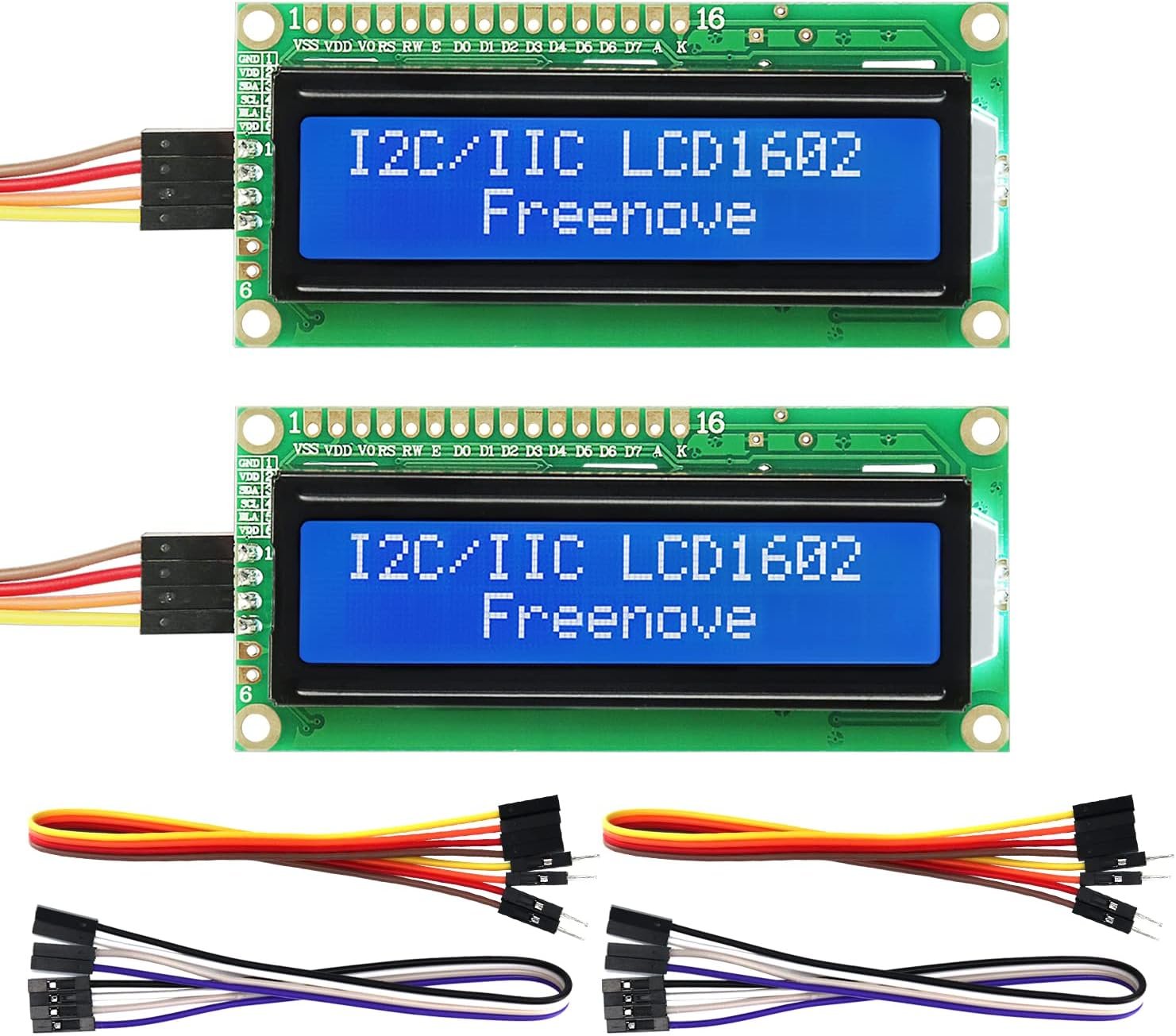
Freenove’s “New Type” I2C LCD 1602 integrates the I2C conversion circuit on the module rather than using a separate soldered-on backpack, which Freenove says makes it more stable. The real reason to buy it is support: Freenove provides example projects and code for Arduino, Raspberry Pi, Raspberry Pi Pico and ESP32, with the tutorial link printed on the box. If you are following a Freenove kit or teaching a class across several platforms, that matching code saves real time. Because the controller differs from the classic PCF8574 backpack, use Freenove’s provided library and examples rather than assuming a generic sketch will work.
✅ Pros:
Example code for four major platforms; integrated I2C design; 2 pack; solid rating with several hundred reviews.
❌ Cons:
Generic LiquidCrystal_I2C sketches may need changes; no paper manual, tutorial is online only.
🎯 Verdict: Buy it when you want tested code for ESP32 and Pico, not just Arduino Uno.
👉 Check Price on Amazon →
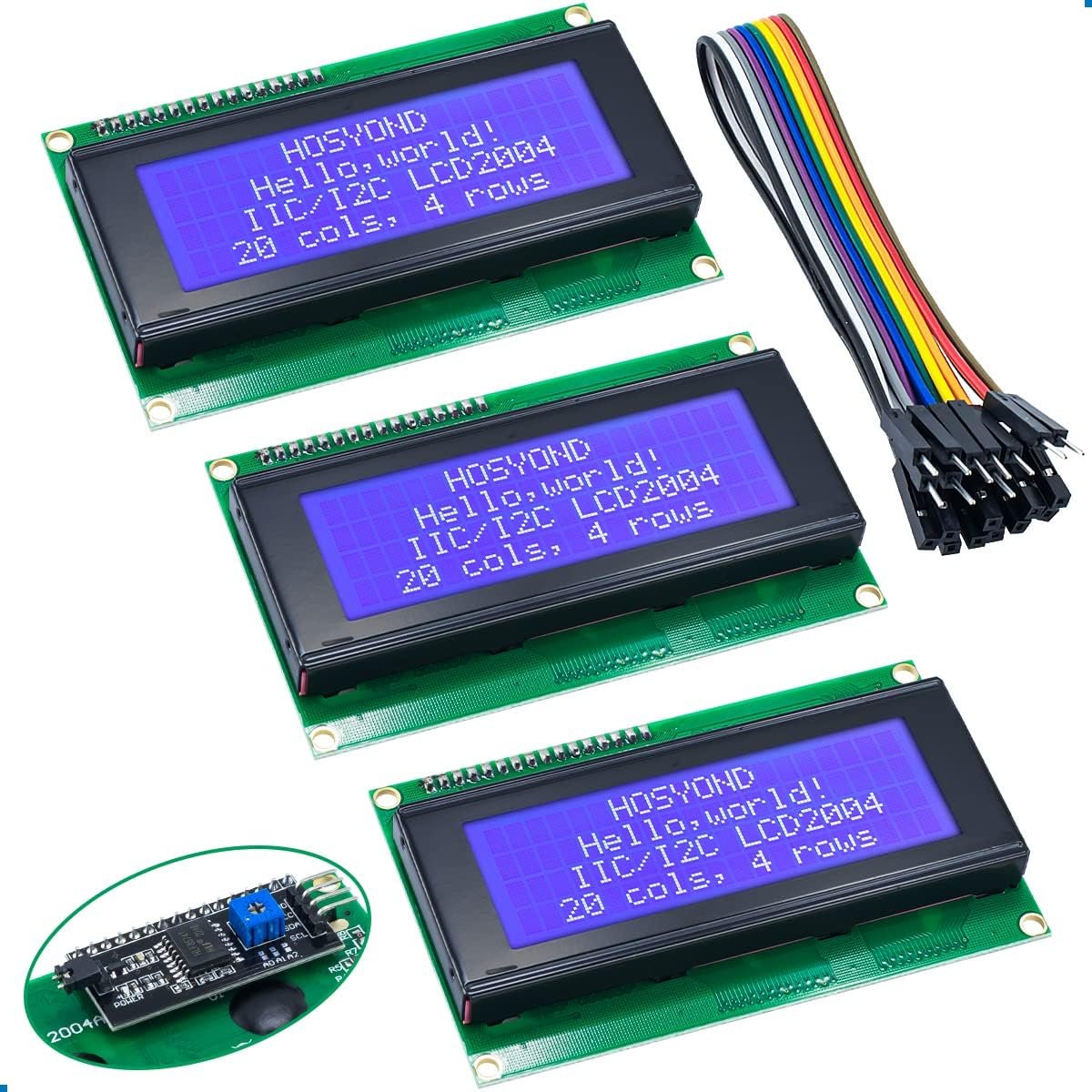
📦 BEST 20×4 MULTIPACK · ⭐ 4.5/55. Hosyond 3pcs I2C 2004
20×4 · I2C PCF8574 · 0x27 · 5 V · blue backlight · onboard pot · 3 pack
Buy Here →

Need several 20×4 displays for a classroom, a set of sensor nodes or a few test fixtures? The Hosyond 3-pack gives you three 2004 modules, each with an I2C backpack at 0x27, a 5 V supply and a backlight potentiometer on the back. Hosyond even prints the Uno wiring on the listing (SDA to A4, SCL to A5). The multipack also hedges against the occasional weak unit you get with budget LCDs, and the listing holds around 4.7 stars from close to two hundred ratings, which is high for this category.
✅ Pros:
Lowest cost per 20×4 display here; standard address and wiring; strong rating.
❌ Cons:
Three identical 0x27 modules on one bus need the address jumpers re-soldered; 5 V only.
🎯 Verdict: The multipack to buy when you need more than one 20×4, or want spares on the shelf.
👉 Check Price on Amazon →
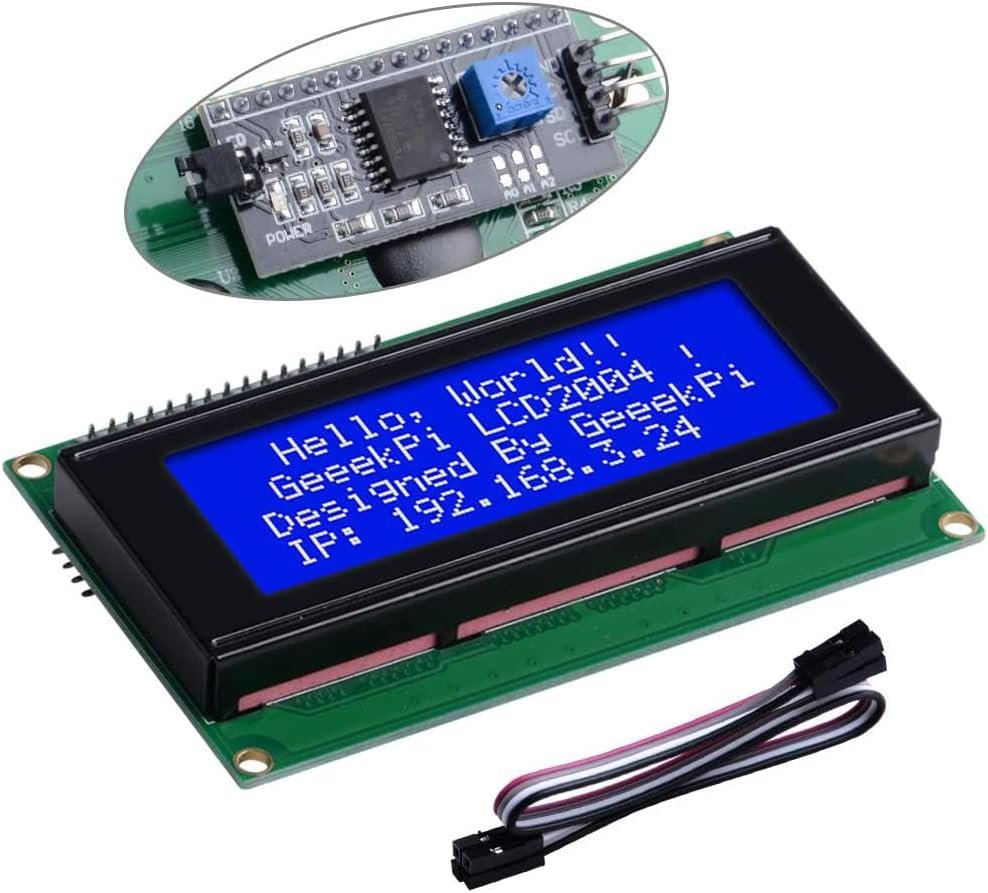
🪙 BUDGET SINGLE 20×4 · ⭐ 4.3/56. GeeekPi I2C 2004
20×4 · I2C adapter · blue backlight · Arduino / Pi / ESP32 / STM32 · includes jumper wires
Buy Here →

If you need exactly one 20×4 for a one-off build, the GeeekPi I2C 2004 is a lower-cost alternative to the SunFounder. It is the same idea: a 20×4 blue character panel with an I2C interface adapter, compatible with anything that speaks I2C, from Arduino and Raspberry Pi to ESP32 and STM32. GeeekPi includes jumper wires in the box, so you can wire it straight to a dev board. Amazon ratings sit around 4.6 stars, although GeeekPi’s listing copy is thin on electrical detail, so plan to run an I2C scanner before you hard-code the address.
✅ Pros:
Cheaper single 20×4; jumper wires included; broad compatibility.
❌ Cons:
Sparse documentation; GeeekPi runs two near-identical 2004 listings, so confirm the pack size before checkout.
🎯 Verdict: A good budget single 20×4. Choose SunFounder instead if you want better documentation.
👉 Check Price on Amazon →
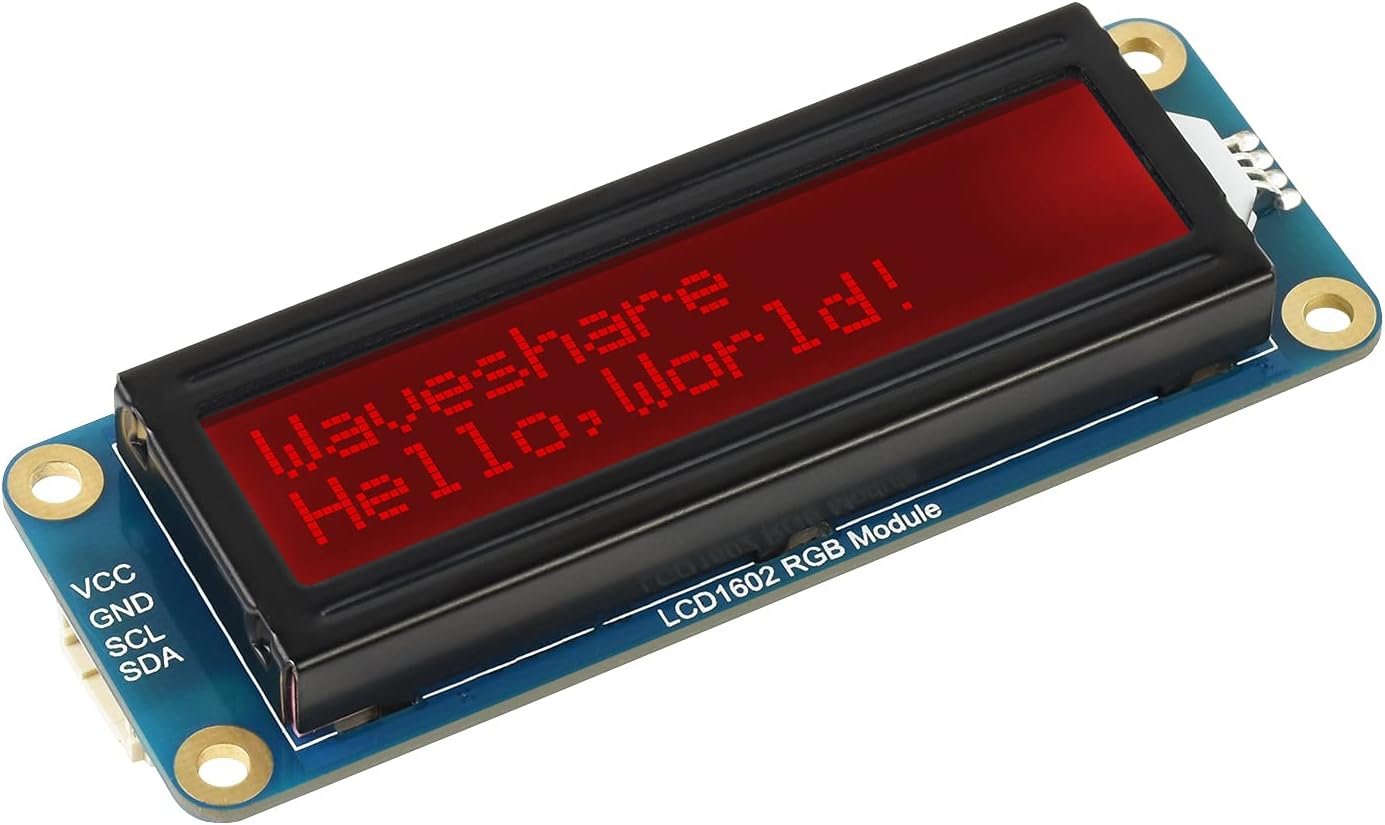
🌈 BEST RGB & 3.3V NATIVE · ⭐ 4.3/57. Waveshare LCD1602 RGB
16×2 · AiP31068L LCD driver + PCA9633 RGB driver · I2C · 3.3 V / 5 V · 87 × 32 × 13 mm
Buy Here →

The Waveshare LCD1602 RGB is the module to pick when you want colour or a clean 3.3 V design. Instead of a PCF8574 backpack, it uses an onboard AiP31068L LCD controller and a PCA9633 RGB driver, giving you software control of up to 16 million backlight colours over I2C. That makes the backlight itself an indicator: green for OK, amber for warning, red for fault. It is specified for both 3.3 V and 5 V operation, so it drops straight onto a Raspberry Pi, Pi Pico, Jetson Nano or ESP32 without level shifting, and Waveshare publishes demo code for all of them. Amazon reviews are more mixed (around 3.9 stars), mostly from buyers who tried generic LiquidCrystal_I2C code, which will not drive this controller.
✅ Pros:
Programmable RGB backlight; true 3.3 V and 5 V support; good Pi and Pico demos.
❌ Cons:
Needs Waveshare’s library, not LiquidCrystal_I2C; lower Amazon rating; costs more than a blue 1602.
🎯 Verdict: The best 16×2 for Raspberry Pi and Pico users, and the only way to get status colours from a character LCD.
👉 Check Price on Amazon →
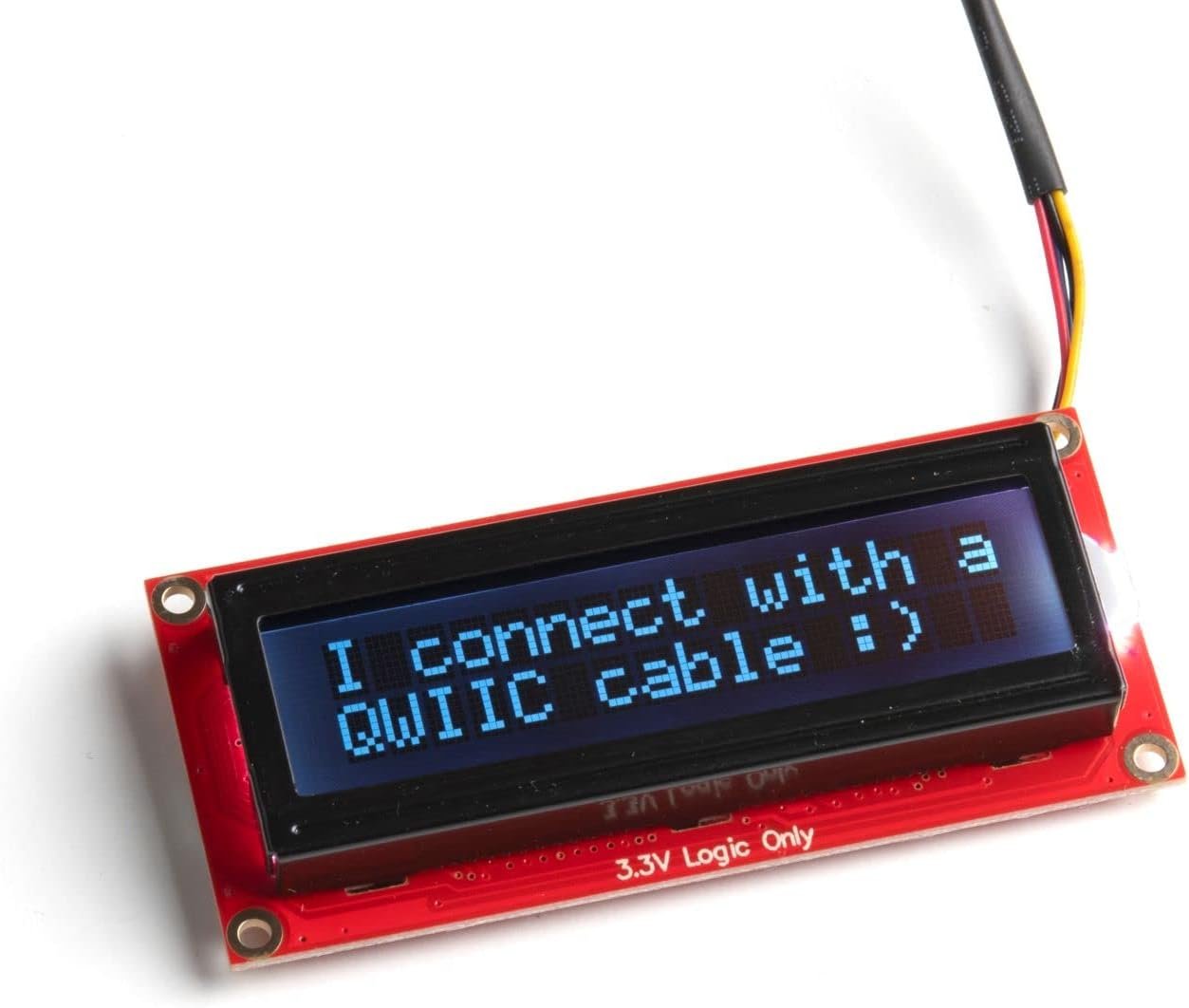
🧠 BEST PREMIUM / QWIIC · ⭐ 4.6/58. SparkFun 16×2 SerLCD RGB (Qwiic)
16×2 · RGB on black · Serial, I2C and SPI · 0x72 default · onboard ATmega328P · Qwiic · 80 × 36 × 14 mm
Buy Here →

The SparkFun SerLCD is a different class of product: an ATmega328P on the back of the display handles all the LCD control, so your microcontroller just sends text over Serial, I2C or SPI. The I2C address (default 0x72) can be changed in software, backlight brightness and contrast are set by PWM from code instead of a potentiometer, there is an 80-character input buffer and a user-definable splash screen. The Qwiic connector means no soldering if you already use SparkFun or Adafruit STEMMA QT boards, and the firmware is open source and reflashable from the Arduino IDE. It is the most expensive pick here, but it is also the least fiddly.
✅ Pros:
Three interfaces; software address, contrast and RGB brightness; Qwiic plug-and-play; open firmware.
❌ Cons:
Costs several times a basic 1602; low review count on Amazon; overkill for simple projects.
🎯 Verdict: The premium pick for Qwiic ecosystems and production-style builds where you never want to touch a contrast pot again.
👉 Check Price on Amazon →
🧭 How to Choose the Right LCD for Your Project
🔰
First LCD for an Arduino Uno?
Get the SunFounder I2C LCD1602. Four wires, address 0x27, and every LiquidCrystal_I2C tutorial works first time.
📊
Building a dashboard or menu?
Text that does not fit in 32 characters needs the SunFounder I2C 2004. Four lines covers a title plus three live values.
👥
Several projects or a classroom?
Buy packs. The GeeekPi 2-Pack for 16×2 or the Hosyond 3-Pack for 20×4 gives you the lowest cost per display plus spares.
🧪
Learning on ESP32 or Pi Pico?
The Freenove New Type 1602 ships with example code for Arduino, Pi, Pico and ESP32, which saves hours of porting.
🚦
Need colour status or 3.3 V logic?
The Waveshare LCD1602 RGB runs natively at 3.3 V and turns the backlight into a red, amber or green indicator.
🔗
Using Qwiic or STEMMA QT boards?
The SparkFun SerLCD plugs straight in, supports Serial, I2C and SPI, and sets contrast in software.
⚙️ Key Specs Compared Side by Side
| Spec | SunFounder 1602 | SunFounder 2004 | Freenove 1602 | Waveshare RGB | SparkFun SerLCD |
|---|
| Characters | 32 (16×2) | 80 (20×4) ⭐ | 32 (16×2) | 32 (16×2) | 32 (16×2) |
| Controller | PCF8574 backpack | PCF8574 backpack | Integrated I2C | AiP31068L + PCA9633 | ATmega328P ⭐ |
| Interfaces | I2C | I2C | I2C | I2C | Serial / I2C / SPI ⭐ |
| Native 3.3 V | No (5 V) | No (5 V) | See listing | Yes ⭐ | Yes ⭐ |
| Backlight | Blue | Blue | Blue | RGB, 16M colours ⭐ | RGB on black |
| Library Support | LiquidCrystal_I2C ⭐ | LiquidCrystal_I2C ⭐ | Freenove examples | Waveshare demos | SparkFun SerLCD |
| Best Use | First LCD project | Dashboards & menus | Multi-platform learning | Pi / Pico status display | Qwiic builds |
Specs are taken from the live Amazon listings and manufacturer documentation and can change between production batches. Always confirm the current specification and pack size on Amazon before ordering.
❓ Frequently Asked Questions
My I2C LCD lights up but shows nothing, or only a row of boxes. What is wrong?
Nine times out of ten it is the contrast potentiometer. Turn the small blue pot on the back slowly with a screwdriver while the sketch runs until the characters appear. A top row of solid boxes means the LCD has power but has not been initialised, which points to the wrong I2C address or wrong SDA/SCL pins. On an Uno, SDA is A4 and SCL is A5; on an ESP32 the defaults are GPIO 21 and 22. If you power a 5 V module from 3.3 V you may also see faint or no text, because the glass needs around 5 V for proper contrast.
Is my LCD at address 0x27 or 0x3F?
It depends on the backpack chip. Modules with a PCF8574T usually answer at 0x27, those with a PCF8574AT at 0x3F, and the A0 to A2 solder pads shift the address within that range. Do not guess: upload an I2C scanner sketch, open the serial monitor and use whatever address it reports. RGB and smart modules such as the Waveshare RGB and SparkFun SerLCD use their own fixed or software-set addresses (SparkFun defaults to 0x72).
Can I use a 16×2 I2C LCD with an ESP32, ESP8266 or Raspberry Pi Pico?
Yes, and it is very common, but be aware of the voltage mismatch. Standard blue modules need 5 V for good contrast, and the backpack’s pull-up resistors then pull SDA and SCL to 5 V, which exceeds the official rating of 3.3 V microcontrollers. The robust options are a small bidirectional I2C level shifter, removing the backpack pull-ups and relying on 3.3 V pull-ups, or choosing a module designed for 3.3 V such as the Waveshare LCD1602 RGB or SparkFun SerLCD. Our ESP32 and ESP8266 I2C LCD tutorial walks through the wiring and code.
Should I choose a 16×2 LCD, a 20×4 LCD or an OLED?
Pick a 16×2 when you only show one or two values and space is tight. Pick a 20×4 for menus, multi-sensor readouts or status pages, since four lines of twenty characters is two and a half times the text. Choose an OLED or TFT when you need graphics, icons or very low power with the backlight off. Character LCDs still win on cost, sunlight readability with a backlight, and the simplicity of a text-only API, which is why they remain standard in test fixtures and industrial panels.
Can I connect two or more I2C LCDs to the same Arduino?
Yes, as long as each one has a unique address. On PCF8574 backpacks, bridge one or more of the A0, A1 and A2 solder pads to move a module away from the default 0x27, giving up to eight displays per chip variant. Then create a separate LiquidCrystal_I2C object for each address. With several 5 V modules on one bus, keep wires short and remember each backpack adds its own pull-ups, so the combined resistance can get quite low; removing the extra pull-ups on all but one module keeps the bus healthy.
🏁 Final Verdict: The Right LCD for Every Project
Pick by how much text you need to show and what voltage your board runs at:
🥇 Best Overall 16×2 · SunFounder I2C LCD1602: the reference module every tutorial assumes
Buy Here →
🏅 Best 20×4 LCD · SunFounder I2C 2004: four lines of twenty, same two-wire bus
Buy Here →
💰 Best Value 16×2 Pack · GeeekPi 2-Pack I2C 1602: two dependable displays at 0x27
Buy Here →
📘 Best for Learning · Freenove New Type 1602: code for Arduino, Pi, Pico and ESP32
Buy Here →
📦 Best 20×4 Multipack · Hosyond 3pcs I2C 2004: lowest cost per 20×4 display
Buy Here →
🪙 Budget Single 20×4 · GeeekPi I2C 2004: one 20×4 with jumper wires included
Buy Here →
🌈 Best RGB & 3.3V · Waveshare LCD1602 RGB: 16M-colour backlight, native 3.3 V
Buy Here →
🧠 Best Premium / Qwiic · SparkFun SerLCD: Serial, I2C and SPI with software contrast
Buy Here →A character LCD is still the fastest way to give a project a face. For most people the SunFounder I2C LCD1602 is the one to buy: it is the module tutorials are written for and it works on the first upload. Step up to the SunFounder I2C 2004 when you need four lines, grab a GeeekPi or Hosyond multipack when you are building several units, and choose the Waveshare RGB or SparkFun SerLCD when your board runs at 3.3 V or you want software control of the backlight. Once your display arrives, get it running with our I2C LCD with ESP32 and ESP8266, I2C LCD with Raspberry Pi Pico (MicroPython) and I2C LCD with STM32 Nucleo guides, or browse all of our Arduino, ESP32, STM32 and Raspberry Pi tutorials. If you need graphics rather than text, see our best TFT LCD displays guide.
💬 Not sure whether a 16×2 or 20×4 fits your project? Tell us what you are building and which board you are using in the comments below, and we will point you to the right LCD.
All Amazon links above use our affiliate tag (microlab05-20). Purchasing through them supports microcontrollerslab.com at no extra cost to you. We do not print prices because they change frequently, so always confirm the current price and exact variant on Amazon before buying.