⚠️ Affiliate Disclosure: This post contains Amazon affiliate links. If you purchase through our links, we may earn a small commission at no extra cost to you. We only recommend products we have thoroughly researched and verified. Prices change frequently, so we don’t list them here. Always tap through and confirm the live price on Amazon before buying.
Ultimate Buying Guide 2026
🦿 Best Humanoid Robot Kits for Makers, Students & Researchers
8 bipedal and humanoid robot kits ranked, from a budget Arduino walker to a 17DOF ESP32 bot, a Raspberry Pi 5 AI humanoid, a ROS research platform and the full-size Unitree G1, with real specs, honest verdicts and verified Amazon links.
✅ 8 Kits Reviewed
✅ Verified Amazon ASINs
✅ Updated September 2026
✅ Honest Pros & Cons
A humanoid robot kit is the hardest and most rewarding project in hobby robotics. Instead of a chassis with two wheels, you are building a machine with a dozen or more coordinated joints that has to lift a foot, shift its centre of mass and land again without tipping over. That is why a humanoid teaches things a robot car never will: inverse kinematics, gait planning, servo bus communication, real-time balance and, on the newer kits, computer vision and voice interaction running on a Raspberry Pi.
The category has also changed fast. A few years ago your only realistic options were a bag of hobby servos and a 3D printer. Today you can buy a fully documented 18–24 DOF humanoid that runs Python on a Raspberry Pi 5, does face tracking with OpenCV, answers voice commands through a large AI model, and even publishes to ROS. At the very top of the market, a genuine full-size humanoid like the Unitree G1 is now a one-click Amazon purchase. This guide ranks 8 humanoid and biped robot kits across every level, from a first Arduino walker to a university research platform.
💡 Reality check before you buy: Humanoids are not plug-and-play. Expect hours of assembly, and expect to re-centre and calibrate every servo before the robot will walk in a straight line. Bipedal walking is inherently fragile, so these robots fall over, and a fall on a hard floor can strip a gear or bend a bracket. Budget for spare servos. Battery life is short (typically 20–60 minutes of active walking), the cheaper kits are Android-app-only, and “AI humanoid” almost always means a Raspberry Pi doing vision on a Wi-Fi link rather than onboard reasoning. Finally, note that full-size humanoids like the Unitree G1 sit in a completely different price bracket to everything else here. They are lab and demo equipment, not hobby kits.
🤖 Quick Comparison: All 8 Humanoid Robot Kits
| Robot Kit | Brain | DOF / Servos | Programming | Best For | Buy |
|---|
| 🥇 Hiwonder TonyPi Pro | Raspberry Pi 5 (8GB) | 20 DOF · bus servos | Python · OpenCV | Best Overall | View → |
| 🏅 Hiwonder TonyPi Standard | Raspberry Pi 5 (4GB) | 16+ DOF · bus servos | Python · Blockly | Best Value AI Humanoid | View → |
| 🚀 Unitree G1 | 8-core CPU · LiDAR | 23 DOF · 90 N·m knee | App / OTA (no SDK) | Best Full-Size Humanoid | View → |
| 🧠 Hiwonder AiNex ROS | Raspberry Pi 5 (8GB) | 24 bus servos | ROS · Python | Best for ROS & Research | View → |
| ⚙️ Hiwonder Tonybot | ESP32 + ESP32-S3 cam | 17 DOF · bus servos | Arduino · Scratch · Python | Best ESP32 / Arduino Humanoid | View → |
| 🛡️ XiaoR Geek XR-MRT | Onboard controller · BT | 18 DOF · metal servos | Graphical (app + PC) | Best DIY / Custom Armor Build | View → |
| 🎓 Robot PU (micro:bit) | BBC micro:bit | Self-balancing biped | MakeCode · JS · Python | Best for Classrooms | View → |
| 🔰 ELEGOO Penguin Bot V2 | Arduino (UNO-class) | Servo-driven biped | Arduino IDE | Best First Biped / Budget | View → |
Specs are taken from the current Amazon listings and manufacturer pages. Kits ship in several bundles (different Raspberry Pi RAM sizes, standard vs. advanced vs. pro), so check exactly which variant a listing is selling. We deliberately don’t publish prices, because they move constantly. Tap through and check the live price yourself.
🔍 What to Look for in a Humanoid Robot Kit
🦿
Degrees of Freedom (DOF)
DOF is the joint count. A 4-servo biped can waddle; 16–18 DOF gives you real arms and a hip that can rotate; 20–24 DOF adds grippers and a waist. More DOF means smoother gaits and more interesting projects, but also more calibration, more current and more to break.
🔩
Servo Type & Gears
Plain PWM servos are cheap but blind. Serial bus servos daisy-chain on a few wires and report position, load, voltage and temperature back, which is what makes closed-loop gait control possible. Metal gears are non-negotiable on the legs: a plastic hip gear will strip the first time the robot falls.
🧠
Controller Platform
micro:bit and Arduino kits are great for learning motion sequences. An ESP32 adds Wi-Fi and enough power for a camera module. A Raspberry Pi 5 unlocks OpenCV vision, Python, ROS and voice models. Match the brain to what you actually want to learn, not to the spec sheet.
📐
Gait & Inverse Kinematics
The difference between a toy and a platform is whether the software solves inverse kinematics: you give it a foot position, it computes the joint angles. Kits with IK and omnidirectional gait planning let you write real behaviours; kits with only recorded action files limit you to playback.
📚
Docs, SDK & Spare Parts
A humanoid is worthless without documentation. Look for a published SDK or GitHub repo, step-by-step assembly guides, and, critically, replacement servos and brackets you can actually buy. Closed platforms with no secondary development support will stop being fun the moment you outgrow the app.
🏆 Detailed Reviews: All 8 Humanoid Robot Kits
🥇 BEST OVERALL

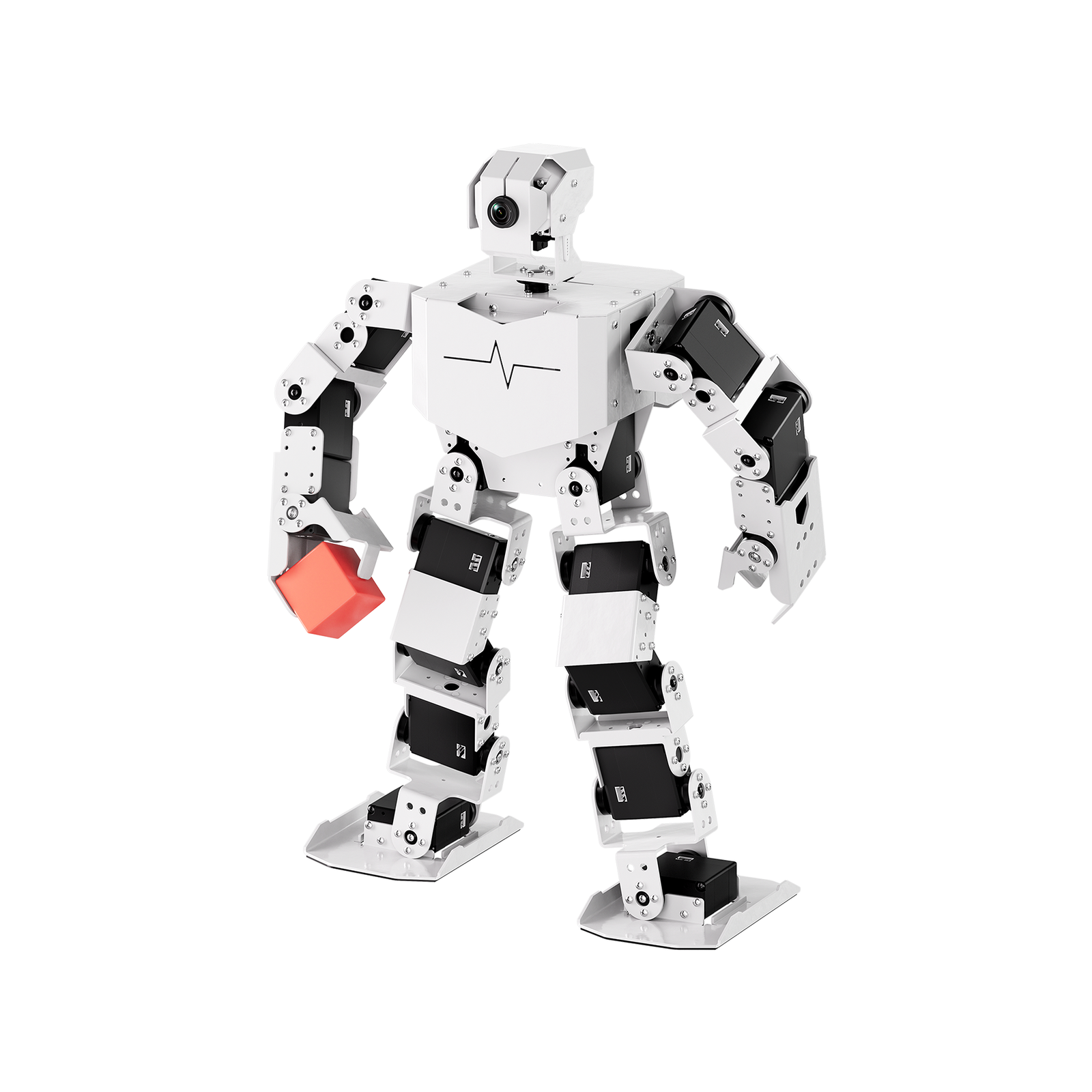
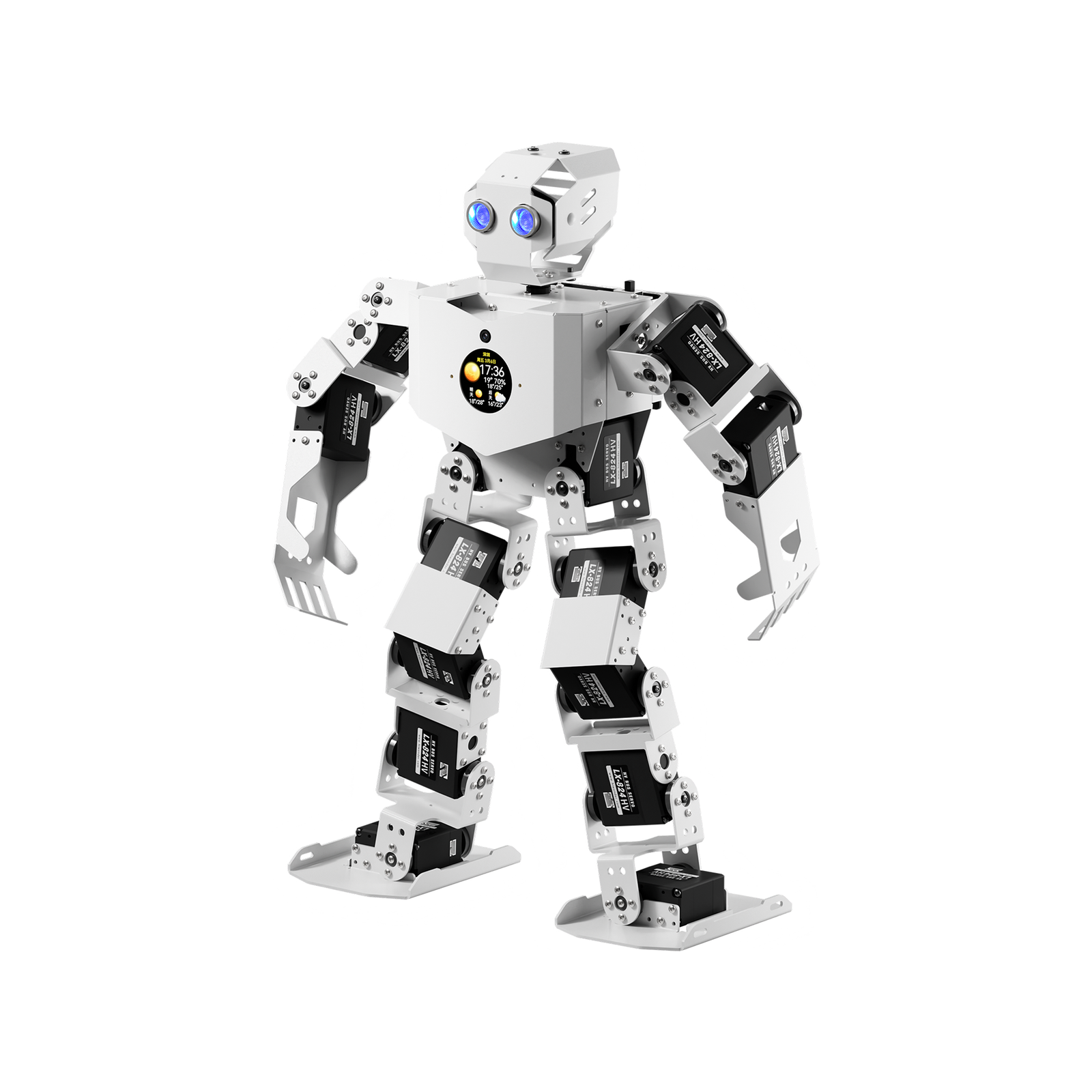
The TonyPi Pro is the humanoid we’d hand to anyone serious about learning robotics rather than just owning a robot. It pairs 18 high-voltage intelligent bus servos (plus two more DOF in the open-close hands, for 20 total) with a Raspberry Pi 5 running Python, OpenCV and MediaPipe. Out of the box it does face and colour tracking, line following, object transport and gesture recognition; Hiwonder’s newer firmware also wires in a multimodal AI model so you can talk to it and have it act on what it sees. Because every servo is on a serial bus, you get real position and load feedback for gait work, the thing that separates a research platform from a dancing toy.
✅ Pros- 20 DOF with feedback bus servos
- Raspberry Pi 5 with real Python/OpenCV stack
- Vision + voice demos work out of the box
- Excellent documentation and course material
❌ Cons- Premium price for a hobby kit
- Long assembly and servo calibration
- AI features need Wi-Fi and API keys
🎯 Verdict: The best all-round humanoid kit. Enough DOF, sensing and compute to carry you from first walk cycle to a genuine vision-and-voice robotics project.
👉 Check Price on Amazon →
🏅 BEST VALUE AI HUMANOID
Hiwonder TonyPi Standard
⭐ 4.6/5 · The Affordable Pi Humanoid
Bus Servos
FULL METAL LEGS
AI Vision
FACE / COLOUR TRACK
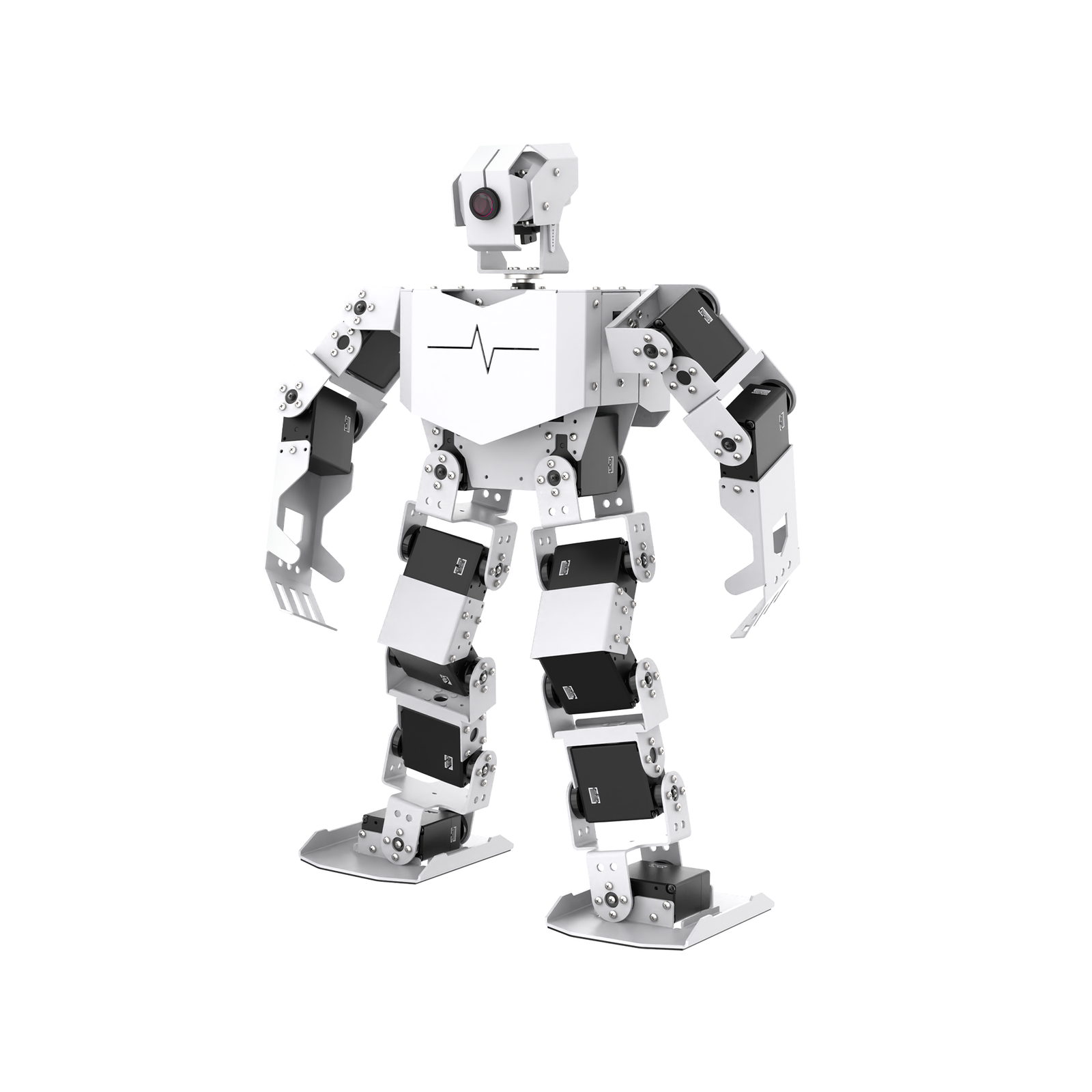
The TonyPi Standard is the same platform as the Pro with a smaller Raspberry Pi (4GB) and a trimmed accessory list. You still get the metal-bracket biped chassis, serial bus servos, an HD camera and Hiwonder’s full Python + OpenCV software stack with ChatGPT-style voice control. You just give up some of the Pro’s extras such as the open-close hands and the larger RAM. For most makers and students that is the right trade: this is the cheapest way to get a Raspberry Pi humanoid that actually sees and walks, and the code you write on it ports straight to the Pro if you upgrade later.
✅ Pros- Same software stack as the Pro
- Raspberry Pi 5 included in the bundle
- Vision + voice without the top-tier price
- Big library of Python example projects
❌ Cons- Fewer DOF than the Pro, no grippers
- 4GB Pi is tight for heavier vision work
- Many similar listings; read the variant carefully
🎯 Verdict: The best value in Pi-powered humanoids. Buy this if you want the TonyPi ecosystem without paying for the Pro’s extras.
👉 Check Price on Amazon →
🚀 BEST FULL-SIZE HUMANOID · ⭐ 4.8/53. Unitree G1
132 cm · ~35 kg · 23 DOF · 90 N·m knee · 3D LiDAR + depth camera · ~2 h battery
Buy →

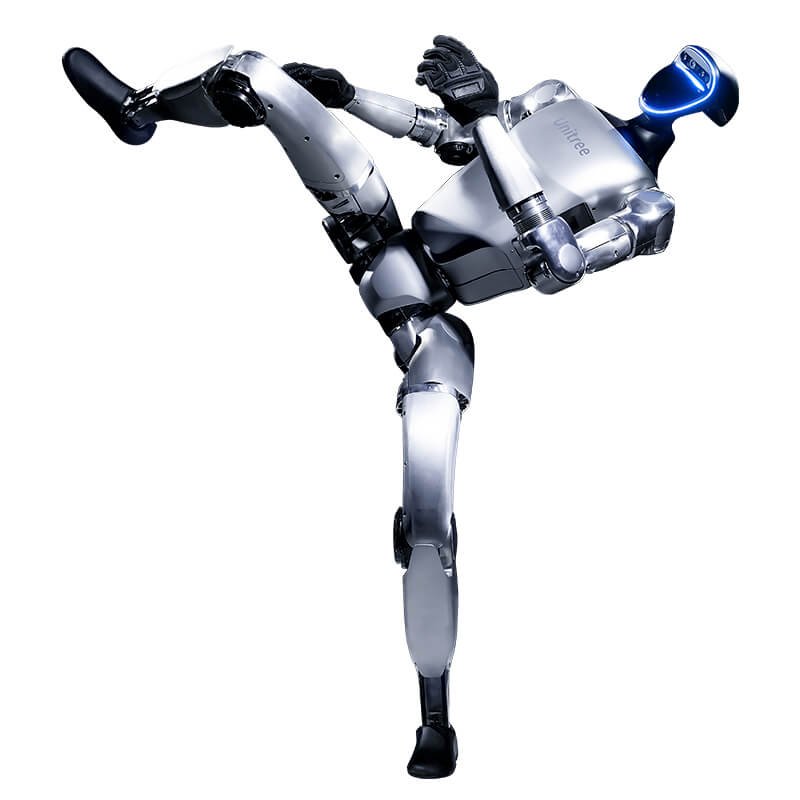
The Unitree G1 is what happens when a humanoid stops being a kit and becomes a machine. It stands 1,320 mm tall, weighs about 35 kg, and carries 23 joint degrees of freedom: six per leg, five per arm and one at the waist, driven by low-inertia PMSM motors with crossed-roller output bearings and up to 90 N·m at the knee. An 8-core CPU, depth camera and 3D LiDAR handle perception, Wi-Fi 6 and Bluetooth 5.2 handle connectivity, and a 9,000 mAh quick-swap battery gives roughly two hours. Be clear-eyed about two things, though: this sits far above every other pick here on price, and the version sold on Amazon explicitly does not support secondary development. If you need SDK or API access you want the G1 EDU instead.
✅ Pros: Genuine full-size humanoid; 23 DOF with huge joint torque; LiDAR + depth perception; aerospace alloy and carbon fibre build; OTA feature updates.
❌ Cons: Costs many times more than any kit here; the Amazon SKU has no SDK/programming access; complex maneuvers are locked; ~2 h runtime.
🎯 Verdict: The showcase humanoid, brilliant for labs, exhibitions and demos, but treat it as capital equipment, not a maker project. Developers should buy the EDU variant.
🧠 BEST FOR ROS & RESEARCH · ⭐ 4.6/54. Hiwonder AiNex ROS
24 serial bus servos · Raspberry Pi 5 8GB · HD camera · inverse kinematics gait · movable hands
Buy →
If your goal is research or a university course rather than a weekend build, the AiNex is the pick. It is built on ROS, runs on a Raspberry Pi 5, and packs 24 intelligent serial bus servos, enough for movable mechanical hands and two extra hip joints that let the legs rotate. That extra hip DOF is what enables genuine omnidirectional walking rather than a fixed forward shuffle, and Hiwonder ships an inverse kinematics layer plus gait planning so you can command poses and trajectories instead of hand-tuning angles. Control comes from the WonderROS app, a wireless gamepad or PC software.
✅ Pros: Native ROS platform; 24 bus servos; real inverse kinematics and omnidirectional gait; rotating hip joints; cross-platform control.
❌ Cons: The most expensive kit here after the G1; steep ROS learning curve; overkill if you only want vision demos.
🎯 Verdict: The best humanoid kit for ROS work and academic projects. Buy it if you want to publish topics, not just play action files.
⚙️ BEST ESP32 / ARDUINO HUMANOID · ⭐ 4.5/55. Hiwonder Tonybot (17 DOF)
ESP32 · 17 intelligent servos · ESP32-S3 vision module · ultrasonic · Arduino / Scratch / Python
Buy →
The Tonybot is the sweet spot for anyone who lives in the Arduino world. It runs on an ESP32 with 17 intelligent servos, walks, dances, kicks a ball and, the party trick, stands itself back up after a fall. An add-on ESP32-S3 vision module brings offline face recognition, target tracking and visual line following, and a voice module handles spoken commands; the higher bundles add multimodal AI models for conversation and scene understanding. You program it in Arduino C++, Scratch-style blocks or Python, and an ultrasonic sensor plus expansion pins keep it hackable.
✅ Pros: Familiar ESP32/Arduino toolchain; 17 DOF with self-stand-up; offline vision on the S3 module; three programming languages.
❌ Cons: Less compute than a Pi kit; the best AI features only come with the pricier Ultimate bundle; smaller community than TonyPi.
🎯 Verdict: The best humanoid for Arduino and ESP32 makers. All the joints of a serious biped, none of the Linux overhead.
🛡️ BEST DIY / CUSTOM ARMOR BUILD · ⭐ 4.3/56. XiaoR Geek XR-MRT
18 DOF metal servos · 27 cm · ~830 g · 7.4 V 1300 mAh · Bluetooth app + PC graphical coding
Buy →

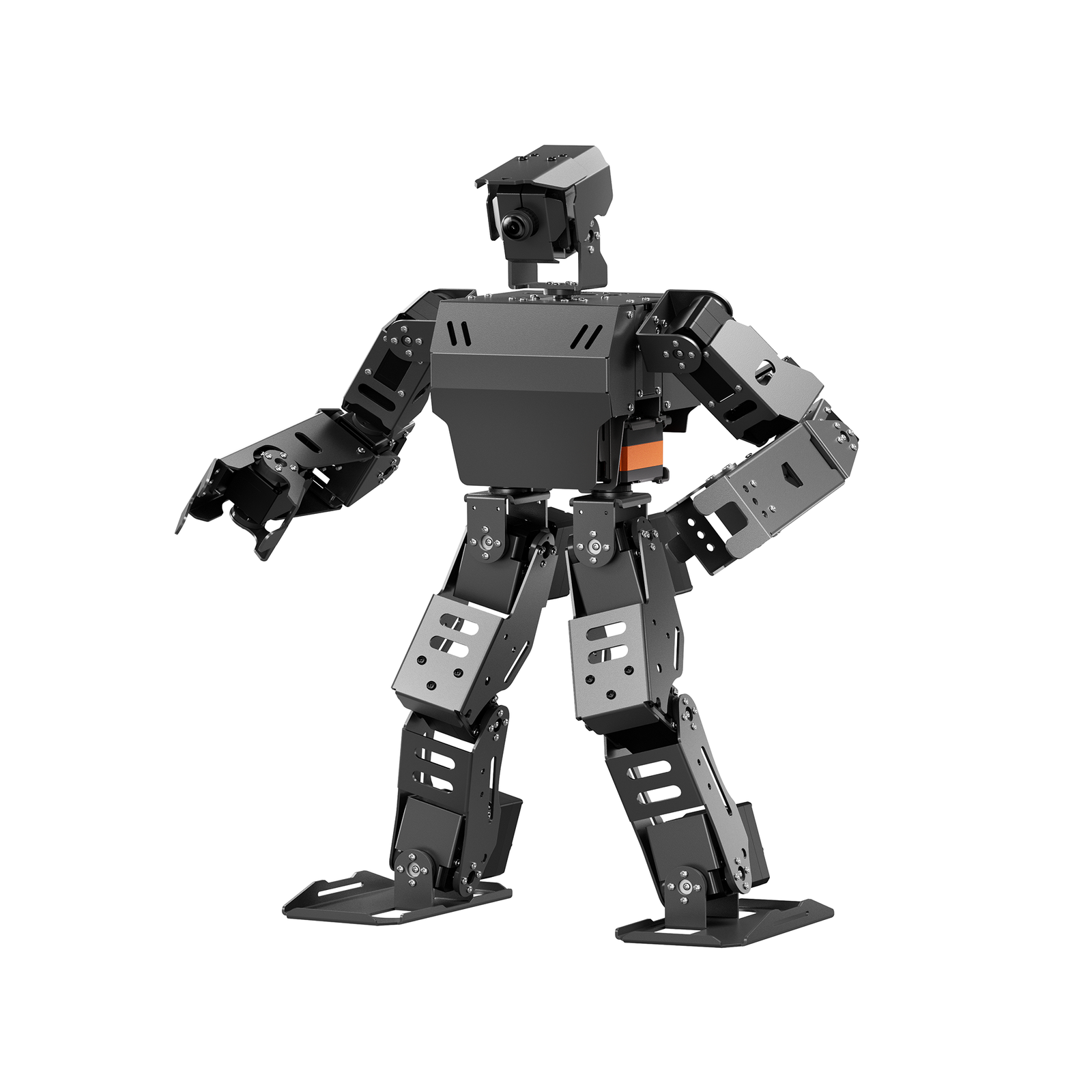
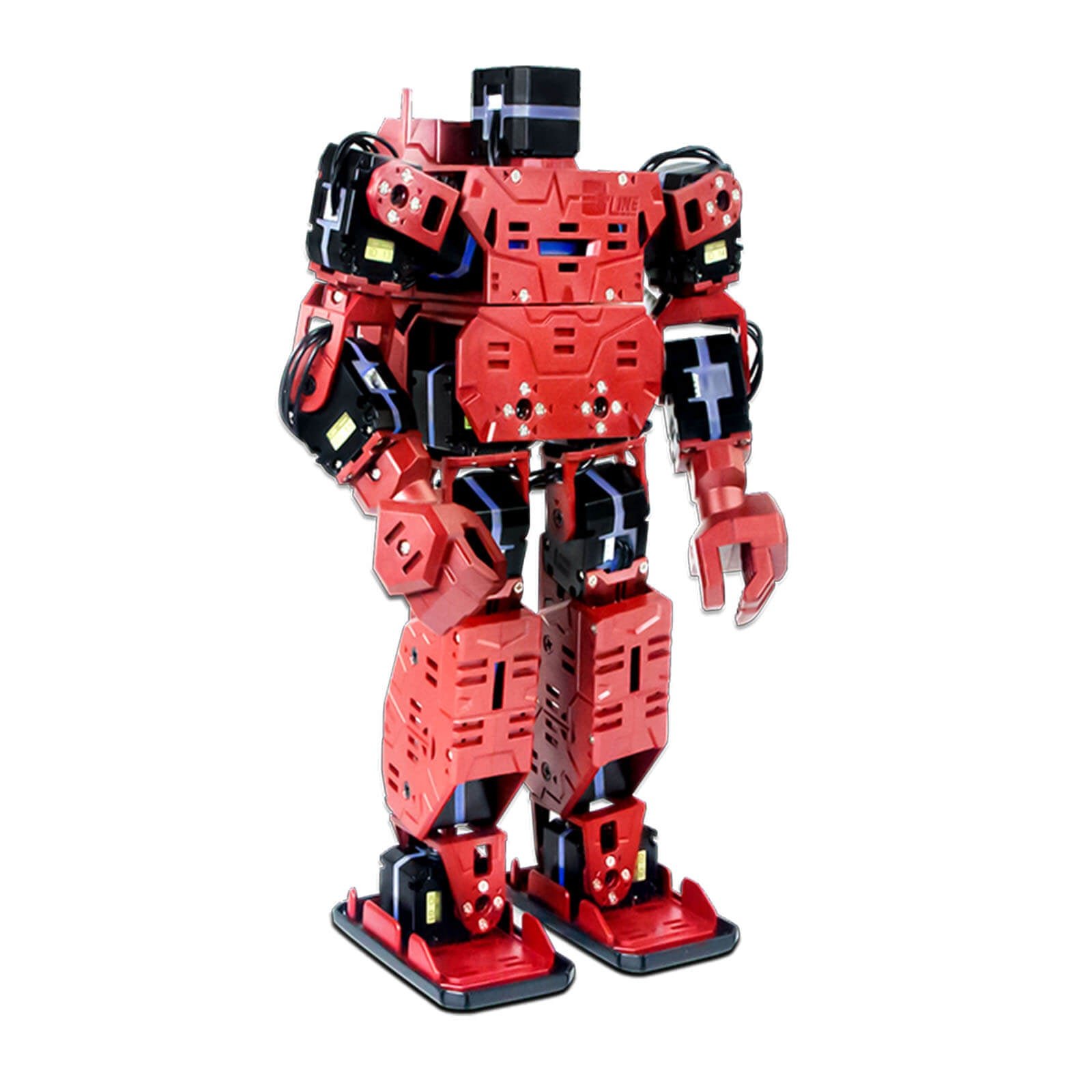
The XiaoR Geek XR-MRT is the fun one. It is a 27 cm, 18 DOF humanoid with metal-gear servos distributed as one in the head, one in the chest, six across the arms and ten in the legs, a genuinely capable joint layout for boxing, football and dance routines. What sets it apart is the swappable armour: the exterior panels and servo colours are meant to be customised, so it is the kit to buy if you want a robot that looks like yours. It supports secondary development through a documented interface, and you program it graphically from the phone app or Windows PC software.
✅ Pros: 18 metal-gear servos; customisable armour and servo colours; supports secondary development; strong pre-programmed action library.
❌ Cons: Bluetooth app is Android-only; no onboard vision or Linux; listing is rated 16+ and assembly is fiddly.
🎯 Verdict: The best kit for makers who want to customise the look as well as the code. Skip it if you’re on iOS only.
🎓 BEST FOR CLASSROOMS · ⭐ 4.4/57. Robot PU (micro:bit Humanoid)
BBC micro:bit · self-balancing · autopilot with obstacle avoidance · MakeCode / JavaScript / Python
Buy →

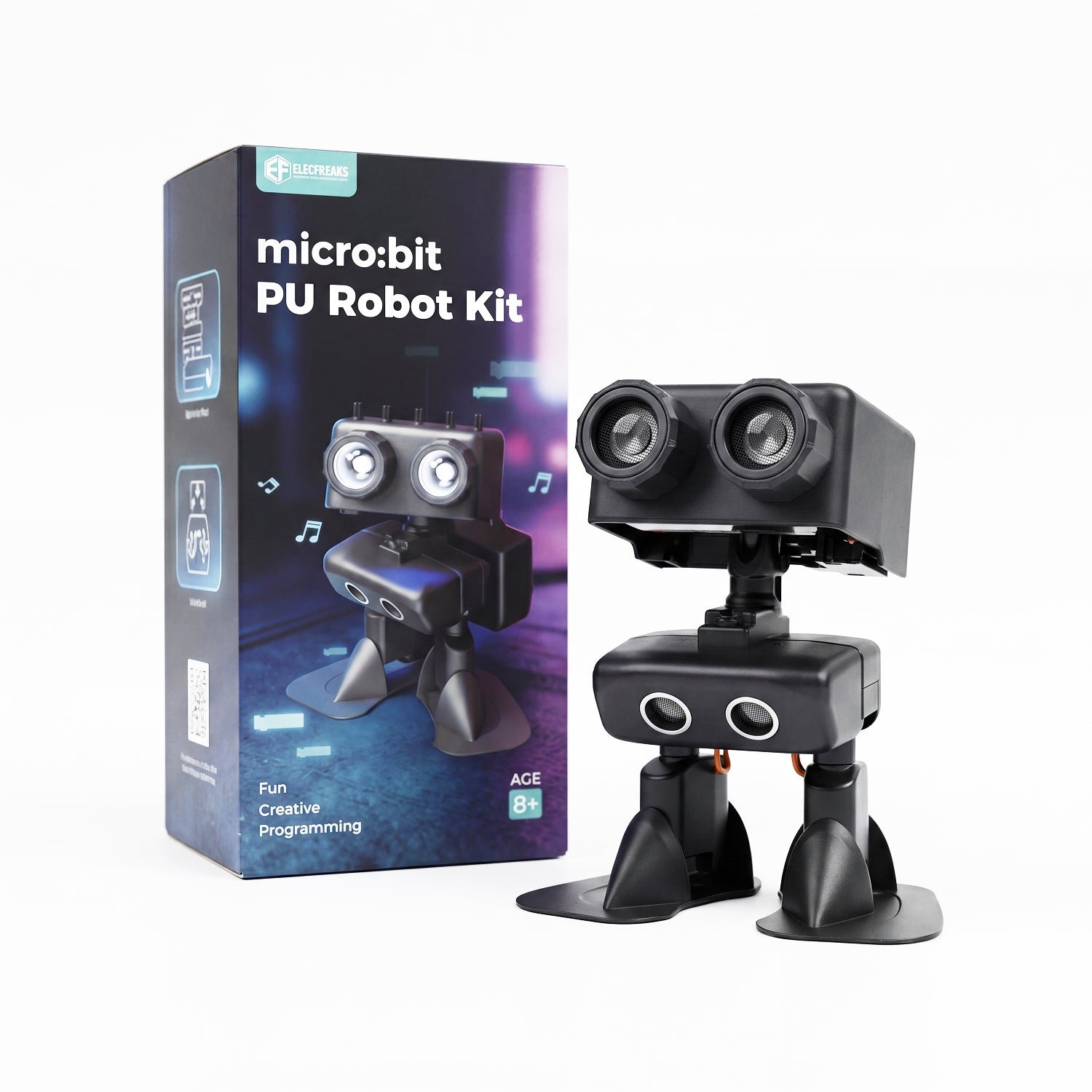
Built around the BBC micro:bit, Robot PU is the humanoid designed for teaching rather than tinkering. It self-balances, walks, dances, plays soccer and runs an autopilot mode that avoids obstacles and even interacts with other PU robots, which is perfect for a class set. The software path is the real selling point: MakeCode blocks for beginners, then JavaScript and Python as students progress, with the firmware open-sourced on GitHub and 30+ free online lessons covering programming, 3D design, printing and AI. Expansion kits add construction parts, extra pins and an AI camera.
✅ Pros: Genuine block-to-Python learning ladder; self-balancing; open source on GitHub; 30+ free lessons; expandable.
❌ Cons: Low DOF compared with the Hiwonder kits; micro:bit board sometimes sold separately; more toy-like build.
🎯 Verdict: The best classroom humanoid. If you’re teaching a group or buying for a younger maker, this is the safest choice on the list.
🔰 BEST FIRST BIPED / BUDGET · ⭐ 4.5/58. ELEGOO Penguin Bot V2.0
Arduino-compatible · servo-driven biped · obstacle avoidance · auto-follow · Bluetooth app · IDE-programmable
Buy →

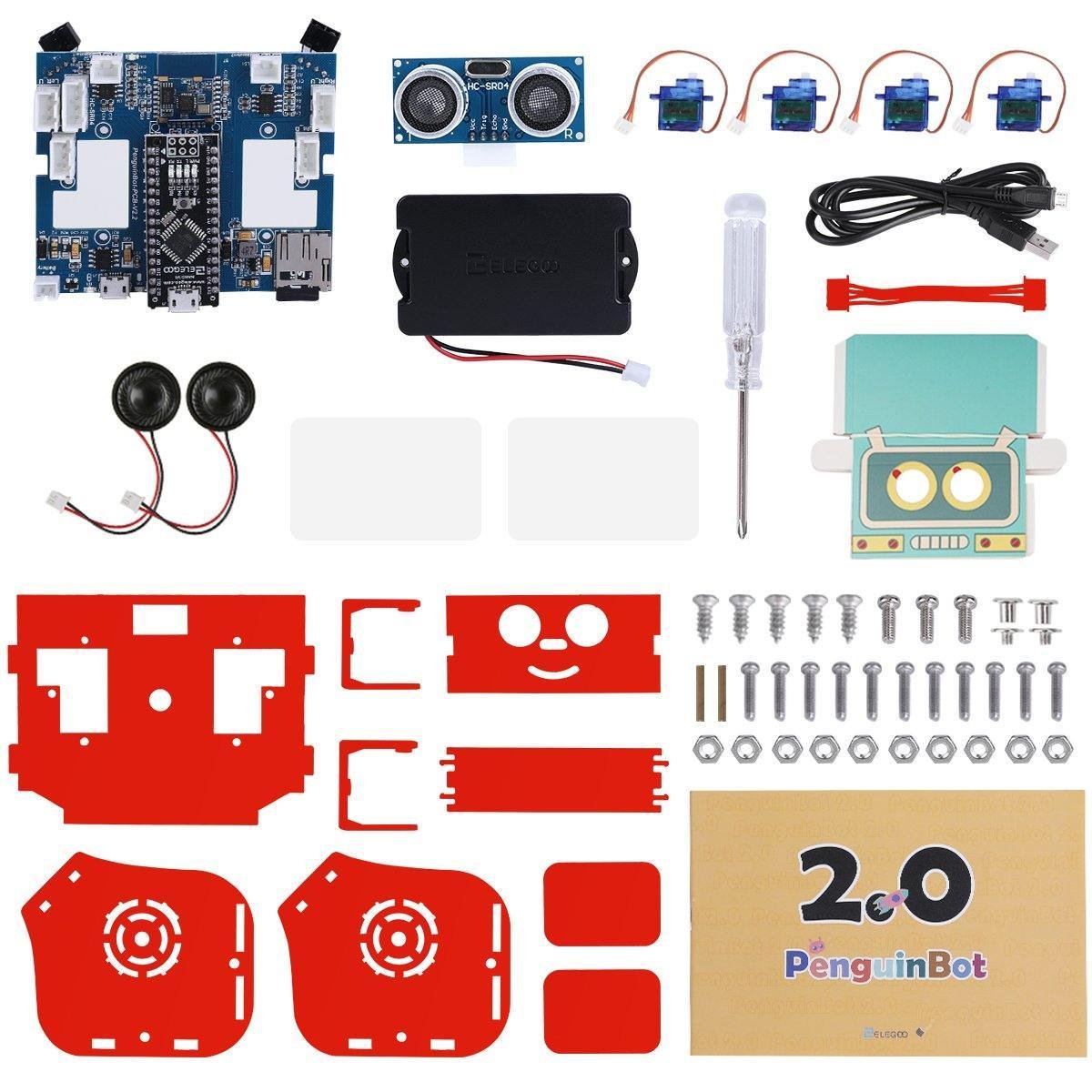
ELEGOO doesn’t build a full humanoid, and we’d rather say so than pretend otherwise, but the Penguin Bot V2.0 is the best cheap way to learn how a walking biped actually works. It is an Arduino-based kit with servo-driven legs, obstacle avoidance, auto-follow, Bluetooth app control, a music player and dance routines, and it ships with a proper illustrated manual, spare screws and tools. Crucially it is fully reprogrammable in the Arduino IDE, so once you’ve built it you can rewrite the gait, add an ultrasonic behaviour or bolt on your own sensors. Think of it as the SG90-class entry point to bipedal robotics.
✅ Pros: By far the cheapest walker here; excellent beginner documentation; fully Arduino IDE programmable; swappable head covers.
❌ Cons: A biped, not a true humanoid, so no arms or torso joints; few DOF; you’ll outgrow it quickly.
🎯 Verdict: The best first step into bipedal robotics. Build it, break it, reprogram it, then graduate to a TonyPi.
🛒 How to Choose the Right Humanoid Robot Kit
🤖
Want the full experience?
The Hiwonder TonyPi Pro gives you 20 DOF, a Raspberry Pi 5, camera vision and voice control in one documented package.
💡
Want AI vision for less?
The TonyPi Standard runs the same Python and OpenCV stack on a 4GB Pi 5 for noticeably less money.
🎓
Doing ROS or a thesis?
The Hiwonder AiNex is a native ROS platform with 24 bus servos, inverse kinematics and omnidirectional gait.
⚙️
Live in the Arduino world?
The ESP32-based Tonybot gives you 17 DOF and optional offline vision without touching Linux.
🏫
Teaching a class?
Robot PU runs on a micro:bit with MakeCode blocks, an open-source repo and 30+ free lessons, ideal for a class set.
🔰
Just want to try walking?
Start with the ELEGOO Penguin Bot V2.0, a cheap Arduino biped you can rewrite from scratch.
⚙️ Key Specs Compared: Side by Side
| Spec | TonyPi Pro | AiNex ROS | Unitree G1 | Tonybot | Penguin Bot V2 |
|---|
| Degrees of Freedom | 20 DOF | 24 servos | 23 DOF (full-size) ⭐ | 17 DOF | Servo-driven biped |
| Controller | Raspberry Pi 5 8GB ⭐ | Raspberry Pi 5 8GB ⭐ | 8-core CPU (closed) | ESP32 + ESP32-S3 | Arduino UNO-class |
| Vision | HD cam · OpenCV | HD cam · OpenCV | Depth cam + 3D LiDAR ⭐ | ESP32-S3 module | Ultrasonic / IR only |
| Programming | Python · OpenCV | ROS · Python ⭐ | App only (no SDK) | Arduino · Scratch · Python | Arduino IDE |
| Gait / IK | Preset + scripted | IK + omnidirectional ⭐ | Factory locked | Preset + self stand-up | Simple sequence |
| Voice / AI model | Multimodal LLM ⭐ | Optional | Voice interaction | Voice module (bundle) | No |
| Best suited to | Makers & students | Researchers | Labs & exhibitions | Arduino hobbyists | Absolute beginners ⭐ |
Specs come from the current Amazon listings and manufacturer product pages and vary by bundle. ⭐ marks the strongest option in each row for that criterion, not an overall winner. Always confirm the exact variant on the live listing.
❓ Frequently Asked Questions
How many degrees of freedom does a humanoid robot kit really need?
For a robot that only has to walk forward and turn, four to six leg servos is enough, which is the Penguin Bot class. To get expressive arms and a hip that rotates you want 16 to 18 DOF, which is where the Tonybot and XR-MRT sit. Above that, the extra joints buy you grippers, a waist and true omnidirectional gait: the TonyPi Pro’s 20 DOF and the AiNex’s 24 servos exist so the robot can pick things up and side-step, not just walk. More DOF also means more calibration, more current draw and more that can strip in a fall, so pick the lowest count that covers the projects you actually want to build.
Can I actually program the Unitree G1 I buy on Amazon?
Not in the developer sense. The G1 listing sold on Amazon states plainly that secondary development is not supported. You get app and remote control, voice interaction, a library of official motions and OTA updates, but no SDK or API access, and some complex maneuvers are locked for safety. If you want to write your own controllers, run reinforcement-learning policies or integrate the robot into a research stack, you need the G1 EDU version, which Unitree sells separately. Buying the consumer G1 and expecting to code on it is the single most expensive mistake you can make in this category.
Why do these kits use serial bus servos instead of normal PWM servos?
Two reasons: wiring and feedback. An 18-joint robot wired with standard PWM servos needs 18 signal lines plus a driver board, and none of those servos can tell you where they actually are. Serial bus servos share one TTL line, each with its own ID, so the whole leg chain runs on three wires, and each servo reports back position, load, voltage and temperature from an internal encoder. That feedback is what lets the controller detect a stalled joint, hold a pose under load and run closed-loop gait correction. It’s the same idea behind smart servos in open-source robot arms, and it’s why bus-servo kits cost more.
Do I need a Raspberry Pi, or is an Arduino/ESP32 humanoid enough?
It depends entirely on whether you want vision. An ESP32 or Arduino can drive 17 servos, run a walk cycle, read an ultrasonic sensor and take Bluetooth commands perfectly well, and the toolchain is far simpler. But the moment you want OpenCV, MediaPipe pose detection, ROS nodes or a speech model, you need a Linux board. That’s why the TonyPi and AiNex ship with a Raspberry Pi 5. A good rule: choose ESP32 if the project is about motion and control, choose Raspberry Pi if the project is about perception.
How hard are humanoid kits to assemble, and will it fall over?
Assume a full day for an 18–24 DOF kit, most of it spent centring servos before they go into brackets. Get that wrong and the joint will hit its end-stop mid-stride. And yes, it will fall over: bipedal walking is unstable by nature, floor surface changes the gait, and a low battery makes the servos sag. Build on carpet or a mat, keep the battery charged, buy one or two spare servos and expect to re-tune the gait after any hard landing. That whole loop is the point of the hobby: you’re learning the same balance and calibration problems that full-size humanoids face.
🏁 Final Verdict: Best Humanoid Robot Kit for Every Budget
The right humanoid for every level, from a first walk cycle to a research platform:
🥇 Best Overall · Hiwonder TonyPi Pro: 20 DOF, Raspberry Pi 5, OpenCV vision and voice control
Buy →🏅 Best Value AI Humanoid · TonyPi Standard: same software stack on a 4GB Pi 5
Buy →🚀 Best Full-Size Humanoid · Unitree G1: 132 cm, 23 DOF, LiDAR (no SDK on this version)
Buy →🧠 Best for ROS & Research · Hiwonder AiNex: 24 bus servos, inverse kinematics, ROS
Buy →⚙️ Best ESP32 / Arduino Humanoid · Hiwonder Tonybot: 17 DOF, self stand-up, optional vision
Buy →🛡️ Best DIY / Custom Build · XiaoR Geek XR-MRT: 18 metal-gear DOF and swappable armour
Buy →🎓 Best for Classrooms · Robot PU: micro:bit, MakeCode to Python, 30+ free lessons
Buy →🔰 Best First Biped · ELEGOO Penguin Bot V2.0: cheap, Arduino-programmable, great docs
Buy →No single humanoid suits every builder, but each pick here earns its slot. For most people the Hiwonder TonyPi Pro is the one to buy: enough joints, sensing and Raspberry Pi compute to take you from a first walk cycle to real vision-and-voice projects. Save money with the TonyPi Standard, go native ROS with the AiNex, stay in your comfort zone with the ESP32-based Tonybot, customise the look with the XR-MRT, teach a class with Robot PU, or spend very little and learn a great deal with the ELEGOO Penguin Bot. The Unitree G1 is the only one that isn’t a kit at all. It’s a full-size machine for labs and demos, and worth knowing about precisely so you don’t buy it by mistake. Whichever you choose, pair it with our Arduino, ESP32, STM32 and Raspberry Pi tutorials and start building today.
💬 Not sure which humanoid fits your project? Tell us what you’re building, whether that’s a walking robot for a competition, a vision demo, a classroom set or a ROS research platform, in the comments below, and we’ll point you to the right kit.
All Amazon links above use our affiliate tag (microlab05-20). Purchasing through them supports microcontrollerslab.com at no extra cost to you. Prices, bundles and availability change frequently, so always confirm the current listing and variant on Amazon before buying.