⚠️ Affiliate Disclosure: This post contains Amazon affiliate links. If you purchase through our links, we may earn a small commission at no extra cost to you. We only recommend boards we have thoroughly researched and verified against live listings. Prices change constantly on Amazon third-party listings, so we deliberately do not print them here. Always tap through and confirm the current price yourself before buying.
Ultimate SBC Buying Guide
🍊 Best Orange Pi Boards for Makers, Developers & Home Servers
7 Orange Pi single board computers ranked, from a $40 class Allwinner H618 Zero 3 to a 16GB RK3588 monster with dual 2.5GbE, with real verified specs, honest trade-offs and direct Amazon links.
✅ 7 Boards Compared
✅ Verified Live Listings
✅ Real Manufacturer Specs
✅ Honest Pros & Cons
Orange Pi has quietly become the most interesting single board computer brand outside the Raspberry Pi ecosystem. While Raspberry Pi optimises for software polish and long term supply, Orange Pi optimises for raw hardware: the Rockchip RK3588 boards give you eight 64-bit cores, a 6 TOPS NPU, PCIe 3.0 NVMe, dual 2.5 Gigabit Ethernet and 8K video output at prices no comparable Pi can match. At the other end, the Allwinner H618 Zero boards squeeze a quad-core 64-bit CPU, Gigabit Ethernet and WiFi onto a board the size of a credit card corner.
The catch is that “Orange Pi” is not one product, it is roughly two dozen boards spread across three chip vendors and four form factors, and the differences matter enormously. An Orange Pi 5 and an Orange Pi 5 Pro sound almost identical but differ in wireless, memory type and PCIe lanes. A Zero 3 has Ethernet, a Zero 2W does not. Some boards use a Raspberry Pi compatible 40-pin header, others use a 26-pin layout that will not take your existing HATs. This guide ranks 7 Orange Pi boards that are actually worth buying, explains exactly what each one is for, and tells you where each one falls short.
💡 Reality check before you buy: Orange Pi wins on hardware and loses on software. You get far more silicon per dollar than a Raspberry Pi, but you also get a smaller community, fewer tested images and, on the RK3588 boards, a vendor kernel rather than fully mainline Linux. Expect to spend an evening on Armbian, Ubuntu or Orange Pi OS before everything works. Three more things catch people out: Amazon third-party listings carry a heavy markup over Orange Pi’s own store, so always compare before checking out; the RK3588 and RK3588S boards need active or heavy passive cooling or they will throttle within minutes; and they need a real 5V/4A or 5V/5A USB-C supply, not a phone charger. Finally, check the GPIO header before you buy: only some Orange Pi boards use the Raspberry Pi compatible 40-pin pinout.
🍊 Quick Comparison, All 7 Orange Pi Boards
| Board | SoC / CPU | Max RAM | Networking | Best For | Buy |
|---|
| 🥇 Orange Pi 5 | RK3588S · 4×A76 + 4×A55 | 16GB LPDDR4X | GbE, no onboard WiFi | Best Overall | Buy Here → |
| 🏅 Orange Pi Zero 3 | Allwinner H618 · 4×A53 | 4GB LPDDR4 | GbE + WiFi 5 + BT 5.0 | Best Value | Buy Here → |
| 🖧 Orange Pi 5 Plus | RK3588 · 4×A76 + 4×A55 | 16GB LPDDR4X | Dual 2.5GbE | Best for NAS & Servers | Buy Here → |
| 🚀 Orange Pi 5 Max | RK3588 · 4×A76 + 4×A55 | 16GB LPDDR5 | 2.5GbE + WiFi 6E + BT 5.3 | Best High-End Desktop | Buy Here → |
| 🧠 Orange Pi 5 Pro | RK3588S · 4×A76 + 4×A55 | 16GB LPDDR5 | GbE + WiFi 5 + BT 5.0 | Best for AI & Edge | Buy Here → |
| 🍓 Orange Pi 3B | RK3566 · 4×A55 @1.8GHz | 8GB LPDDR4X | GbE + WiFi 5 + BT 5.0 | Best Raspberry Pi Drop-In | Buy Here → |
| 🪶 Orange Pi Zero 2W | Allwinner H618 · 4×A53 | 4GB LPDDR4 | WiFi 5 + BT 5.0, no onboard LAN | Best Ultra-Compact | Buy Here → |
Every board here ships in several RAM tiers, and Amazon listings often bundle a power supply, case or eMMC module. We link the configuration we consider the best starting point, so check the variant selector on the listing before you order.
🔍 What to Look for in an Orange Pi Board
🧩
SoC Family
RK3588 and RK3588S are the flagship parts: eight cores, Mali-G610 MP4 and a 6 TOPS NPU. RK3566 is a quad-core A55 with a 0.8 TOPS NPU for light work. Allwinner H618 is the budget quad-core A53 used in the Zero line.
🔌
GPIO Header Pinout
This is the trap. The Orange Pi 3B, 5 Pro, 5 Max, 5 Plus and Zero 2W use a 40-pin header, and the 3B matches the Raspberry Pi layout closely. The Orange Pi 5 and Zero 3 use 26-pin headers, so many HATs will not fit.
💾
Storage: M.2 and eMMC
An M.2 NVMe slot transforms an SBC. PCIe 3.0 x4 on the 5 Plus and 5 Max reaches roughly 2 GB/s; the Orange Pi 5 uses PCIe 2.0 x4 and the 5 Pro just PCIe 2.0 x1. An eMMC socket is far more reliable than a microSD for a 24/7 server.
🌐
Networking
Check for onboard WiFi, because the plain Orange Pi 5 has none and needs a USB dongle or an M.2 card. If you are building a router, firewall or NAS, the dual 2.5GbE on the 5 Plus is the single most valuable feature in this whole lineup.
🌡️
Cooling & Power
RK3588 boards pull real power under load and will thermal throttle bare. Budget for a heatsink or active cooler and a proper 5V/4A to 5V/5A USB-C supply. The H618 Zero boards are happy with 5V/3A and a small heatsink.
🏆 Detailed Reviews, All 7 Orange Pi Boards
🥇 BEST OVERALL
1. Orange Pi 5 (RK3588S)
⭐ 4.7/5 · The RK3588S Sweet Spot
8 Cores
4×A76 @2.4GHz + 4×A55
PCIe 2.0 ×4
M.2 M-KEY NVMe

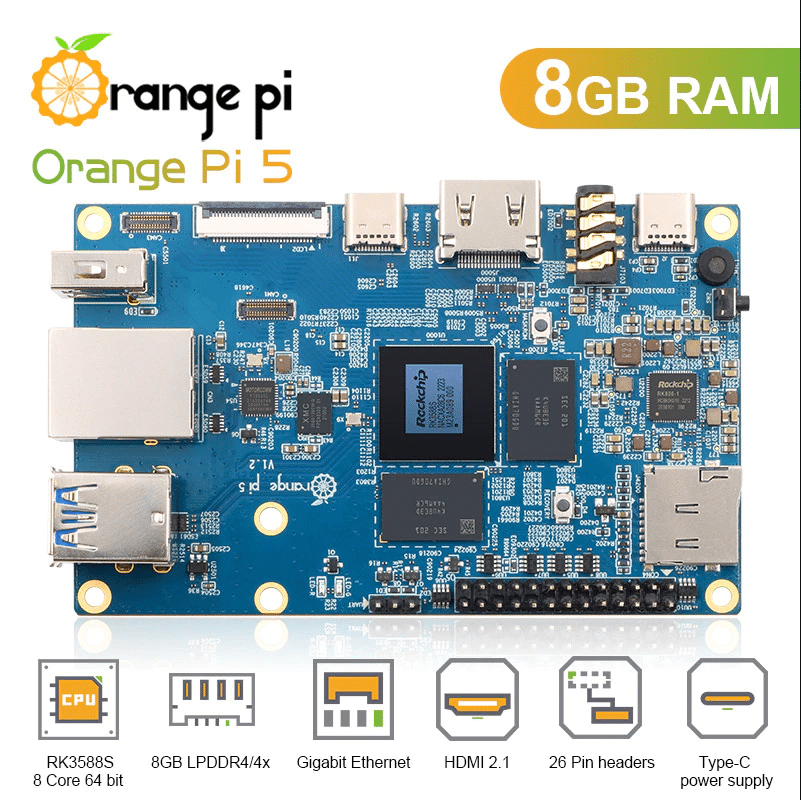
The Orange Pi 5 is the board that made the rest of the SBC market pay attention. Its Rockchip RK3588S pairs four Cortex-A76 cores at 2.4GHz with four Cortex-A55 cores at 1.8GHz, adds a Mali-G610 MP4 GPU and a 6 TOPS NPU, and drives 8K@60 over HDMI 2.1. Crucially it also gives you a real M.2 M-Key slot with PCIe 2.0 ×4, so an NVMe SSD becomes your root filesystem instead of a microSD card. On a 62 × 100mm board that is a staggering amount of compute, and it is why the Orange Pi 5 remains the default recommendation for a desktop replacement, a Docker host, a Frigate NVR or a light AI inference box.
✅ Pros- Huge 8-core A76/A55 performance
- 6 TOPS NPU for on-device AI
- M.2 PCIe 2.0 ×4 NVMe boot
- Up to 16GB RAM, 8K HDMI 2.1
- Largest community of any Orange Pi
❌ Cons- No onboard WiFi or Bluetooth
- 26-pin header, not RPi HAT compatible
- No eMMC socket on this model
- Throttles hard without a cooler
- Heavily marked up on Amazon
🎯 Verdict: The best balance of price, power and community support in the Orange Pi range. Add a heatsink, an NVMe drive and a WiFi dongle and it will out-run any Raspberry Pi you own.
👉 Check Price on Amazon →
🏅 BEST VALUE
2. Orange Pi Zero 3 (H618)
⭐ 4.5/5 · Gigabit Ethernet in Your Palm
Buy on Amazon →

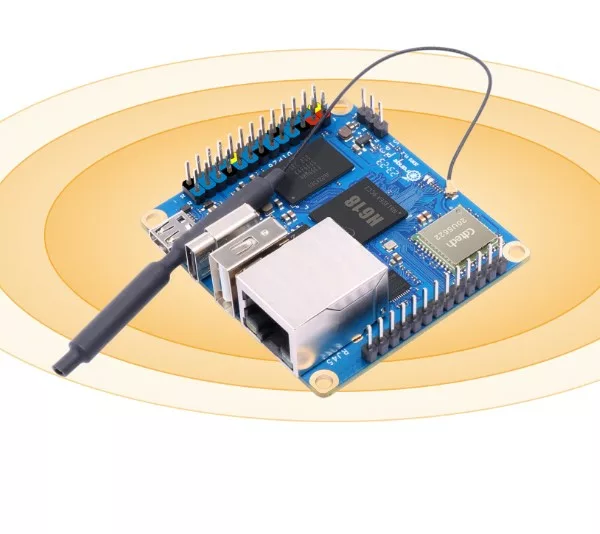
The Orange Pi Zero 3 is the best cheap Linux board you can buy right now, and the spec sheet is the reason. On a 50 × 55mm PCB you get an Allwinner H618 quad-core Cortex-A53 at 1.5GHz, a Mali-G31 MP2 GPU, up to 4GB of LPDDR4, real Gigabit Ethernet, WiFi 5 with Bluetooth 5.0, micro-HDMI, 16MB of SPI flash for SPI booting and a 26-pin header. Nothing else in this class combines 4GB of RAM with Gigabit on a board this small and this cheap. It is the natural home for Pi-hole, Home Assistant satellites, WireGuard endpoints, MQTT brokers, print servers and any always-on service that does not need heavy CPU.
✅ Pros- Gigabit Ethernet on a tiny board
- Up to 4GB LPDDR4, rare at this price
- Onboard WiFi 5 and Bluetooth 5.0
- 16MB SPI flash for SD-free booting
- Sips power, runs cool
❌ Cons- 26-pin header, not RPi compatible
- Only one USB 2.0 port on the board
- No NPU, no eMMC, no M.2
- H618 mainline support still maturing
- Second USB and audio need the expansion board
🎯 Verdict: The best value board in the whole Orange Pi catalogue. If your project is a small always-on network service rather than a desktop, buy this and spend the savings on a decent power supply and case.
👉 Check Price on Amazon →
🖧 BEST FOR NAS & HOME SERVERS · ⭐ 4.6/53. Orange Pi 5 Plus
RK3588 · up to 16GB LPDDR4X · dual 2.5GbE · M.2 PCIe 3.0 ×4 · eMMC socket · 40-pin · 100×70mm
Buy Here →

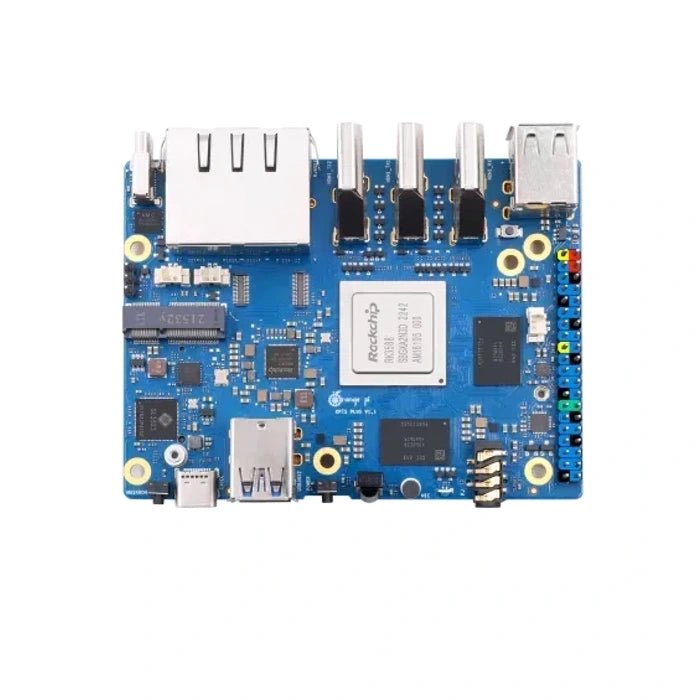
The Orange Pi 5 Plus swaps the RK3588S for the full RK3588 and spends every extra pin on I/O. You get two 2.5 Gigabit Ethernet ports on RTL8125BG controllers, an M.2 2280 socket wired for PCIe 3.0 ×4 (roughly 2 GB/s to an NVMe drive), a separate M.2 E-Key slot for a WiFi card, an eMMC socket, dual HDMI 2.1 outputs at 8K@60 plus an HDMI input for capture work, and a 40-pin header. That combination makes it the obvious choice for OpenWrt routers, OPNsense firewalls, small NAS builds, Proxmox-style container hosts and anything where storage and network throughput matter more than physical size.
✅ Pros: Dual 2.5GbE; PCIe 3.0 ×4 NVMe; eMMC socket; dual 8K HDMI out plus HDMI in; 40-pin header; RTC header.
❌ Cons: Priciest board here on Amazon by a wide margin; WiFi needs an M.2 card unless bundled; 100×70mm will not fit Pi cases; needs 5V/4A and active cooling.
🎯 Verdict: If you are building a router, firewall or NAS, the dual 2.5GbE and PCIe 3.0 make this the only Orange Pi worth considering. Note honestly that Amazon third-party pricing sits far above Orange Pi’s own store, so compare before you commit.
🚀 BEST HIGH-END DESKTOP · ⭐ 4.6/54. Orange Pi 5 Max
RK3588 · up to 16GB LPDDR5 · WiFi 6E + BT 5.3 · 2.5GbE · M.2 PCIe 3.0 ×4 · 89×57mm
Buy Here →

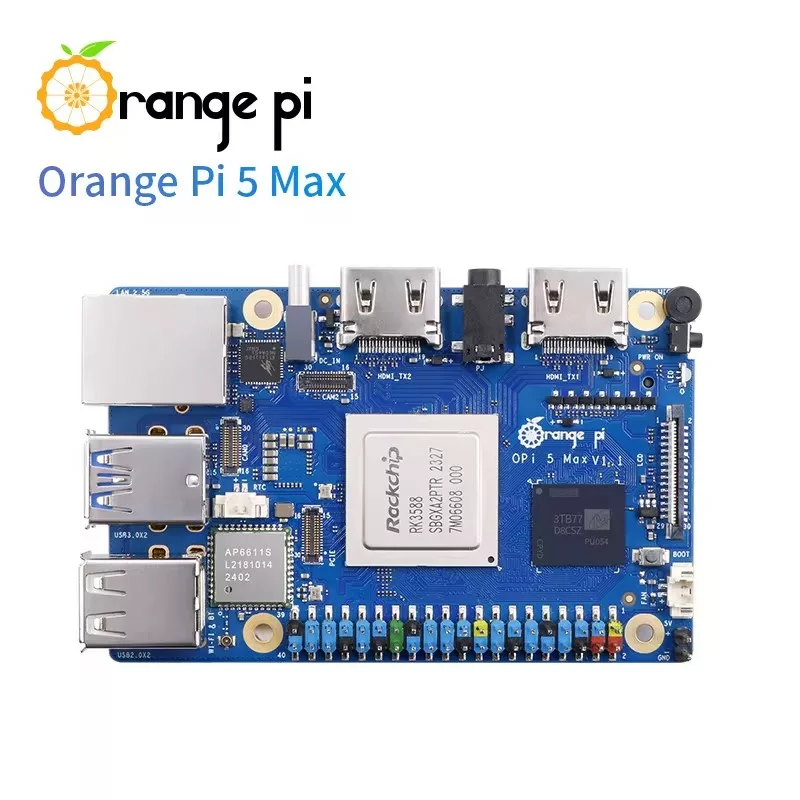
The Orange Pi 5 Max is what you buy when you want the 5 Plus experience in a smaller, better-connected package. It keeps the full RK3588 and the M.2 2280 PCIe 3.0 ×4 socket, upgrades the memory to LPDDR5, and finally puts proper wireless on the board with onboard WiFi 6E and Bluetooth 5.3. Networking drops to a single 2.5GbE port and the board shrinks to 89 × 57mm, which makes it the most convincing Orange Pi desktop: dual HDMI 2.1 at 8K@60, an eMMC socket, four USB ports and a 40-pin header, all in something close to Raspberry Pi footprint.
✅ Pros: Faster LPDDR5 memory; onboard WiFi 6E and BT 5.3; 2.5GbE; PCIe 3.0 ×4 NVMe; eMMC socket; compact 89×57mm.
❌ Cons: Single Ethernet port, no HDMI input; premium pricing; newer board so fewer community images; still needs active cooling.
🎯 Verdict: The most complete single-board desktop Orange Pi makes. Pick this over the 5 Plus unless you specifically need two Ethernet ports or HDMI capture.
🧠 BEST FOR AI & EDGE PROJECTS · ⭐ 4.5/55. Orange Pi 5 Pro
RK3588S · up to 16GB LPDDR5 · 6 TOPS NPU · WiFi 5 + BT 5.0 · eMMC socket · 40-pin · 89×56mm
Buy Here →
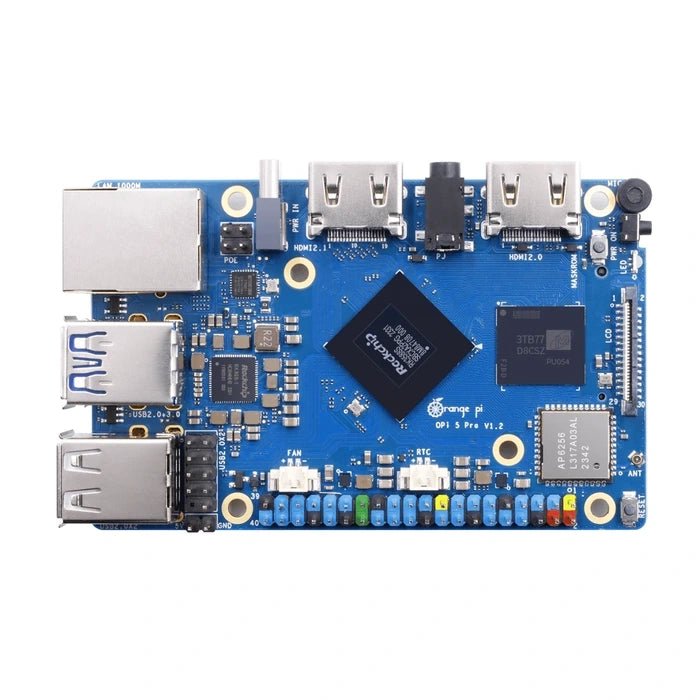
The Orange Pi 5 Pro fixes the two things people complain about on the original Orange Pi 5: it adds onboard dual-band WiFi 5 and Bluetooth 5.0, and it swaps the 26-pin header for a 40-pin header with 28 GPIOs, 4 UARTs, 8 PWMs, 4 I2C, SPI and CAN. You also get LPDDR5 memory, an eMMC socket and dual HDMI output. The same RK3588S and the same 6 TOPS NPU are still there, which makes this the friendliest board in the range for edge AI work: RKNN model conversion, YOLO object detection, local speech pipelines and camera analytics all run without a USB accelerator. The one real compromise is the M.2 slot, which is only PCIe 2.0 ×1, so NVMe throughput is a fraction of what the 5 Plus and 5 Max deliver.
✅ Pros: 6 TOPS NPU with onboard WiFi 5 and BT 5.0; 40-pin header with CAN; LPDDR5; eMMC socket; dual HDMI up to 8K.
❌ Cons: M.2 is only PCIe 2.0 ×1, so slow NVMe; Gigabit rather than 2.5GbE; wants a 5V/5A supply; RKNN toolchain has a learning curve.
🎯 Verdict: The best pick if you want NPU-accelerated AI plus wireless and a Pi-style 40-pin header in one board. Skip it if fast NVMe storage is the point of your build.
🍓 BEST RASPBERRY PI DROP-IN · ⭐ 4.3/56. Orange Pi 3B
RK3566 · 4×A55 @1.8GHz · up to 8GB · M.2 NVMe/SATA · eMMC socket · 40-pin RPi header · 85×56mm
Buy Here →

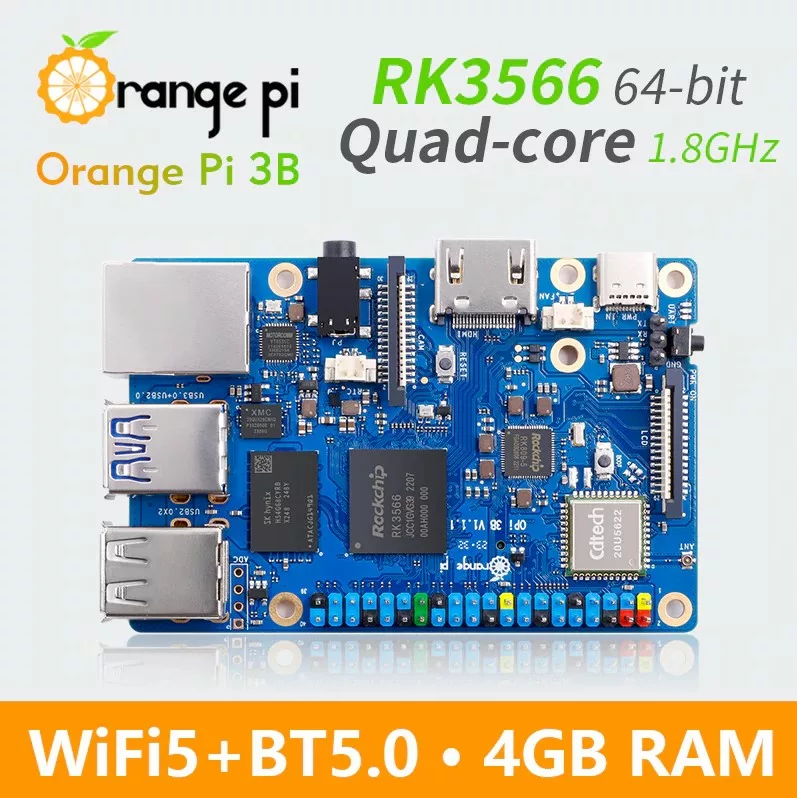
The Orange Pi 3B is the one to buy when compatibility matters more than raw speed. It measures 85 × 56mm, matching the Raspberry Pi 3B footprint, and carries a 40-pin Raspberry Pi compatible GPIO header, so your existing cases, HATs, fans and mounting plates mostly just work. The RK3566 gives you four Cortex-A55 cores at 1.8GHz, a Mali-G52 2EE GPU and a modest 0.8 TOPS NPU, alongside Gigabit Ethernet, WiFi 5, Bluetooth 5.0, HDMI 2.0 at 4K@60, an eMMC socket and an M.2 M-Key slot that accepts either an NVMe or a SATA III SSD. It is roughly Raspberry Pi 4 class in CPU terms, with better storage options.
✅ Pros: Raspberry Pi 3B form factor and 40-pin pinout; M.2 takes NVMe or SATA; eMMC socket; onboard WiFi 5 and BT 5.0; runs cool.
❌ Cons: Far slower than the RK3588 boards; 0.8 TOPS NPU is limited; HDMI caps at 4K@60; several hardware revisions in circulation, so check the version.
🎯 Verdict: The easiest migration path off a Raspberry Pi 3B or 4. You keep your accessories and gain an NVMe slot and an eMMC socket.
🪶 BEST ULTRA-COMPACT · ⭐ 4.3/57. Orange Pi Zero 2W
Allwinner H618 · 4×A53 @1.5GHz · up to 4GB LPDDR4 · WiFi 5 + BT 5.0 · 40-pin · 65×30mm
Buy Here →

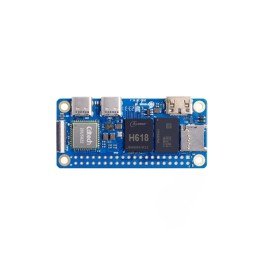
The Orange Pi Zero 2W is the direct answer to the Raspberry Pi Zero 2 W, and on paper it wins comfortably. Same 65 × 30mm footprint, same 40-pin header position, but with a quad-core Allwinner H618 at 1.5GHz, a Mali-G31 MP2 GPU, up to 4GB of LPDDR4 where the Pi Zero 2 W tops out at 512MB, mini-HDMI at 4K@60, dual USB-C ports and onboard WiFi 5 with Bluetooth 5.0. The trade-off is I/O: there is no Ethernet on the board itself, and the second USB port plus 100M Ethernet only appear if you add the 24-pin expansion board. For embedded builds where the board disappears inside an enclosure, that is usually fine.
✅ Pros: Up to 4GB RAM in a Pi Zero footprint; 40-pin header; onboard WiFi 5 and BT 5.0; 4K mini-HDMI; very low power.
❌ Cons: No Ethernet without the expansion board, and only 100M when added; only two USB-C ports natively; no NPU or eMMC; smaller software community than the Pi Zero.
🎯 Verdict: The best tiny Linux board for embedded projects, wearables and anything that lives inside an enclosure. Buy the Zero 3 instead if you need wired Ethernet.
🛒 How to Choose the Right Orange Pi
🖥️
Want a desktop replacement?
Start with the Orange Pi 5 and an NVMe drive. Step up to the 5 Max if you want LPDDR5, WiFi 6E and 2.5GbE built in.
🖧
Building a router, firewall or NAS?
Only the Orange Pi 5 Plus gives you dual 2.5GbE plus PCIe 3.0 ×4 NVMe, which is exactly what OpenWrt and OpenMediaVault want.
💵
On a tight budget?
The Orange Pi Zero 3 gives you 4GB of RAM and Gigabit Ethernet for less than the shipping on some boards here.
🤖
Running AI models at the edge?
The Orange Pi 5 Pro pairs the 6 TOPS RK3588S NPU with onboard wireless and a proper 40-pin header for sensors.
🍓
Migrating off a Raspberry Pi?
Choose the Orange Pi 3B. It matches the Pi 3B footprint and pinout, so your HATs, cases and fans carry over.
🪶
Squeezing Linux into a tiny enclosure?
The Orange Pi Zero 2W puts up to 4GB of RAM and WiFi into a 65 × 30mm Raspberry Pi Zero footprint.
⚙️ Key Specs Compared, Side by Side
| Spec | Orange Pi 5 | 5 Plus | 5 Max | 5 Pro | 3B | Zero 3 |
|---|
| SoC | RK3588S | RK3588 ⭐ | RK3588 ⭐ | RK3588S | RK3566 | H618 |
| CPU | 4×A76 + 4×A55 | 4×A76 + 4×A55 | 4×A76 + 4×A55 | 4×A76 + 4×A55 | 4×A55 @1.8GHz | 4×A53 @1.5GHz |
| Memory | 16GB LPDDR4X | 16GB LPDDR4X | 16GB LPDDR5 ⭐ | 16GB LPDDR5 ⭐ | 8GB LPDDR4X | 4GB LPDDR4 |
| NPU | 6 TOPS ⭐ | 6 TOPS ⭐ | 6 TOPS ⭐ | 6 TOPS ⭐ | 0.8 TOPS | None |
| Ethernet | 1 GbE | 2 × 2.5GbE ⭐ | 1 × 2.5GbE | 1 GbE | 1 GbE | 1 GbE |
| Onboard Wireless | None | M.2 E-Key only | WiFi 6E + BT 5.3 ⭐ | WiFi 5 + BT 5.0 | WiFi 5 + BT 5.0 | WiFi 5 + BT 5.0 |
| M.2 Storage | PCIe 2.0 ×4 | PCIe 3.0 ×4 ⭐ | PCIe 3.0 ×4 ⭐ | PCIe 2.0 ×1 | PCIe 2.0 / SATA | None |
| eMMC Socket | No | Yes ⭐ | Yes ⭐ | Yes ⭐ | Yes ⭐ | No |
| Video Out | HDMI 2.1 8K@60 | 2× HDMI 8K + HDMI in ⭐ | 2× HDMI 2.1 8K@60 | HDMI 8K + HDMI 4K | HDMI 2.0 4K@60 | Micro-HDMI 4K |
| GPIO Header | 26-pin | 40-pin | 40-pin | 40-pin | 40-pin RPi compatible ⭐ | 26-pin + 13-pin |
| Board Size | 100 × 62 mm | 100 × 70 mm | 89 × 57 mm | 89 × 56 mm | 85 × 56 mm | 55 × 50 mm ⭐ |
Specs are taken from Orange Pi’s published documentation. Board revisions do change, so confirm the exact variant and version on the live Amazon listing before ordering.
❓ Frequently Asked Questions
Is an Orange Pi better than a Raspberry Pi?
On hardware, usually yes. An Orange Pi 5 gives you four Cortex-A76 cores, a 6 TOPS NPU, PCIe NVMe and 8K video, which no Raspberry Pi in the same price bracket matches. On software, no. Raspberry Pi OS is polished, mainline-supported and backed by a decade of tutorials, while Orange Pi relies more on Armbian, vendor kernels and community images, and support for a given board can vary a lot. Buy Orange Pi when you want the performance and are comfortable troubleshooting Linux; buy Raspberry Pi when you want something that works the first time and stays supported for years.
Will my Raspberry Pi HATs and cases fit an Orange Pi?
Only on some boards, so check before you buy. The Orange Pi 3B is the closest match: 85 × 56mm, Raspberry Pi 3B layout, and a 40-pin Raspberry Pi compatible header, so most HATs and cases work. The 5 Pro, 5 Max and 5 Plus also have 40-pin headers, but their board outlines and port positions differ, so cases usually will not fit and some HAT pin functions may not map identically. The plain Orange Pi 5 and the Zero 3 use 26-pin headers, so full-size HATs are out. Also note that Raspberry Pi libraries like RPi.GPIO do not work directly. You will use WiringOP, Python periphery, libgpiod or the OPi.GPIO port instead.
Which Orange Pi is best for a home server or NAS?
The Orange Pi 5 Plus, and it is not close. Two 2.5 Gigabit Ethernet ports let you run a router, firewall or link-aggregated file server without a USB adapter, and the M.2 2280 socket runs at PCIe 3.0 ×4, so an NVMe drive can reach roughly 2 GB/s instead of being bottlenecked. Add the eMMC socket for a reliable boot device and 16GB of RAM for containers and virtual machines and you have a genuinely capable little server. If you only need one network port, the Orange Pi 5 Max keeps the PCIe 3.0 ×4 slot in a smaller board with onboard WiFi 6E.
Do RK3588 boards really need a heatsink or fan?
Yes. A bare RK3588 or RK3588S board will hit its thermal limit within a couple of minutes of sustained load and start dropping clock speed, which shows up as stuttering video, slow compiles and inconsistent benchmark scores. A large passive heatsink is enough for light desktop use, but anything continuous, such as transcoding, compiling, NPU inference or a busy server, wants active cooling. Pair that with a proper USB-C supply rated at 5V/4A for the Orange Pi 5 and 5 Plus, or 5V/5A for the 5 Pro. Undersized power supplies cause random reboots that look exactly like software bugs.
Which operating system should I install on an Orange Pi?
Start with the official Orange Pi images, which are Debian or Ubuntu builds on a Rockchip or Allwinner vendor kernel and include the drivers for video, NPU and wireless. For a better long-term experience on the boards it supports, Armbian is usually the better choice: cleaner packaging, more frequent updates and an active forum. Android images exist if you want a TV box or a kiosk, and there are DietPi and Ubuntu Server builds for headless work. Whatever you pick, always download the image for your exact board and revision. Images are not interchangeable across Orange Pi models, even ones with similar names.
🏁 Final Verdict, Best Orange Pi for Every Build
The right Orange Pi board for every project and budget:
🥇 Best Overall · Orange Pi 5: RK3588S, 6 TOPS NPU, PCIe 2.0 ×4 NVMe, 8K HDMI
Buy Here →🏅 Best Value · Orange Pi Zero 3: 4GB RAM and Gigabit Ethernet on a 55 × 50mm board
Buy Here →🖧 Best for NAS & Servers · Orange Pi 5 Plus: dual 2.5GbE plus PCIe 3.0 ×4 NVMe
Buy Here →🚀 Best High-End Desktop · Orange Pi 5 Max: LPDDR5, WiFi 6E, 2.5GbE, PCIe 3.0
Buy Here →🧠 Best for AI & Edge · Orange Pi 5 Pro: 6 TOPS NPU, onboard WiFi, 40-pin header
Buy Here →🍓 Best Raspberry Pi Drop-In · Orange Pi 3B: RPi 3B footprint and 40-pin pinout
Buy Here →🪶 Best Ultra-Compact · Orange Pi Zero 2W: up to 4GB RAM in a Pi Zero footprint
Buy Here →There is no single best Orange Pi, only the right board for the job. For most people the Orange Pi 5 is the one to buy: it is the fastest board per dollar in the range and has the largest community behind it. If you are watching every dollar, the Zero 3 is astonishing value for small always-on services. Network-heavy builds belong on the 5 Plus, desktop users should look at the 5 Max, edge AI projects at the 5 Pro, Raspberry Pi migrations at the 3B, and space-constrained embedded work at the Zero 2W. Whichever you pick, budget for a real power supply, a heatsink and a fast microSD or NVMe drive, because those three things decide whether the board feels fast or frustrating. Pair it with our Raspberry Pi, ESP32, STM32 and Arduino tutorials and start building today.
💬 Not sure which Orange Pi fits your project? Tell us what you are building, whether it is a home NAS, a Pi-hole box, a robot brain or an AI camera, in the comments below, and we will point you to the right board.
All Amazon links above use our affiliate tag (microlab05-20). Purchasing through them supports microcontrollerslab.com at no extra cost to you. We deliberately do not print prices, because Orange Pi boards are mostly sold by third-party Amazon sellers whose pricing changes frequently and often sits well above Orange Pi’s own store. Always confirm the current price, the RAM variant and the bundle contents on the live listing before buying.
| Arduino Components | Amazon Links |
|---|
| Arduino Starter Kit | Buy Now |
| Arduino Development Kit | Buy Now |
| Arduino Smart Robot Car Kit V4 | Buy Now |
| Arduino Sensors Kit | Buy Now |