⚠️ Affiliate Disclosure: This post contains Amazon affiliate links. If you purchase through our links, we may earn a small commission at no extra cost to you. We only recommend kits we have researched and whose listings we checked live on Amazon. Prices and bundles change constantly, so we deliberately do not print them here. Always tap through and confirm the current price and variant before buying.
Ultimate Buying Guide
🍓 Best Raspberry Pi Robot Kits for Beginners, Students & Makers
7 Raspberry Pi robot kits ranked, from a sixty dollar three wheeled camera car to an Ackermann steering rover, a mecanum ROS 2 platform, a tracked robot with a 4-DOF arm, a twelve servo robot dog and an eighteen servo hexapod, with real specs, honest verdicts and Amazon listings we checked live.
✅ 7 Kits Reviewed
✅ Live Amazon Listings
✅ Python · OpenCV · ROS 2
✅ Honest Pros & Cons
A Raspberry Pi robot kit is a different animal from an Arduino robot car, and buying one for the wrong reason is the most common mistake in this category. An Arduino chassis runs a tight, predictable control loop on bare metal. A Raspberry Pi robot boots a full Linux system, which costs you deterministic timing and gains you something an 8-bit microcontroller can never do: a real camera pipeline, OpenCV and MediaPipe running on the robot itself, Python libraries you already know, SSH access while the robot is moving, and the option to log and plot sensor data as it drives. If your project is computer vision, autonomous navigation, ROS 2 or an LLM voice interface, the Pi is the right brain. If your project is a line follower, it is overkill.
The second thing to settle before you buy is form factor, because it decides what you will actually learn. A wheeled rover teaches you drive kinematics, PWM and sensor fusion. A mecanum chassis adds omnidirectional motion and a genuinely interesting inverse kinematics problem. A tracked robot with an arm turns into a manipulation project. A quadruped or hexapod is really a gait and servo coordination exercise wearing an animal costume, and it will teach you more about interpolation and inverse kinematics than any car will. This guide ranks 7 Raspberry Pi robot kits across all four shapes and tells you which one matches the project you actually have in mind.
💡 Reality check before you buy: Almost every kit on this list ships without the Raspberry Pi, and several ship without batteries or an SD card either, so budget for those before you compare listings. Expect a real build: these are screw-by-screw assemblies with laser cut or aluminium parts, and four to six hours is normal for the more complex ones. Expect a software setup step too, because most vendors want a specific Raspberry Pi OS release and their install scripts are version sensitive, so read the current online documentation rather than a two year old blog post. Finally, remember that a Pi camera on a battery powered robot is a bandwidth and lighting problem as much as a code problem: cheap camera modules struggle in dim rooms, and Wi-Fi video lags when the robot moves away from the router.
🦖 What about the GoPiGo3? The Dexter Industries GoPiGo3 is the kit most people remember from the classroom era of Raspberry Pi robotics, and its Python and Blockly libraries are still maintained on GitHub by Modular Robotics. We checked both Amazon listings while writing this guide, the GoPiGo Base Kit and the GoPiGo Starter Kit, and both currently show as unavailable with no featured offer. Because every link in this guide has to point at a listing you can actually buy, we have left it out of the ranking rather than sending you to a dead page. If you specifically want that classroom experience, the closest live equivalents here are the SunFounder PiCar-X for its documentation and Python API, and the Freenove Three-Wheeled Smart Car for a cheap, simple first Pi robot.
🤖 Quick Comparison: All 7 Raspberry Pi Robot Kits
| Robot Kit | Form Factor | Vision & Sensors | Programming | Best For | Buy |
|---|
| 🥇 SunFounder PiCar-X | Ackermann steering rover | Pan-tilt camera, ultrasonic, 3-ch grayscale | Python · Scratch | Best Overall | Buy Here → |
| 🏅 Freenove 4WD Smart Car | Four wheel drive car | Camera on servo head, ultrasonic, line and light sensors | Python | Best Value | Buy Here → |
| 👁️ Hiwonder TurboPi | Mecanum, metal chassis | 2-DOF HD camera, FPV video | Python · OpenCV · ROS 2 | Best for Vision & ROS 2 | Buy Here → |
| 🐕 SunFounder PiDog | 12-servo quadruped | Camera, IMU, ultrasonic, touch, sound direction | Python · App | Best Legged Robot | Buy Here → |
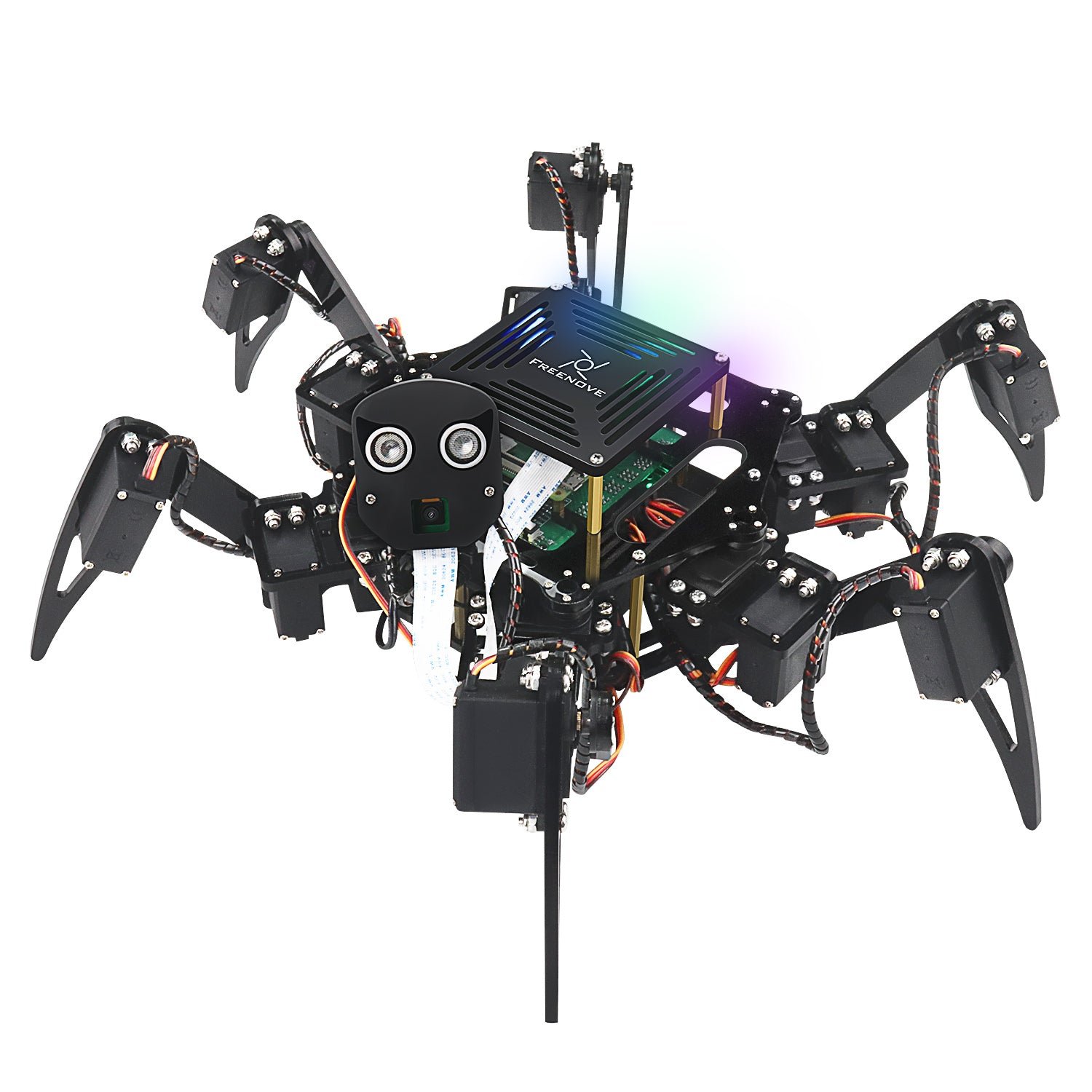
| 🕷️ Freenove Big Hexapod | Six legs, 18 servos | Camera on servo head, ultrasonic | Python | Best for Gait Programming | Buy Here → |
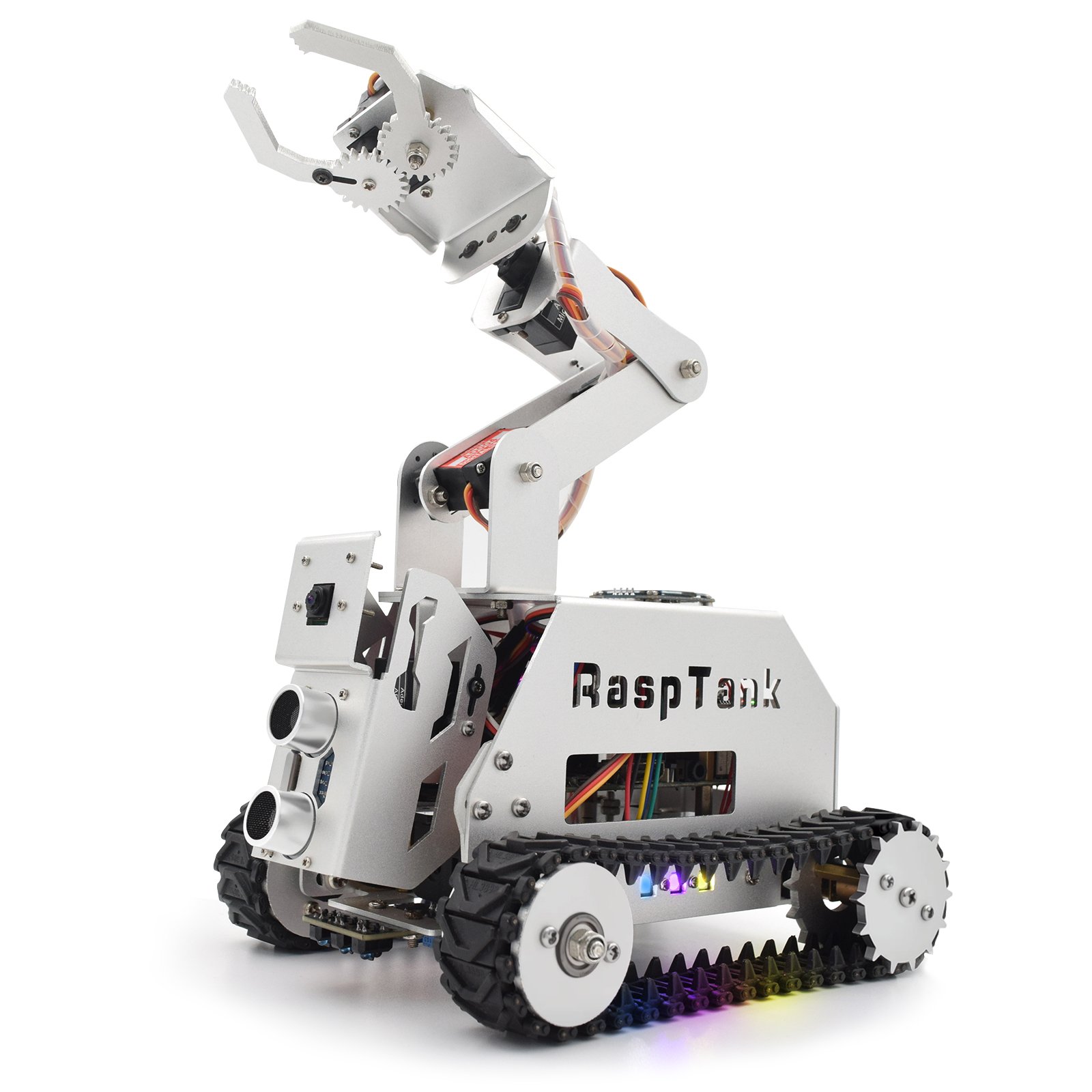
| 🦾 Adeept RaspTank Metal | Tracked tank with 4-DOF arm | Camera, ultrasonic, line tracking | Python · OpenCV | Best for Manipulation | Buy Here → |
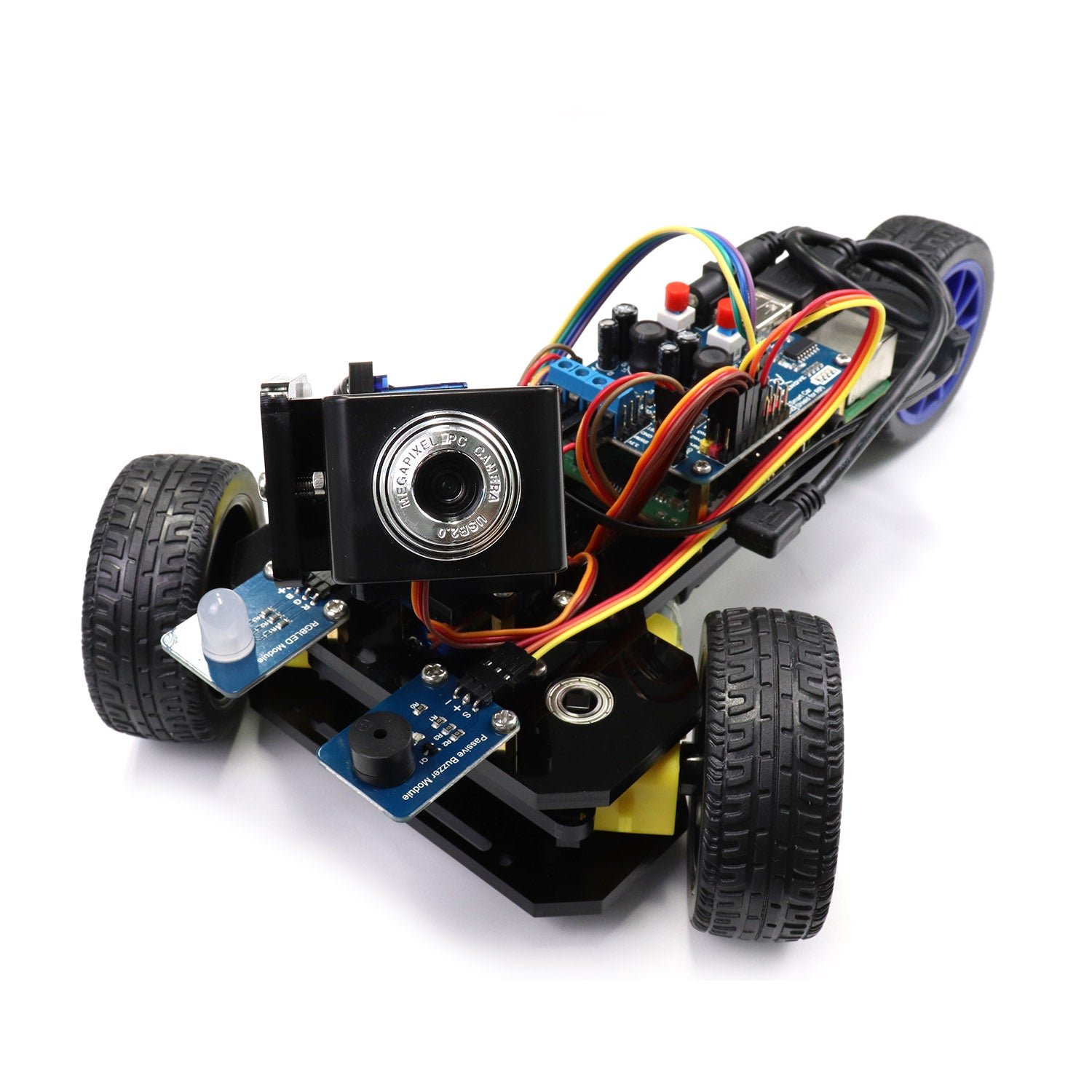
| 🔰 Freenove Three-Wheeled Car | Three wheeled camera car | Pan-tilt camera, ultrasonic radar sweep | Python | Best Cheapest Way In | Buy Here → |
Specs come from the current Amazon listings and manufacturer documentation. Every one of these kits sells in several bundles, with or without a Raspberry Pi, with or without batteries, and sometimes with a different chassis material, so check exactly which variant a listing is selling. We deliberately do not publish prices because they move constantly. Tap through and check the live price yourself.
🔍 What to Look for in a Raspberry Pi Robot Kit
🍓
Which Pi It Actually Supports
This is the single biggest gotcha. Kits designed around the Pi 4 may not have a mounting pattern, camera cable or power headroom for a Pi 5, and the Pi 5 uses a different, smaller camera connector, so an older kit’s ribbon cable will not fit. Kits built for a Pi Zero 2 W save weight and battery but give you far less compute for OpenCV. Read the compatibility line on the listing, then check the vendor’s current documentation, not an archived version.
📷
Camera and Pan-Tilt Quality
The camera is the reason you chose a Pi, so do not treat it as a bonus. Look for a pan-tilt or 2-DOF gimbal, because a fixed camera makes target tracking almost pointless. Also look at how the module is mounted: several kits rivet the camera in place, which means a failed module is not user replaceable. Budget kits ship low megapixel modules that need bright light, and swapping in a better Pi camera later is usually cheap and worth it.
⚙️
Servo Count and Drive Type
Servo count is a proxy for how hard the software will be. Two drive motors and one camera servo is a weekend. Ackermann steering changes the kinematics in a useful way. Mecanum wheels need a proper inverse kinematics matrix before the robot moves sideways correctly. Twelve or eighteen servos on a quadruped or hexapod means gait tables, interpolation and leg IK, which is a much bigger and much more rewarding project.
🔋
Power, Batteries and the HAT
A Pi 4 or Pi 5 driving motors and servos is a real power problem, and brownouts that reboot the Pi mid run are the classic symptom. Check whether the kit includes a proper robot HAT with a regulated 5 V supply and separate motor rail, whether 18650 cells and a charger are in the box, and whether you can charge without disassembly. Kits that ship no battery at all can add a meaningful amount to the real cost.
📚
Documentation and Open Source Code
On a Pi robot, software support matters more than plastic quality. The best vendors publish versioned online docs and a public GitHub repository you can read, fork and fix. The worst ship a download link on the box and a zip file that assumes an OS release from three years ago. Before you buy, open the vendor’s docs site and the repo, check the last commit date, and see whether the install steps name a specific Raspberry Pi OS version.
🏆 Detailed Reviews: All 7 Raspberry Pi Robot Kits
🥇 BEST OVERALL
SunFounder PiCar-X
⭐ 4.1/5 · The All-Round Raspberry Pi Rover
Ackermann
STEERING GEOMETRY
Pi 5 → Zero 2W
BOARD NOT INCLUDED
Robot HAT
SPEAKER + MIC ONBOARD

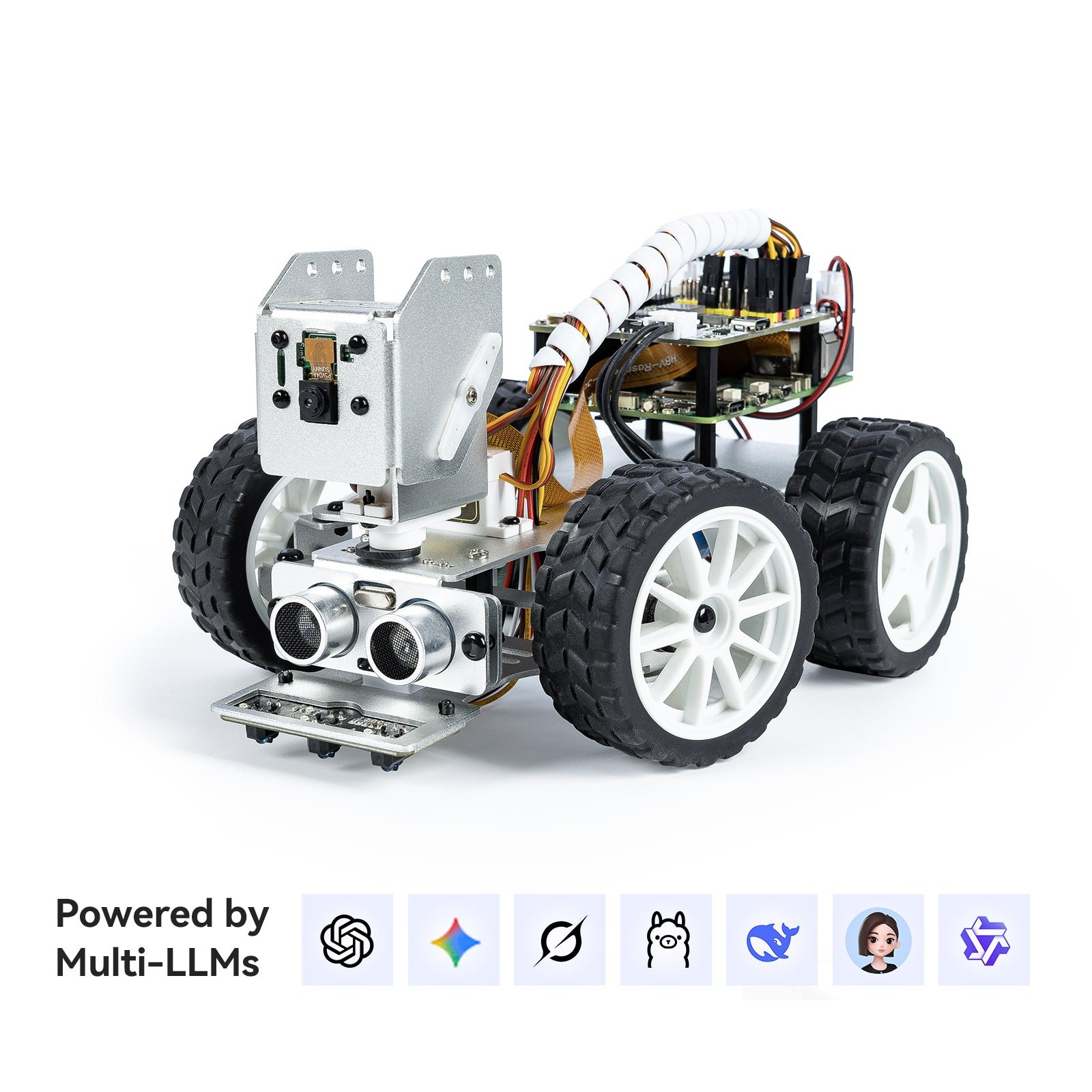
The PiCar-X is the kit we would hand to almost anyone asking for their first Raspberry Pi robot, because it is the one that gets the balance right between hardware you can grow into and software you can actually read. Its Robot HAT handles regulated power, PWM for the servos, an onboard speaker and a microphone, so you are not wiring a driver board yourself. The chassis uses Ackermann steering rather than differential turning, which is a more realistic vehicle model and a genuinely more interesting control problem. On top sits a two axis pan-tilt camera, and underneath there is an ultrasonic sensor plus a three channel grayscale module that doubles as a line sensor and a cliff detector. Everything is exposed through a clean Python API, with Scratch available for younger users, and SunFounder ships OpenCV and MediaPipe examples along with speech to text, text to speech and optional large language model integrations if you want a talking robot. It runs on the Pi 5, 4B, 3B+, 3B and Zero 2 W, and the Raspberry Pi is not included, though SunFounder does sell a bundle with a Pi Zero 2 W and an SD card if you would rather not source one.
✅ Pros- Clean, well documented Python API with a Scratch option
- Ackermann steering is a better control exercise than tank turning
- Robot HAT solves power, PWM and audio in one board
- Rechargeable battery pack included in the box
- Versioned online docs and responsive vendor support
❌ Cons- Raspberry Pi and SD card sold separately on this listing
- Bundled camera module is low light limited and riveted in place
- Servos and plastic joints feel delicate during assembly
- Software install is fussy about the exact Raspberry Pi OS release
🎯 Verdict: The best all round Raspberry Pi robot kit. Buy it if you want one platform that covers driving, vision, line following and voice without outgrowing it in a month.
👉 Check Price on Amazon →
🏅 BEST VALUE
Freenove 4WD Smart Car Kit
⭐ 4.3/5 · Most Python per Dollar
Servo Head
CAMERA + ULTRASONIC

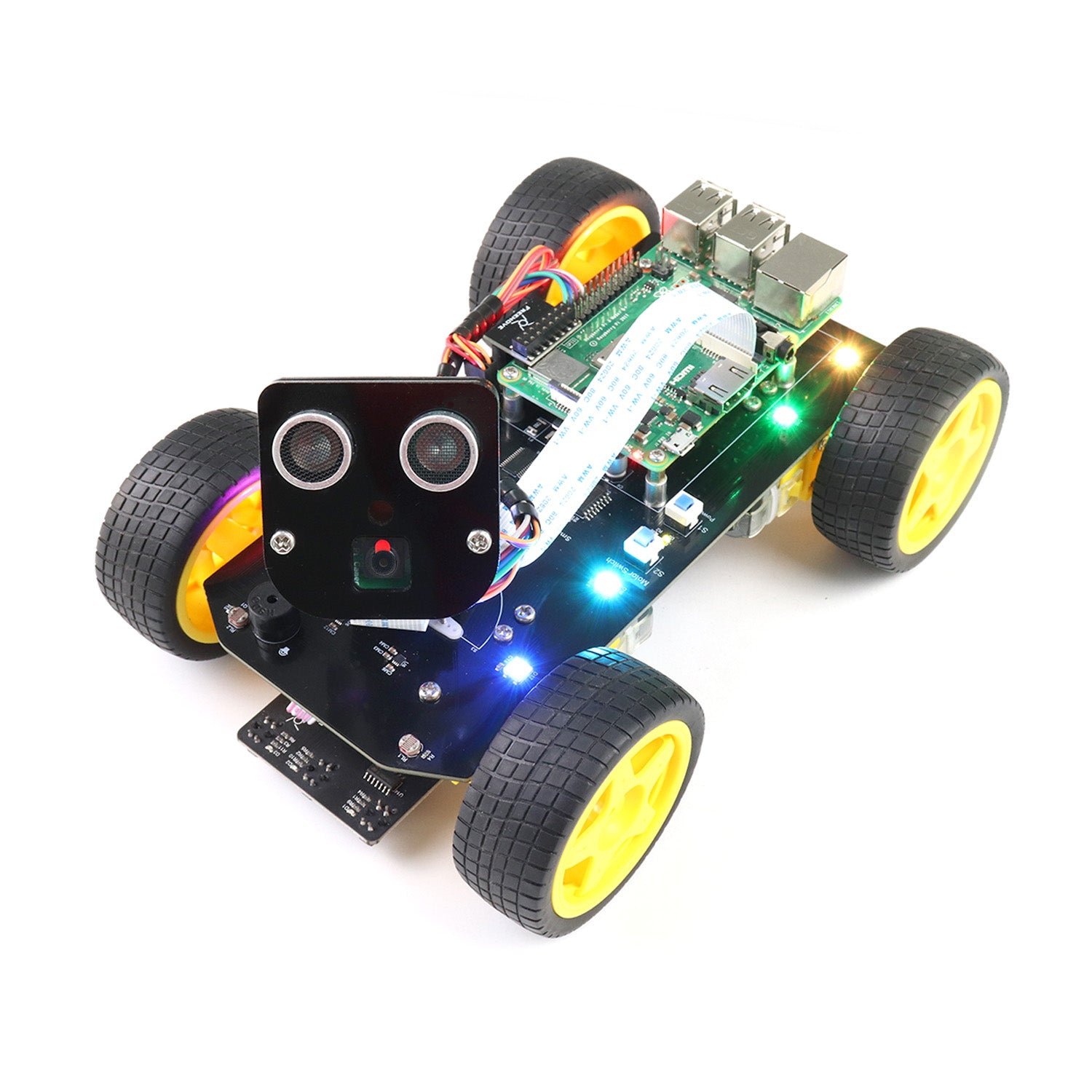
If you care about what you learn rather than how the robot looks, the Freenove 4WD Smart Car is the best value on this page and it is not close. You get four drive wheels, a rotatable head carrying both the camera and an ultrasonic distance sensor, plus line tracking and light tracing modules, and Freenove ships the whole thing as complete, readable Python with a public GitHub repository rather than a compiled app. That single decision is why this kit punches above its price: you can open any behaviour, face tracking, obstacle avoidance, line following or app control, read exactly how it works, and rewrite it. It supports the Pi 5, 4B, 3B+, 3B and 3A+ out of the box, with Zero 2 W possible using extra parts, and it is controllable from Android, iOS or a desktop over Wi-Fi. Be clear about what is missing though: there is no Raspberry Pi, no battery and no printed manual. The tutorial is a download link printed on the box, which is fine once you find it and annoying if you were expecting paper.
✅ Pros- Complete Python source published openly on GitHub
- Camera and ultrasonic both ride the same servo head
- Four sensing modes in one kit, including face tracking
- Largest review base of any Pi robot kit in this guide
- Excellent price for the amount of hardware
❌ Cons- No Raspberry Pi and no batteries in the box
- No printed tutorial, only a download link on the packaging
- Zero 2 W support needs extra parts
- Acrylic chassis is functional rather than premium
🎯 Verdict: The smartest buy for a self taught maker. Open Python, four sensing modes and a camera on a servo head for a price that leaves room in the budget for the Pi itself.
👉 Check Price on Amazon →
👁️ BEST FOR VISION & ROS 2 · ⭐ 3.8/53. Hiwonder TurboPi
Mecanum wheels · metal chassis · 2-DOF HD camera · Python, OpenCV and ROS 2 · FPV video · sold with or without a Raspberry Pi
Buy Here →

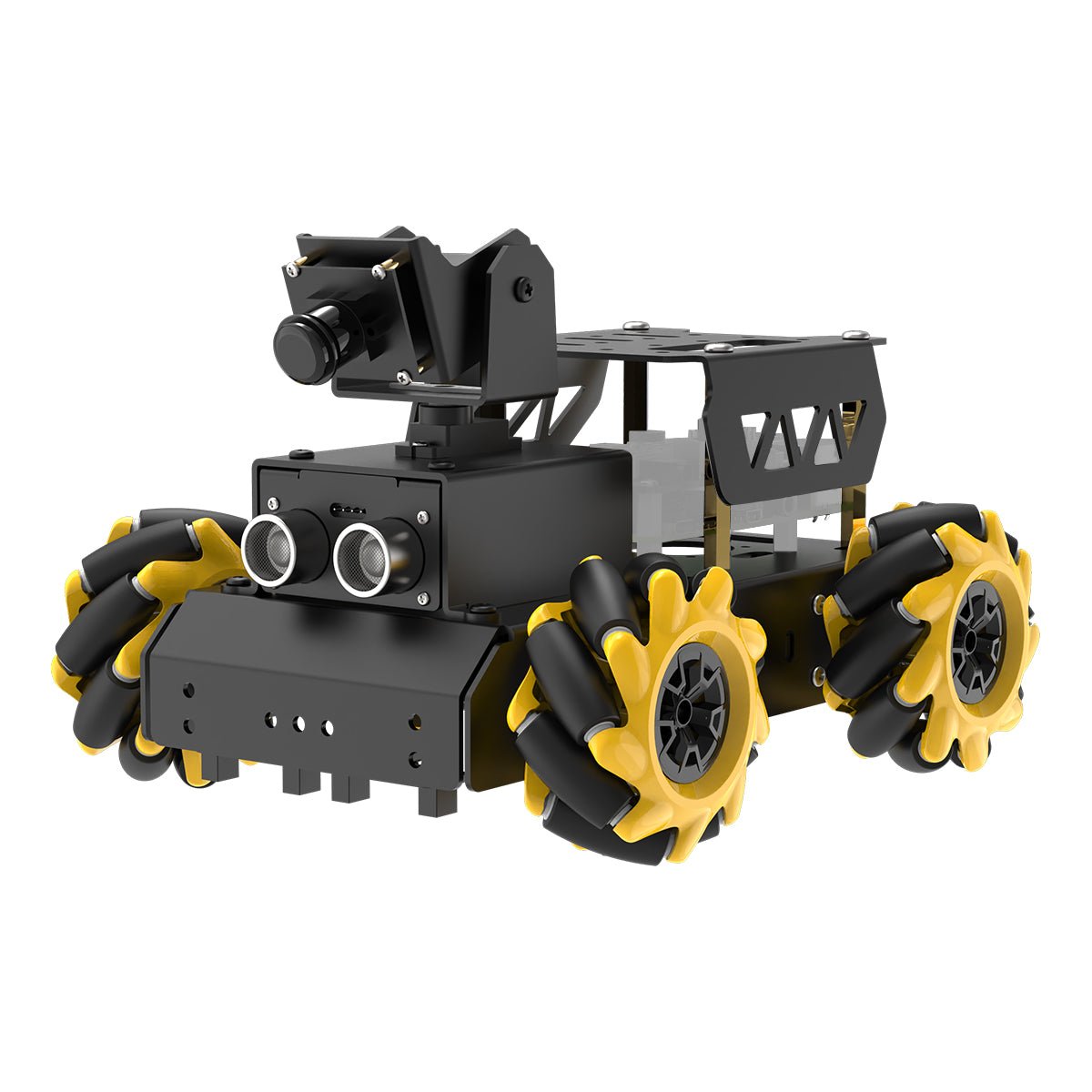
The TurboPi is the kit to buy when the robot is the smallest part of the project and the perception stack is the point. It rides on mecanum wheels bolted to a metal chassis, which means genuine 360 degree omnidirectional movement and a real inverse kinematics exercise before it will strafe cleanly. Hiwonder builds the software around Python, OpenCV and ROS 2, so this is the natural pick if you are heading towards navigation stacks, SLAM experiments or a robotics course that expects ROS. The two axis HD camera feeds FPV video and drives the built in colour recognition, object tracking, line following and autonomous driving demos, and recent bundles add multimodal AI model and voice interaction support. The catch is the listing itself: TurboPi is sold in a confusing spread of variants, standard and advanced, with a Raspberry Pi 5 included or not, at very different prices, and reviewer numbers on each individual listing are small. Read the bundle title carefully before you order.
✅ Pros: True mecanum omnidirectional drive; sturdy metal chassis; ROS 2 plus Python and OpenCV out of the box; 2-DOF camera with FPV; strong set of vision demos to learn from.
❌ Cons: Confusing bundle naming across listings; low review counts on each variant; noticeably pricier than the wheeled kits above; ROS 2 is a steep first step for a beginner.
🎯 Verdict: The right Raspberry Pi robot if your destination is ROS 2 and computer vision. Just confirm which TurboPi bundle a listing is actually selling before you buy.
🐕 BEST LEGGED ROBOT · ⭐ 4.2/54. SunFounder PiDog
12 servos · camera, 6-axis IMU, ultrasonic, touch and sound direction sensors · Python and app control · Raspberry Pi not included
Buy Here →
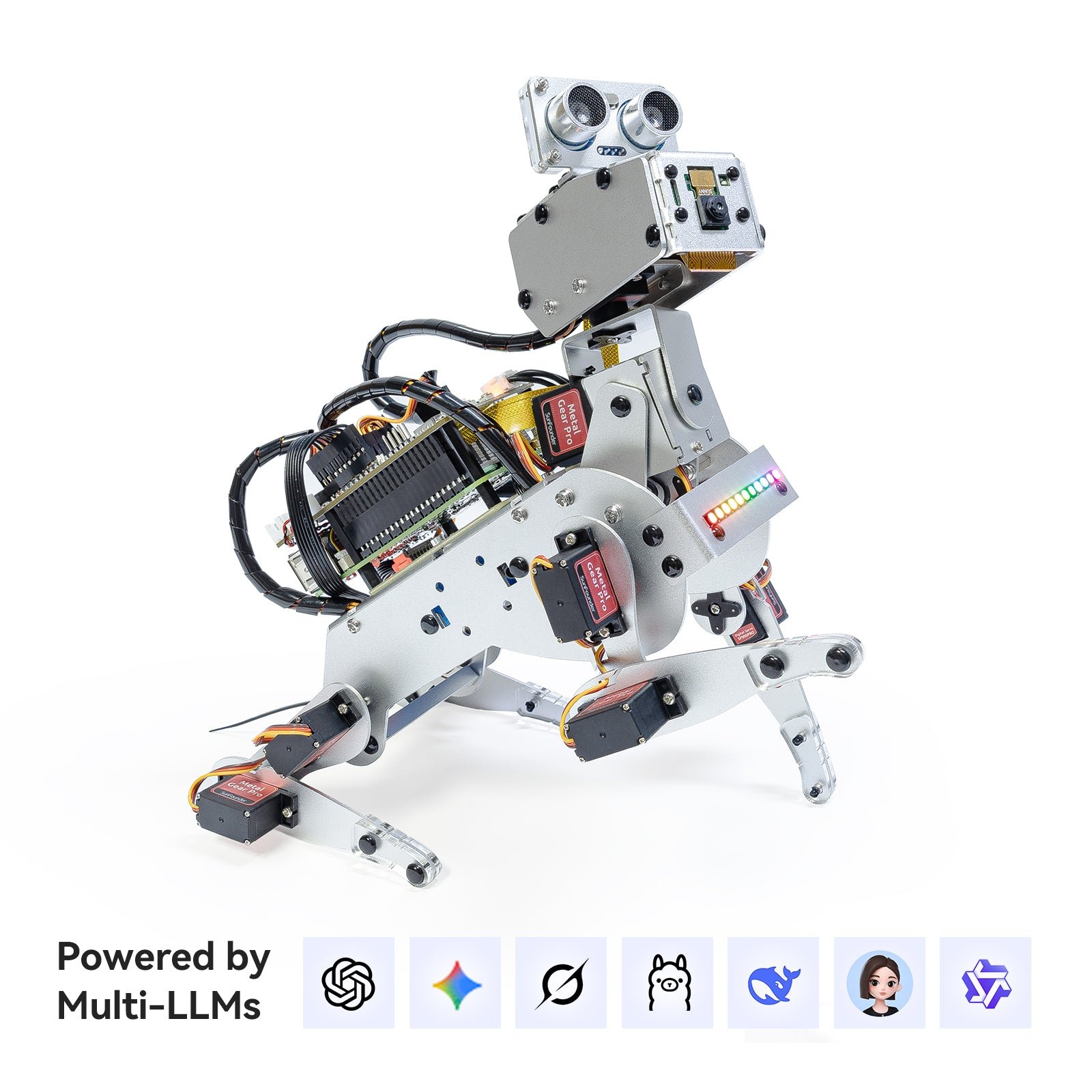
The PiDog is where a Raspberry Pi robot stops being a car with a camera and becomes a genuine robotics problem. Twelve servos across four legs mean you are coordinating a gait, not setting two PWM values, and SunFounder ships around 32 prebuilt actions, walking, sitting, standing, head shakes and tail wags, that you can read as Python and then take apart to understand the interpolation and leg inverse kinematics behind them. The sensor suite is the most complete here: a camera, a six axis IMU for balance, an ultrasonic range finder, a touch sensor, a sound direction module, a speaker and a microphone, which together are enough for balance experiments, reactive behaviours and voice interaction. It runs on the Pi 5, 4B, 3B+, 3B or Zero 2 W, and the board is not included, though a bundle with a Pi Zero 2 W and SD card exists. Assembly is long and fiddly, and twelve cheap servos will eventually need a spare or two.
✅ Pros: Real gait and inverse kinematics learning; richest sensor suite in this guide; IMU makes balance projects possible; strong Python API and versioned docs; genuinely fun to demo.
❌ Cons: Expensive before you add a Raspberry Pi; long, fiddly assembly with twelve servos to calibrate; servos are the usual hobby grade and can fail; not the kit for a first ever build.
🎯 Verdict: The best legged Raspberry Pi robot for someone who wants to learn gaits and leg IK rather than drive another car around the kitchen.
🕷️ BEST FOR GAIT PROGRAMMING · ⭐ 4.3/55. Freenove Big Hexapod
Six legs, three servos each · self balancing · camera and ultrasonic on a servo head · face recognition · Raspberry Pi and battery not included
Buy Here →
Six legs with three servos each gives the Big Hexapod eighteen degrees of freedom, and that number is the whole point. A hexapod is statically stable, so unlike a quadruped it can lift legs without falling over, which makes it the ideal platform for actually understanding tripod gaits, body pose control and leg inverse kinematics. Freenove leans into that: the kit self balances, walks over uneven ground, and the same open Python codebase philosophy from their 4WD car applies here, so every gait is source you can read. The rotatable head carries a camera and an ultrasonic sensor, and the software adds face recognition, ranging and app control from a phone or computer. It runs on the Pi 5, 4B, 3B+, 3B and 3A+, with the Zero 2 W possible using extra parts. As with the rest of the Freenove range, the Raspberry Pi and batteries are not included, and eighteen servos is a long build with a lot of calibration before your first clean step.
✅ Pros: Eighteen servos and a statically stable frame make gait work approachable; open, readable Python; camera plus ultrasonic on a servo head; strong review base; walks over uneven ground.
❌ Cons: Long build with eighteen servos to calibrate; no Pi and no batteries included; power draw is high when all legs move; documentation is a download rather than a printed manual.
🎯 Verdict: The best kit for learning walking robots. Six legs are more forgiving than four, and Freenove’s open Python makes the gait code something you can read instead of guess at.
🦾 BEST FOR MANIPULATION · ⭐ 3.8/56. Adeept RaspTank Metal
Tracked chassis · 4-DOF robotic arm · OpenCV vision · obstacle avoidance and line tracking · Pi 5, 4B, 3B and 3B+ · board not included
Buy Here →
Everything else in this guide moves things around. The RaspTank Metal picks them up. A tracked chassis handles carpet, cable runs and small obstacles far better than wheels, and the four degree of freedom robotic arm on top turns the whole project into mobile manipulation, which is a much richer software problem: you now have a base frame, an arm frame and a camera frame to reconcile. Adeept pairs it with OpenCV vision for target recognition and colour tracking, plus the usual obstacle avoidance, line tracking, real time video streaming and Wi-Fi control, all in Python. The metal version is the one to buy because it adds Raspberry Pi 5 support alongside the 4B, 3B and 3B+ and replaces the acrylic frame; the older laser cut acrylic RaspTank is cheaper and has far more reviews but is Pi 4 era. Adeept rates the build as intermediate, roughly four to six hours, and the Raspberry Pi is not included.
✅ Pros: Only kit here with a real 4-DOF arm; tracks handle rough indoor terrain; OpenCV target tracking included; Pi 5 support on the metal version; 18650 cells charge over USB-C without disassembly.
❌ Cons: Modest rating and a small review base on the metal listing; four to six hour intermediate build; arm payload is light and the servos are hobby grade; no Raspberry Pi included.
🎯 Verdict: Buy it if you want your robot to grab things. It is the only kit in this guide that turns a driving project into a manipulation project.
🔰 BEST CHEAPEST WAY IN · ⭐ 4.1/57. Freenove Three-Wheeled Smart Car
Three wheeled chassis · pan-tilt camera · ultrasonic radar sweep mode · app control · Pi 5, 4B, 3B+, 3B and A+ · board not included
Buy Here →
This is the cheapest sensible way to put a Raspberry Pi on wheels, and for a first project that is exactly the right trade. The three wheeled chassis keeps the mechanics simple, two driven wheels and a caster, so nothing about the drivetrain gets in the way of the software. What you actually get to play with is a pan-tilt camera for live video, and an ultrasonic sensor on a servo that Freenove uses for a radar sweep mode, building a simple polar map of the space in front of the robot. That one feature is a better introduction to sensing than another line follower, because it makes the relationship between servo angle and range reading obvious. Control is from a phone or a computer over Wi-Fi, the code is Python and documented at Freenove’s docs site, and it runs on the Pi 5, 4B, 3B+, 3B and A+. As always with this brand, the Pi and batteries are extra. It has fewer sensors than the 4WD car, so buy it on price, not on features.
✅ Pros: Lowest cost entry to Pi robotics here; radar sweep mode is a great sensing lesson; pan-tilt camera included at this price; simple mechanics and a fast build; documented Python source.
❌ Cons: No line tracking or light sensors; three wheels are less capable on carpet than the 4WD; no Pi and no batteries; you will outgrow it faster than the 4WD car.
🎯 Verdict: The cheapest way to find out whether Raspberry Pi robotics is for you. If you already know it is, spend a little more and take the 4WD car instead.
🛒 How to Choose the Right Raspberry Pi Robot Kit
🤖
Want one kit that does everything?
The SunFounder PiCar-X covers driving, vision, line following, cliff detection and voice on one well documented Python platform, with a Robot HAT that solves power and PWM for you.
💰
Want the most hardware per dollar?
The Freenove 4WD Smart Car gives you four wheel drive, a camera and ultrasonic on a servo head, line and light sensors, and the entire Python source on GitHub.
🧭
Heading towards ROS 2?
The Hiwonder TurboPi runs Python, OpenCV and ROS 2 on a metal mecanum chassis, which is the closest thing here to a small research platform.
🦿
Want to learn walking robots?
The SunFounder PiDog puts twelve servos, a six axis IMU and a full sensor suite under a clean Python API, so gaits and balance become something you can experiment with.
🕷️
Prefer six legs to four?
The Freenove Big Hexapod is statically stable, so it forgives a half tuned gait, and its eighteen servos plus open Python make tripod walking a readable exercise.
🦾
Want the robot to pick things up?
The Adeept RaspTank Metal is the only kit here with a 4-DOF arm, and its tracks handle carpet and thresholds that stop the wheeled kits.
🔰
Just testing the water?
The Freenove Three-Wheeled Smart Car is the cheapest way to get a camera and an ultrasonic radar sweep onto a Pi powered chassis and find out if you enjoy it.
🍓
Do not own a Raspberry Pi yet?
Add a Pi 4B or Pi 5, a good SD card and a proper supply to your budget before you compare kits. SunFounder also sells PiCar-X and PiDog bundles with a Pi Zero 2 W if you would rather buy once.
⚙️ Key Specs Compared: Side by Side
| Spec | PiCar-X | Freenove 4WD | TurboPi | PiDog | RaspTank Metal |
|---|
| Drive type | Ackermann steering | 4WD differential | Mecanum, omnidirectional ⭐ | 12-servo quadruped | Tracked |
| Camera mount | 2-axis pan-tilt ⭐ | Servo head | 2-DOF HD ⭐ | Head mounted | On arm assembly |
| Line following | 3-ch grayscale ⭐ | Yes, IR module | Vision based | No | Yes, plus OpenCV |
| Manipulator | No | No | Optional on some bundles | No | 4-DOF arm ⭐ |
| Programming | Python + Scratch ⭐ | Python | Python, OpenCV, ROS 2 ⭐ | Python + app | Python + OpenCV |
| Battery included | Yes ⭐ | No | Yes | Yes ⭐ | 18650 via USB-C |
| Pi 5 support | Yes ⭐ | Yes ⭐ | Yes ⭐ | Yes ⭐ | Yes ⭐ |
| Best suited to | Most makers ⭐ | Budget conscious coders | ROS 2 and vision work | Gait and IK learners | Manipulation projects |
Specs come from current Amazon listings and manufacturer documentation and vary by bundle. ⭐ marks the strongest option in each row for that criterion, not an overall winner. Note that none of these kits include a Raspberry Pi on their standard listing, though several vendors sell a bundle that does. Always confirm the exact variant on the live listing before buying.
❓ Frequently Asked Questions
Do Raspberry Pi robot kits include the Raspberry Pi?
Usually not. Every kit in this guide ships on its standard listing without the board, and most also leave out the SD card and the batteries. That is the single biggest reason people feel misled by the price. Some vendors do sell bundles that include a board, typically a Raspberry Pi Zero 2 W with an SD card, and SunFounder offers those for both the PiCar-X and the PiDog. Before you compare two kits on price, add a Pi, a fast microSD card, a decent power supply and cells to whichever one is missing them, then compare again.
Which Raspberry Pi model should I use for a robot?
For anything involving OpenCV, a Pi 4B with 4 GB is the sensible floor and a Pi 5 is noticeably more comfortable, especially if you are running face or object detection at a usable frame rate. A Pi Zero 2 W works well for driving, streaming and simple behaviours and keeps the robot light and cheap, but it will struggle with heavier vision pipelines. Two practical warnings: the Pi 5 uses a different, smaller camera connector, so an older kit’s ribbon cable will not fit, and the Pi 5 draws more current, so check that the kit’s power board can actually feed it while the motors are running.
Raspberry Pi or Arduino for a robot project?
Choose by what the robot has to do. An Arduino gives you a deterministic loop, instant boot, microsecond timing and low power, which is why it still wins for line followers, balancing robots and anything with a tight control loop. A Raspberry Pi gives you Linux, a camera stack, OpenCV, Python libraries, networking, SSH and enough compute for machine learning, at the cost of boot time and timing jitter. The honest test is one question: does your project need a camera or a heavy library? If yes, buy a Pi kit. If no, an Arduino chassis will teach you more for less money. Serious builds often use both, with the Pi doing perception and a microcontroller doing the motor loop.
Why does my Pi robot keep rebooting when the motors run?
Almost always power, not software. Motors and servos pull large current spikes when they start or stall, and if they share a rail with the Pi that spike drops the 5 V line below the point where the Pi resets. The fixes, in order: use a power board that gives the Pi its own regulated supply separate from the motor rail, use healthy cells that can deliver the current rather than tired 18650s, keep the power wiring short and thick, add bulk capacitance across the motor supply, and avoid commanding all servos to move at once on a quadruped or hexapod. If the Pi throttles or shows the low voltage warning under load, treat that as the cause rather than a nuisance message.
Are these kits good for ROS 2, and which one should I pick?
Only one of them targets it directly. The Hiwonder TurboPi ships with a ROS 2 stack alongside Python and OpenCV, which makes it the natural choice if you want to learn nodes, topics and navigation on real hardware rather than in simulation. The other kits are Python first, and while you can absolutely wrap any of them in your own ROS 2 nodes, you will be writing the drivers and message plumbing yourself. That is not wasted effort, and doing it for the Freenove 4WD is a genuinely good way to learn how a ROS 2 hardware interface is built, but be clear that you are choosing a project rather than buying a ready platform.
🏁 Final Verdict: Best Raspberry Pi Robot Kit for Every Builder
The right kit for every level, from a first camera car to a ROS 2 mecanum platform:
🥇 Best Overall · SunFounder PiCar-X: Ackermann steering, pan-tilt camera, grayscale module and the cleanest Python API here
Buy Here →🏅 Best Value · Freenove 4WD Smart Car: four wheel drive, camera and ultrasonic on a servo head, full Python source on GitHub
Buy Here →👁️ Best for Vision and ROS 2 · Hiwonder TurboPi: metal mecanum chassis with Python, OpenCV and a ROS 2 stack
Buy Here →🐕 Best Legged Robot · SunFounder PiDog: twelve servos, a six axis IMU and the richest sensor suite in this guide
Buy Here →🕷️ Best for Gait Programming · Freenove Big Hexapod: eighteen servos, statically stable, open Python gait code
Buy Here →🦾 Best for Manipulation · Adeept RaspTank Metal: tracked chassis with a 4-DOF arm and OpenCV target tracking
Buy Here →🔰 Best Cheapest Way In · Freenove Three-Wheeled Smart Car: pan-tilt camera and an ultrasonic radar sweep for the lowest price here
Buy Here →There is no single best Raspberry Pi robot kit, only the one that matches the project you actually want to build. For most people the SunFounder PiCar-X is the right buy: Ackermann steering, a pan-tilt camera, a grayscale module for line and cliff work, and a Python API that is pleasant to read. Take the Freenove 4WD Smart Car if you want the most hardware and the most readable open source per dollar, the Hiwonder TurboPi if you are heading for ROS 2 and computer vision, the PiDog or the Big Hexapod if legged locomotion and inverse kinematics are the real interest, the Adeept RaspTank Metal if you want an arm on the front, and the Three-Wheeled Smart Car if you just want to find out whether any of this is for you. Whichever you pick, remember to budget for the Pi, the SD card and the batteries, then pair the build with our Raspberry Pi, ESP32, STM32 and Arduino tutorials and start writing your own code instead of running the vendor demos forever.
💬 Not sure which Raspberry Pi robot kit fits your project? Tell us what you are building, whether that is an OpenCV line follower, a ROS 2 learning platform, a class set or a walking robot, in the comments below, and we will point you to the right kit.
All Amazon links above use our affiliate tag (microlab05-20). Purchasing through them supports microcontrollerslab.com at no extra cost to you. Prices, bundles and availability change frequently, so always confirm the current listing and variant on Amazon before buying.
| Raspberry Pi Components | Amazon Links |
|---|
| Raspberry Pi 5 Starter Kit PRO - Turbine Black (128GB Edition) (8GB RAM) | Buy Now |
| Raspberry Pi 5 Starter Kit MAX - Turbine White (256 GB Edition) (16GB RAM) | Buy Now |
| Raspberry Pi 5 8GB | Buy Now |
| Raspberry Pi 5 4GB | Buy Now |
| Raspberry Pi 5 (16GB) | Buy Now |
| CM5 Pi Compute Module 5 Kit | Buy Now |