⚠️ Affiliate Disclosure: This post contains Amazon affiliate links. If you purchase through our links, we may earn a small commission at no extra cost to you. We only recommend products we have thoroughly researched and verified. Prices change frequently, so we don’t list them here — always tap through and confirm the live price on Amazon before buying.
Ultimate Buying Guide 2026
🔌 Best USB Hubs for Raspberry Pi
10 USB hubs ranked for the Raspberry Pi 5, Pi 4, Pi 400 and Pi Zero — from powered 7-port desktop hubs and a stackable Pi HAT to pocketable bus-powered splitters — with real specs, honest verdicts and direct Amazon links.
The Raspberry Pi is a tiny computer with a big appetite for peripherals — keyboards, mice, USB flash drives, SSDs, webcams, microcontrollers, SDR dongles and more. But even the latest Raspberry Pi 5 only has four USB ports (two USB 3.0, two USB 2.0), and boards like the Pi Zero give you just one. A good USB hub is the cheapest, fastest way to turn that handful of ports into a proper workstation — and on the Pi it does something a laptop hub doesn’t have to worry about: keep your board from browning out.
That’s the catch. The Pi shares a limited power budget across its USB ports (the Pi 4 caps total downstream USB current at roughly 1.2 A; the Pi 5 does better with a 5 V/5 A supply but still has limits). Plug an SSD, a powered microphone and a couple of flash drives into a cheap unpowered hub and you’ll see the dreaded lightning-bolt under-voltage warning — or random disconnects mid-write. This guide ranks 10 USB hubs across every use-case, from self-powered desktop units that feed your peripherals from their own adapter, to feather-light bus-powered splitters for travel, to a Pi-specific HAT that bolts straight onto the GPIO header.
💡 Reality check before you buy: For anything power-hungry on a Pi — SSDs, mechanical hard drives, powered speakers, or lots of peripherals at once — you want a powered (self-powered) hub with its own adapter, not a bus-powered splitter. Watch out for back-powering: some cheap powered hubs feed voltage back down the data cable into the Pi’s USB port, which can bypass the Pi’s fuse and cause odd boot behaviour — quality hubs isolate this. Remember a USB 3.0 hub only hits 5 Gbps on the Pi’s blue USB 3.0 ports (Pi 4/5); on a Pi 3 or Pi Zero you’re limited to USB 2.0 speeds. And a hub only shares the bandwidth of one upstream port — it multiplies connections, not total throughput.
All hubs above are USB 3.0 (5 Gbps) and backward-compatible with USB 2.0. “Powered” means it ships with its own AC adapter — the safest choice for driving SSDs and many peripherals on a Pi. Always confirm the live price and current variant on Amazon before buying.
🔍 What to Look for in a Raspberry Pi USB Hub
🔋
Powered vs Bus-Powered
A powered hub has its own adapter and feeds peripherals directly — essential for SSDs, HDDs and heavy setups on a Pi. Bus-powered hubs draw from the Pi and suit light loads: keyboards, mice, flash drives.
⚡
USB 3.0 vs 2.0
The Pi 4 and Pi 5 have blue USB 3.0 ports good for 5 Gbps — great for SSD boot. A USB 3.0 hub is worth it there; on a Pi 3 or Zero (USB 2.0 only) any hub tops out at 480 Mbps.
🛡️
Back-Power Isolation
Some powered hubs push voltage back down the data line into the Pi, bypassing its fuse. Look for hubs that block back-feeding, or add a data-only cable, to keep boot behaviour predictable.
🔢
Port Count & Switches
Four ports suit most builds; 7–10 ports help servers, camera rigs and lab benches. Per-port power switches let you reset a stuck device or cut idle draw without unplugging.
📐
Form Factor & Cable
A stackable HAT keeps a Pi Zero tidy; a slim splitter travels well; a desktop brick anchors a workstation. Watch cable length — too short tugs the Pi around your bench.
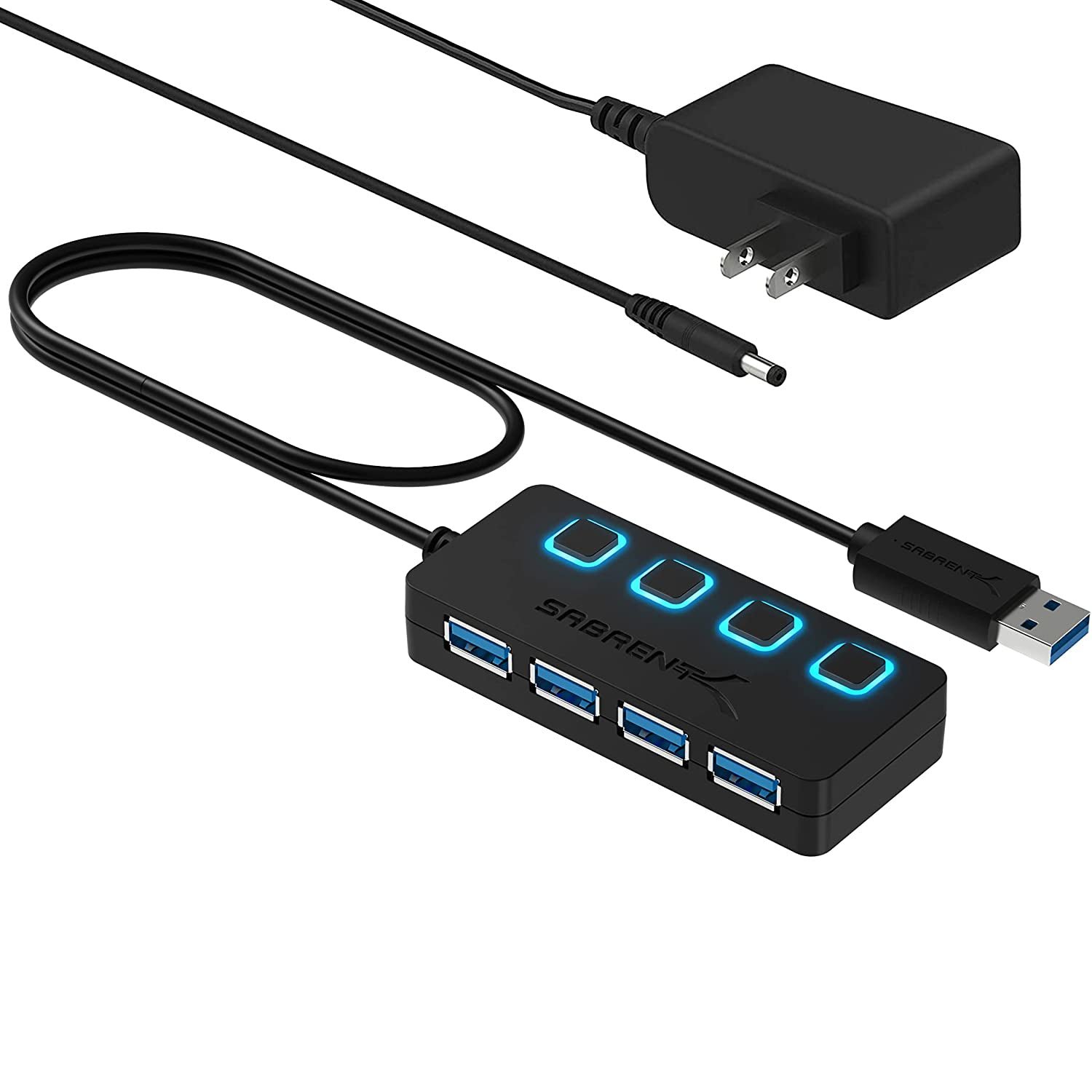
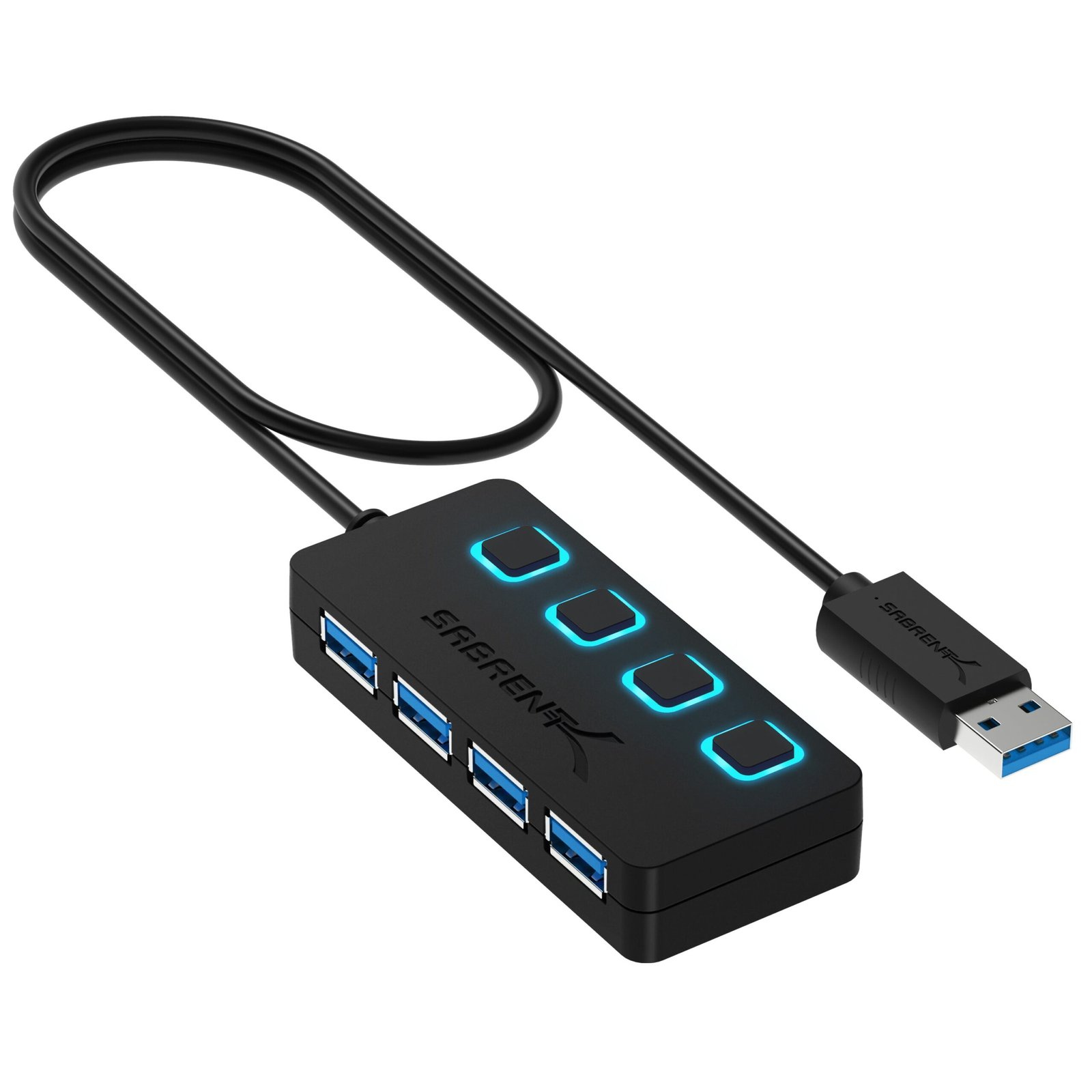
The Sabrent HB-UMP3 is the hub we hand to most Pi users. It’s self-powered from an included 5 V/2.5 A adapter, so your peripherals draw from the brick instead of the Pi’s limited USB budget — exactly what you want when running an SSD plus a webcam and a couple of drives. Four USB 3.0 ports hit the full 5 Gbps on a Pi 4/5, and each port has its own LED power switch so you can hard-reset a frozen device or cut idle draw without crawling behind the board. It’s a compact, no-nonsense brick that just works.
✅ Pros
Powered — no Pi brown-outs
Individual LED power switches
Full 5 Gbps USB 3.0
Compact, reliable, well-supported
❌ Cons
Only 4 ports
Short integrated 10″ cable
Adapter is another wall-wart
🎯 Verdict: The best all-round USB hub for the Raspberry Pi. Powered, switched and fast — enough for real SSD-and-peripherals builds without stressing the board.
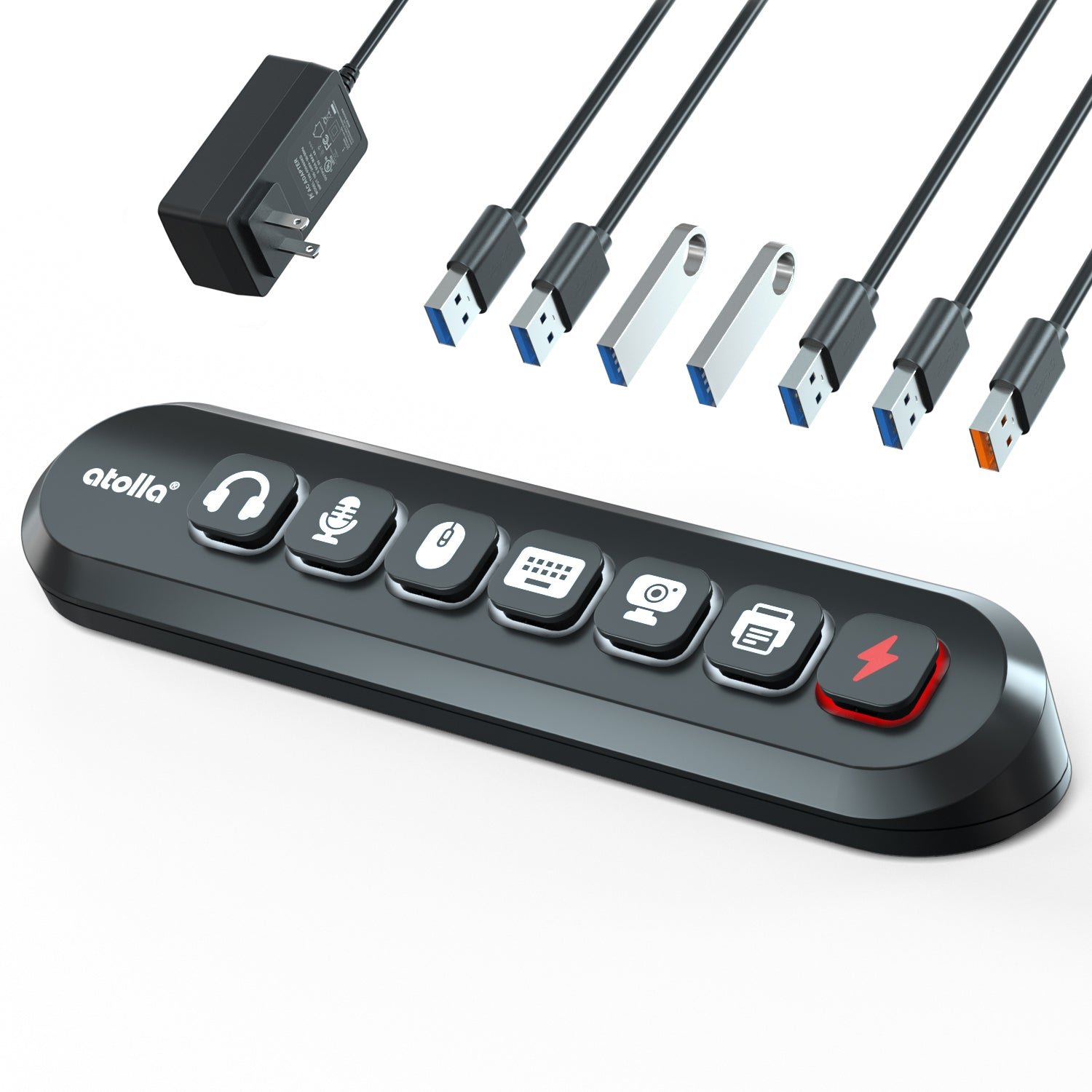
When four ports isn’t enough, the Atolla KR307 gives you six SuperSpeed data ports plus a dedicated 18 W charging port, all fed by a beefy 12 V/3 A adapter. That headroom makes it a great desktop anchor for a Pi 4/5 media server, print server or camera rig where you’re juggling drives, dongles and a phone on charge. The party trick is the swappable illuminated icon switches — each port has a lit, labelled button so you can see and toggle exactly what’s live. A generous ~1.5 m cable reaches around a cluttered bench.
✅ Pros
7 ports + strong 12V/3A supply
Dedicated 18W charging port
Lit, labelled per-port switches
Long 1.5 m cable
❌ Cons
Bigger desktop footprint
Another 12V brick to place
Overkill for a bare Pi Zero
🎯 Verdict: The best powered hub for a Pi workstation or server. Loads of ports, real power headroom and the clearest per-port controls here.
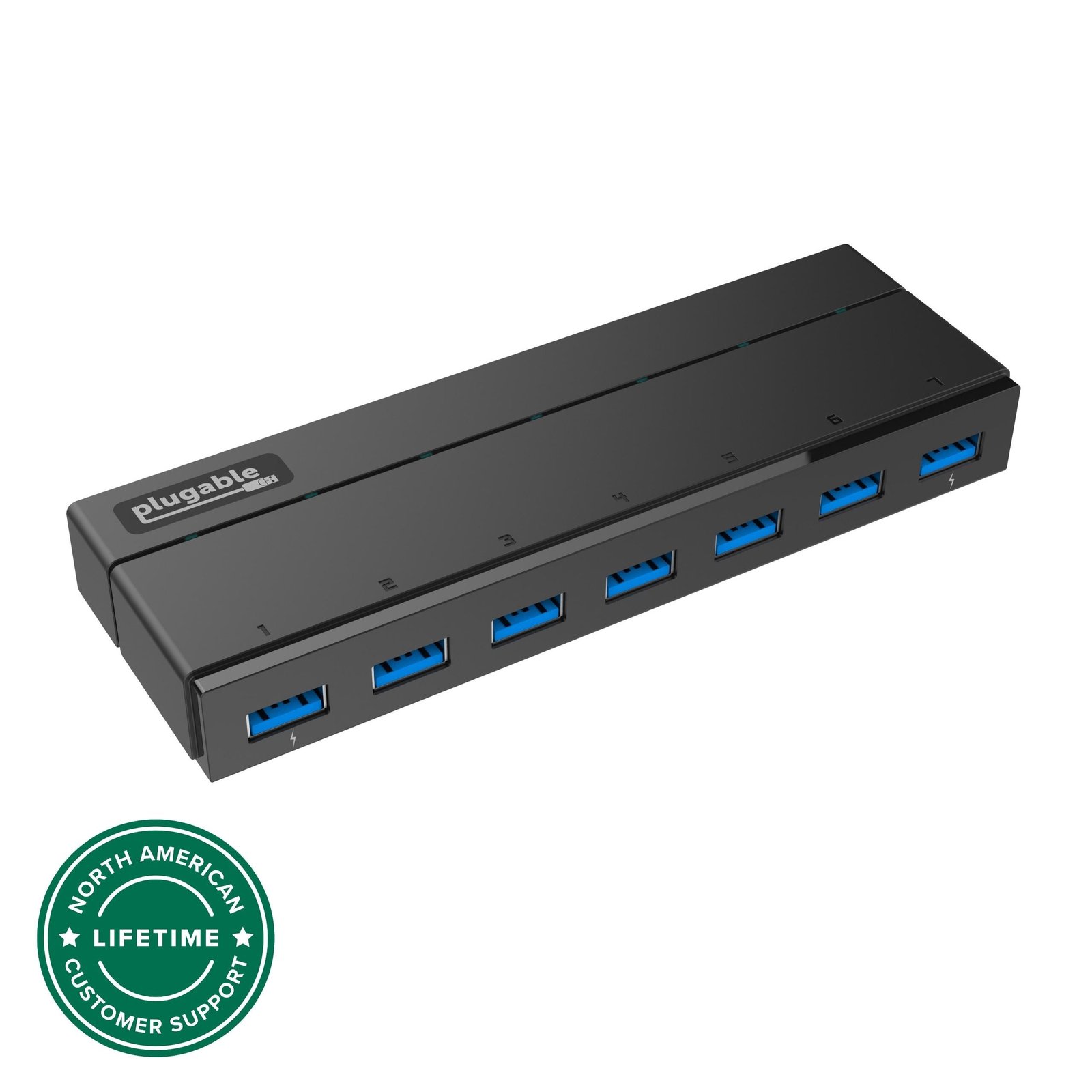
The Plugable USB3-HUB7C is a proper powered desktop hub built around a modern VIA VL817 chipset and a 36 W (12 V/3 A) adapter, with two edge ports delivering up to 1.5 A of BC 1.2 charging. That external power is exactly what a Pi wants when you’re spinning up bus-powered SSDs and hard drives. One honest caveat: Plugable itself notes mixed results pairing this hub with older USB-2.0-era Raspberry Pis, so it’s at its best on a Pi 4 or Pi 5 where the USB 3.0 ports and power headroom shine. Lifetime North-American support is a nice bonus.
✅ Pros:Strong 36W power for drives; 7 ports; 2 fast-charge ports; solid chipset & support.
❌ Cons:Mixed results on older/USB-2.0 Pis; desktop-sized; not pocketable.
🎯 Verdict: The best hub for running USB drives and SSDs off a Pi 4/5 — power headroom to spare. Check price →
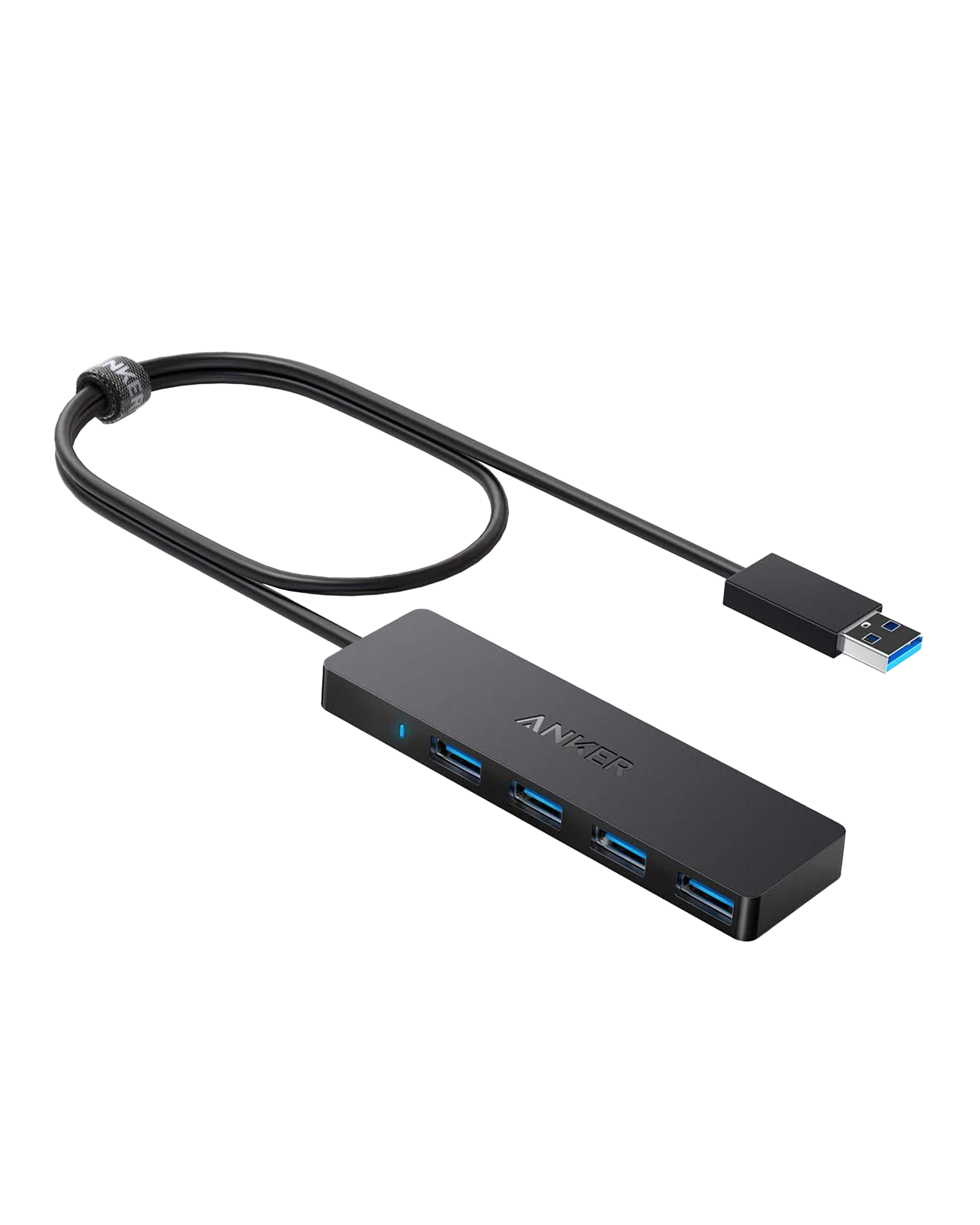
If you just need to hang a keyboard, mouse and a couple of flash drives off a Pi, the Anker A7516 is the classic pick. It’s an aluminium-trimmed, feather-light bus-powered hub with a well-judged 2 ft cable and Anker’s usual build quality and support. It doesn’t charge devices and shouldn’t be asked to run a bus-powered SSD (keep total draw under ~900 mA), but for everyday desktop expansion on a Pi 4/5 it’s tidy, dependable and cheap. A staple on the desks of Pi tinkerers for a reason.
✅ Pros:Tiny & light; solid build; good 2 ft cable; reliable at 5 Gbps.
❌ Cons:No external power; no charging; not for SSDs/HDDs.
🎯 Verdict: The best compact hub for light peripherals on a Pi desk. Clean, small and trustworthy. Check price →
🧩 BEST PI-SPECIFIC · ⭐ 4.5/5
5. Waveshare USB 3.2 Gen1 HUB HAT
4 × USB 3.0 · stackable HAT · USB-C 5V power input · driver-free
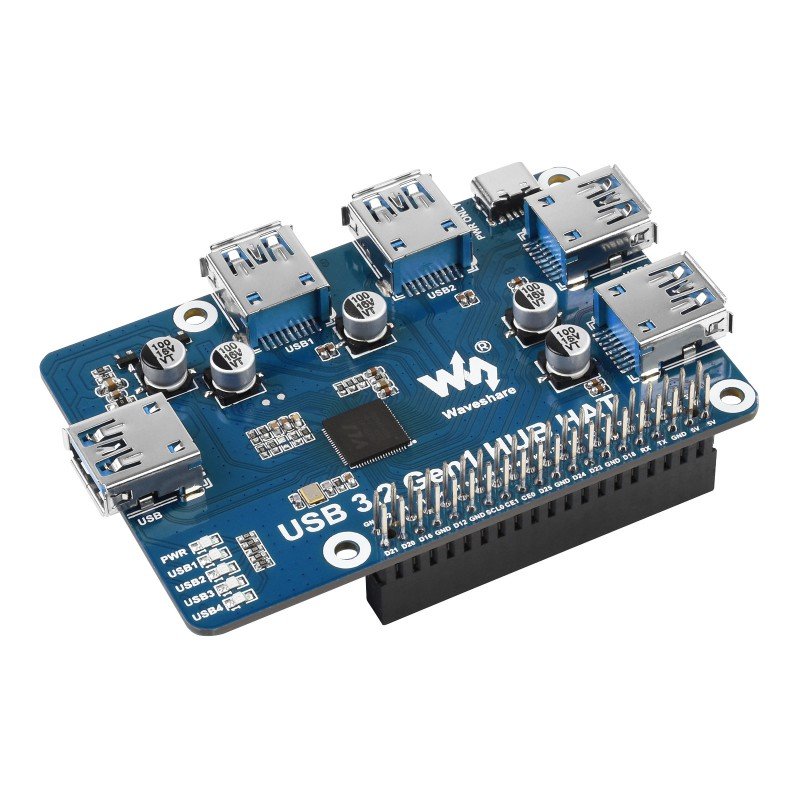
For a clean, embedded build there’s nothing like a purpose-made HAT. The Waveshare USB 3.2 Gen1 HUB HAT adds four USB 3.0 ports that bolt directly onto the Pi’s header — no dangling cable — and it’s driver-free plug-and-play. Crucially it has an onboard USB-C 5 V input so you can feed the ports externally instead of leaning on the Pi. It’s ideal for compact Pi 4/5 projects, robots, kiosks and anything that needs to look tidy in an enclosure. It is a bare board, so it suits makers who are comfortable stacking HATs rather than plug-and-go desktop users.
✅ Pros:Bolts onto the Pi; no cable clutter; optional USB-C power in; driver-free.
❌ Cons:Bare PCB; occupies the GPIO header; maker-oriented.
🎯 Verdict: The best hub for tidy, embedded Pi projects — four ports with zero cable mess. Check price →
The Sabrent HB-UM43 is the value champion: a slim bus-powered 4-port USB 3.0 hub that still gives you individual LED power switches — a feature you rarely see at this price. With thousands of reviews behind it, it’s a safe, cheap way to add ports to a Pi for light peripherals, and the per-port switches make it handy for toggling a stubborn dongle or SDR without unplugging. It has no adapter, so keep it to keyboards, mice, flash drives and low-draw gadgets rather than SSDs. If you want the same maker’s powered version, step up to the HB-UMP3 above.
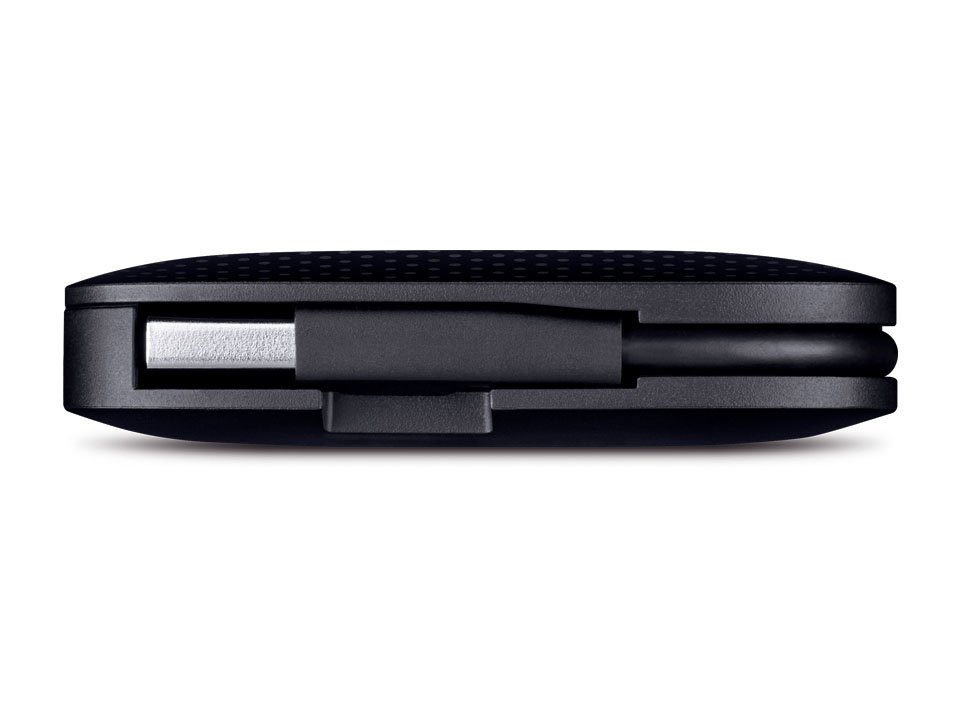
The TP-Link UH400 is the one to throw in a bag with a portable Pi kit. Its foldable built-in cable tucks into the sturdy ABS body so there’s nothing to tangle or snag, and a slot hides the metal connector so it won’t scratch your gear. It’s a straightforward bus-powered 4-port USB 3.0 hub with LED indicators, from a name brand you already trust for networking. There’s no external power and no charging, so it’s a light-duty companion — perfect for on-the-go Pi demos, classroom kits and travel setups rather than a drive-heavy home server.
✅ Pros:Foldaway cable; rugged; name brand; travel-friendly.
❌ Cons:Bus-powered; short built-in cable; no switches.
🎯 Verdict: The best travel hub for a portable Pi — no loose cable, brand-name reliability. Check price →
🪶 BEST VALUE · ⭐ 4.5/5
8. UGREEN 4-Port Ultra-Slim
4 × USB 3.0 · bus-powered · ~0.4 in thin · 0.5 ft cable
UGREEN’s ultra-slim 4-port hub is the value sweet spot — barely 0.4 inches thick, well-built and cheap, turning one of the Pi’s ports into four. It’s bus-powered with a short 0.5 ft cable, which keeps it neat next to the board but means it’s happiest with mice, keyboards, flash drives and dongles rather than drives. UGREEN’s reputation for solid, no-drama accessories carries over here: plug it in, it’s recognised instantly on Raspberry Pi OS, and it gets out of the way. A great “just add ports” pick when you don’t need external power.
✅ Pros:Very slim; great value; solid build; instant plug-and-play.
❌ Cons:Bus-powered; very short cable; no switches or charging.
🎯 Verdict: The best-value slim hub for adding light-duty ports to a Pi. Check price →
Sometimes you just want a cheap, powered hub from a brand that’ll be in stock next year. The Amazon Basics 4-Port (HU3641V1) ships with a 5 V/2.5 A adapter, so it can feed peripherals from the wall instead of the Pi — the key thing that separates it from bus-powered budget hubs. There are no per-port switches and the styling is plain, but it does the powered-hub job for a Pi 4/5 at a keen price. A sensible, boring, reliable choice when you want external power without paying for extras you won’t use.
Running a Pi cluster, a camera array or a lab bench full of microcontrollers? The Amazon Basics 10-Port throws sheer connectivity at the problem: ten USB 3.0 ports fed by an external AC adapter so the whole array doesn’t hang off the Pi’s power rail. It’s not fancy and it’s physically large, but for maximum devices per hub it’s hard to beat on price. Spread genuinely heavy loads (multiple SSDs) sensibly rather than assuming ten drives at once — but as a big, powered expander for a Pi 4/5 hub-and-spoke setup, it earns its place.
✅ Pros:10 powered ports; great for clusters/labs; affordable per port.
❌ Cons:Large; plain; shared bandwidth across many ports.
🎯 Verdict: The best high-port-count hub for Pi clusters and busy benches. Check price →
🛒 How to Choose the Right USB Hub for Your Pi
💾
Running an SSD or hard drive?
Get a powered hub — the Sabrent HB-UMP3 or Plugable USB3-HUB7C. External power keeps your Pi from browning out under drive spin-up.
🖥️
Building a Pi workstation/server?
The Atolla KR307 7-Port gives ports, power headroom and lit per-port switches to manage a busy desk.
🎒
Just need more ports, lightly?
Grab the Anker A7516, UGREEN Slim or budget Sabrent HB-UM43 for keyboards, mice and flash drives.
🧩
Want a tidy embedded build?
The Waveshare USB HUB HAT stacks onto the header with no cables — ideal for robots, kiosks and enclosures.
✈️
Travelling with your Pi?
The TP-Link UH400 folds its cable away — nothing to tangle in a bag with a portable Pi kit.
🗄️
Feeding a cluster or lab bench?
The Amazon Basics 10-Port powered hub connects a whole array of devices from one adapter.
⚙️ Key Specs Compared — Side by Side
Spec
Sabrent HB-UMP3
Atolla KR307
Plugable HUB7C
Anker A7516
Amazon Basics 10-Port
Ports
4
7
7
4
10 ⭐
Power
5V/2.5A ⭐
12V/3A
36W (12V/3A)
Bus-powered
AC adapter
Speed
5 Gbps
5 Gbps
5 Gbps
5 Gbps
5 Gbps
Per-Port Switches
Yes ⭐
Yes ⭐
No (master)
No
No
Charging Port
No
18W ⭐
2× 1.5A
No
No
Good for SSD/HDD
Yes ⭐
Yes ⭐
Yes ⭐
No
Yes ⭐
Best For
All-round Pi
Workstation
Drives
Compact
Clusters
Specs are approximate and vary by seller and revision. On a Pi 3 or Pi Zero all hubs run at USB 2.0 speeds. Always confirm details on the live Amazon listing.
❓ Frequently Asked Questions
Do I need a powered USB hub for my Raspberry Pi?
It depends on what you’re plugging in. For a keyboard, mouse and a few flash drives, a bus-powered hub is fine. But the Pi shares a limited USB power budget (the Pi 4 caps total downstream current around 1.2 A), so the moment you add an SSD, a mechanical hard drive, a powered mic or many devices at once, you should use a powered (self-powered) hub with its own adapter. It feeds your peripherals directly and stops the under-voltage warnings and random disconnects that plague overloaded setups.
Will a USB 3.0 hub work on the Raspberry Pi 4 and Pi 5?
Yes. The Pi 4 and Pi 5 each have two blue USB 3.0 ports that support up to 5 Gbps, so a USB 3.0 hub plugged into a blue port gives you fast expansion — great for SSD boot drives. All the hubs here are backward-compatible, so on a Pi 3, Pi Zero or the Pi’s black USB 2.0 ports they’ll still work, just at USB 2.0 (480 Mbps) speeds. For the fastest storage, plug your hub (and drive) into a blue USB 3.0 port.
What is USB “back-powering” and should I worry about it?
Back-powering (or back-feeding) is when a powered hub sends voltage up the data cable into the Pi’s USB port. On some Pi models this can partially power the board through a path that bypasses its input fuse, leading to odd boot behaviour or making it hard to fully power-cycle the Pi. Good-quality hubs block this. If you hit strange symptoms, a data-only USB cable (power lines removed) between the hub and the Pi is a reliable fix, and it’s why many people prefer a hub they can also switch off at the port.
Can I boot my Raspberry Pi from an SSD connected to a hub?
Usually yes on a Pi 4/5, but it’s best to connect the boot SSD to a powered hub (or directly to a blue USB 3.0 port with a good adapter). SSDs draw a surge of current at spin-up that can trip an unpowered setup mid-boot. A powered hub like the Sabrent HB-UMP3 or Plugable HUB7C supplies that current from its own adapter, giving a far more reliable USB-boot experience. Make sure your Pi’s firmware is up to date and USB boot is enabled.
How many ports do I actually need, and does a hub slow things down?
Four ports cover most Pi projects; step up to 7–10 for servers, camera rigs, clusters or a lab bench. Remember a hub multiplies connections, not bandwidth — every device shares the single upstream link to the Pi. That’s rarely an issue for keyboards, mice and dongles, but if you run several fast SSDs at once through one hub, they’ll share that 5 Gbps pipe. For maximum throughput on two drives, split them across the Pi’s two separate USB 3.0 controllers rather than one hub.
🏁 Final Verdict — Best USB Hub for Every Pi Setup
The right hub for every Raspberry Pi project and budget:
🥇 Best Overall — Sabrent HB-UMP3: powered 4-port with per-port switches, no brown-outs.
No single USB hub is right for every Raspberry Pi, but every pick here earns its place. For most people the Sabrent HB-UMP3 is the one to buy — a powered, switched 4-port hub that keeps your Pi stable whether you’re running an SSD, a webcam or a bench full of dongles. Need more ports or a desktop anchor? The Atolla KR307 and Plugable HUB7C bring real power headroom; embedded builders should reach for the Waveshare USB HUB HAT; and if you just want cheap extra ports, the Sabrent HB-UM43, Anker A7516 and UGREEN Slim are all safe bets. Pair your hub with our Raspberry Pi, Arduino, ESP32 and Pico tutorials and start building today.
💬 Not sure which hub fits your project? Tell us what you’re building — a Pi NAS, a retro-gaming box, a robot or a camera rig — in the comments below, and we’ll point you to the right pick.
All Amazon links above use our affiliate tag (microlab05-20). Purchasing through them supports microcontrollerslab.com at no extra cost to you. Prices and availability change frequently — always confirm the current price on Amazon before buying.