⚠️ Affiliate Disclosure: This post contains Amazon affiliate links. If you purchase through our links, we may earn a small commission at no extra cost to you. We only recommend products we have thoroughly researched and verified. Prices change frequently — and Teensy listings in particular swing a lot between sellers — so we don’t list them here. Always tap through and confirm the live price on Amazon before buying.
Ultimate Buying Guide 2026
⚡ Best Teensy 4.1 & Teensy 4.0 Boards
8 verified picks for the fastest hobby microcontroller you can buy — pre-soldered and bare boards, the Ethernet kit, the Rev D audio shield, the lockable secure version and a screw-terminal breakout — with real PJRC specs, honest verdicts, and direct Amazon links.
✅ 8 Boards & Add-Ons
✅ Verified Amazon ASINs
✅ Updated August 2026
✅ Honest Pros & Cons
The Teensy 4.1 and Teensy 4.0 are, by a wide margin, the fastest Arduino-compatible boards most makers will ever plug into a breadboard. Both run an NXP i.MX RT1062 ARM Cortex-M7 at 600 MHz — a dual-issue superscalar core with a hardware floating-point unit, branch prediction and 32K instruction/data caches. In practice that means real-time audio DSP, 1 MHz+ sensor sampling, multi-axis motion control and machine-learning inference on a board smaller than a stick of gum.
But choosing a Teensy is not as simple as “4.1 is better than 4.0”. The two boards differ in flash, RAM expansion, pin count, Ethernet, SD card and physical length — and each is sold in several variants (with pins, without pins, lockable). Then there is the add-on ecosystem: the Ethernet kit you need to actually use the 4.1’s on-board PHY, the Rev D audio shield that turns a Teensy into a synth or recorder, and screw-terminal breakouts for permanent installs. This guide ranks 8 Teensy 4.x boards and accessories on the specs that matter for embedded work — and tells you honestly which one to skip.
💡 Reality check before you buy: A Teensy is a raw compute board, not an all-in-one IoT module. There is
no Wi-Fi and no Bluetooth on any Teensy 4.x — if your project needs wireless, an ESP32 costs a fifth as much and does it out of the box. All Teensy 4.x I/O pins run at
3.3V and are NOT 5V tolerant; feeding one 5 volts is the single most common way people kill these boards, so use level shifters with 5V sensors and displays. The 4.1’s Ethernet PHY is on the board but the
RJ45 jack is not — you need the separate Ethernet kit and a soldering iron. And on Amazon, Teensy boards are frequently sold by third-party marketplace sellers at a markup over PJRC’s own price, so always compare the live listing against
pjrc.com before you check out.
Table of Contents
- Quick Comparison — All 8 Teensy Picks
- What to Look for in a Teensy 4.x Board
- Detailed Reviews — All 8 Teensy Picks
- How to Choose the Right Teensy for Your Project
- Key Specs Compared — Teensy vs the Usual Alternatives
- Frequently Asked Questions
- Final Verdict — Best Teensy for Every Build
⚡ Quick Comparison — All 8 Teensy Picks
| Product | Type | Key Specs | Best For | Rating | Buy |
|---|
| 🥇 Teensy 4.1 (with Pins) | Full board | 600 MHz M7 · 8 MB flash · 55 I/O · Ethernet + SD | Best Overall | ⭐ 4.8/5 | View → |
| 🏅 Teensy 4.0 (Without Pins) | Full board | 600 MHz M7 · 2 MB flash · 40 I/O · 35.6 × 17.8 mm | Best Value | ⭐ 4.8/5 | View → |
| 🔌 Teensy 4.0 (Headers) | Full board | Same as 4.0, pins pre-soldered · breadboard-ready | Best No-Solder Compact | ⭐ 4.7/5 | View → |
| 🔧 Teensy 4.1 (No Pins) | Full board | 600 MHz M7 · 8 MB flash · bare pads for custom wiring | Best for Permanent Builds | ⭐ 4.8/5 | View → |
| 🌐 Ethernet Kit for Teensy 4.1 | Add-on | RJ45 MagJack board · 6-pin ribbon cable · headers | Best Networking Add-On | ⭐ 4.5/5 | View → |
| 🎵 Teensy 4 Audio Shield (Rev D) | Add-on | SGTL5000 codec · line in/out · headphone amp · microSD | Best for Audio & DSP | ⭐ 4.5/5 | View → |
| 🔒 Teensy 4.0 Lockable | Full board | Teensy 4.0 + fuse-lockable encrypted firmware | Best for Commercial Products | ⭐ 4.8/5 | View → |
| 🏭 Terminal Block Breakout (4.1) | Add-on | Screw terminals for every pin · screw-mount · board only | Best for Wiring & Industrial | ⭐ 4.8/5 | View → |
Ratings are Amazon customer ratings recorded in August 2026 and will drift over time. We deliberately don’t print prices — Teensy listings vary a lot between marketplace sellers, so always confirm the live price on Amazon (and compare it with pjrc.com) before buying.
🔍 What to Look for in a Teensy 4.x Board
⚙️
Raw Speed & the FPU
Both boards share the same 600 MHz Cortex-M7 with hardware single- and double-precision floating point, dual-issue execution and 32K caches. If your code does FFTs, PID loops, filters or matrix maths, that FPU is the whole reason to buy a Teensy over an 8-bit or M0+ board.
📌
Pin Count & Peripherals
Teensy 4.1 gives you 55 I/O (42 breadboard-friendly), 35 PWM, 18 analog inputs and 8 serial ports. Teensy 4.0 gives 40 I/O, 31 PWM, 14 analog and 7 serial. Both carry 3 SPI, 3 I2C and 3 CAN buses (one with CAN FD) — count your peripherals before you pick.
🧠
Memory & Expansion
Both have 1024K RAM (512K tightly coupled to the core). The 4.1 has 8 MB flash and 4284 bytes of emulated EEPROM against the 4.0’s 2 MB and 1K — and adds two QSPI pads where you can solder extra PSRAM or flash for audio buffers and frame buffers.
🔗
Connectivity You Actually Need
Teensy 4.1 has a 10/100 Mbit DP83825 Ethernet PHY, a native SDIO micro SD socket and a 5-pin USB host header on board. Teensy 4.0 exposes USB host and SD only as bottom SMT pads. Neither board has Wi-Fi or Bluetooth — plan an ESP32 or module if you need wireless.
📐
Size, Pins & 3.3V Logic
Teensy 4.0 is 35.6 × 17.8 mm; the 4.1 is 61 × 17.8 mm. Buy the “with pins” version if you want to breadboard today, the bare version if you’re soldering into a product. And remember: 3.3V I/O only, not 5V tolerant, roughly 100 mA at full clock.
🏆 Detailed Reviews — All 8 Teensy Picks
🥇 BEST OVERALL
Teensy 4.1 (with Pins)
⭐ 4.8/5 · The Complete 600 MHz Powerhouse
Buy on Amazon →

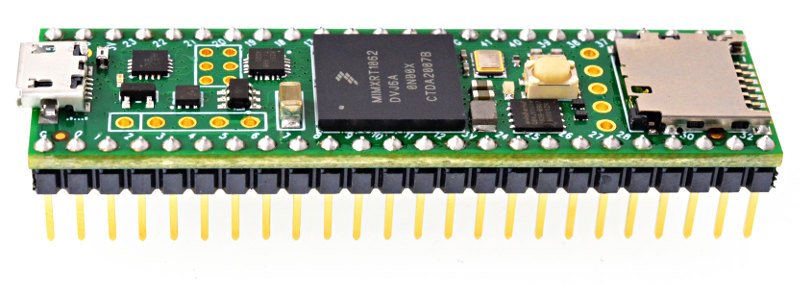
The Teensy 4.1 with pre-soldered pins is the board we hand to anyone who has outgrown an Arduino or ESP32 and needs real compute. You get the full 600 MHz i.MX RT1062 Cortex-M7 with hardware floating point, 8 MB of flash, 1 MB of RAM (512K tightly coupled), 55 I/O pins — 42 of them breadboard-friendly — 35 PWM outputs, 18 analog inputs, 8 serial ports, 3 CAN buses, a native micro SD socket, a USB host header and a 10/100 Mbit Ethernet PHY. The headers come soldered, so it goes straight into a breadboard, and it programs from the Arduino IDE via Teensyduino or from PlatformIO with no extra hardware. It is the most capable board in this guide by a wide margin.
✅ Pros- Fastest hobby MCU you can breadboard
- 8 MB flash + QSPI pads for PSRAM
- SD socket, USB host and Ethernet PHY on board
- Headers pre-soldered — no iron needed
- Superb library support (audio, CAN, OctoWS2811)
❌ Cons- No Wi-Fi or Bluetooth at all
- Costs several times an ESP32 board
- 3.3V I/O, not 5V tolerant
- RJ45 jack needs the separate Ethernet kit
- 61 mm long — won’t fit tiny enclosures
🎯 Verdict: The best all-round Teensy. If you’re doing audio DSP, data logging, motion control or anything Ethernet-connected, buy this one and don’t look back.
👉 Check Price on Amazon →
🏅 BEST VALUE
Teensy 4.0 (Without Pins)
⭐ 4.8/5 · Same 600 MHz Core, Half the Board
Buy on Amazon →

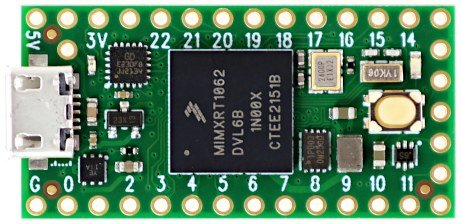
The Teensy 4.0 runs the exact same 600 MHz Cortex-M7 as the 4.1 in a board barely bigger than a postage stamp — 35.6 × 17.8 mm. You still get 1 MB of RAM, 40 digital I/O, 31 PWM outputs, 14 analog inputs, 7 serial ports, 3 SPI, 3 I2C, 3 CAN buses, I2S audio and 480 Mbit/s USB. What you give up is flash (2 MB vs 8 MB), EEPROM (1K vs 4284 bytes), the Ethernet PHY, the SD socket and the QSPI expansion pads. For the vast majority of projects that never touch a network, this is the smarter buy — and its size makes it the obvious choice for wearables, drones and anything squeezed into a 3D-printed shell.
✅ Pros- Identical 600 MHz M7 core for much less
- Thumb-sized — fits almost any enclosure
- 1 MB RAM and 480 Mbit/s USB retained
- 3 CAN buses and I2S audio still on board
❌ Cons- Pins not fitted — you must solder headers
- Only 2 MB flash, 1K emulated EEPROM
- No Ethernet PHY, no SD socket
- SD and USB host only via bottom SMT pads
🎯 Verdict: The best performance-per-dollar in this guide. If you don’t need Ethernet, an SD socket or the extra pins, the 4.0 gives you the same speed in half the space.
👉 Check Price on Amazon →
🔌 BEST NO-SOLDER COMPACT · ⭐ 4.7/53. Teensy 4.0 (Headers)
600 MHz M7 · 2 MB flash · 1 MB RAM · 40 I/O · pins pre-soldered
Buy →

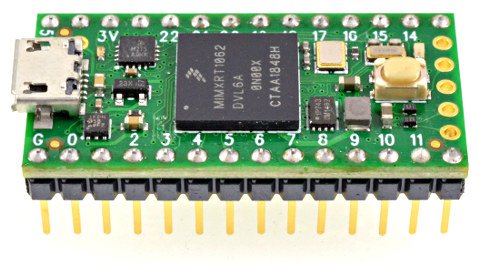
Exactly the same Teensy 4.0 board, but with the header pins already fitted at the factory. If you don’t own a soldering iron — or you simply want to be prototyping ten minutes after the box arrives — this is the version to order. It drops straight into a breadboard with a row free on each side, and the small premium over the bare board is usually less than the cost of a decent pin-header strip and your time. The trade-off is that permanent installs get messier: once pins are on, you’re soldering wires to pins rather than flat to pads.
✅ Pros: Breadboard-ready out of the box; no soldering skill needed; identical performance to the bare 4.0.
❌ Cons: Costs a little more; taller profile; awkward if you later want a flush, permanent install.
🎯 Verdict: The friendliest way into the Teensy ecosystem. Buy this if your first project lives on a breadboard.
🔧 BEST FOR PERMANENT BUILDS · ⭐ 4.8/54. Teensy 4.1 (No Pins)
600 MHz M7 · 8 MB flash · 55 I/O · Ethernet PHY · SD socket · bare pads
Buy →

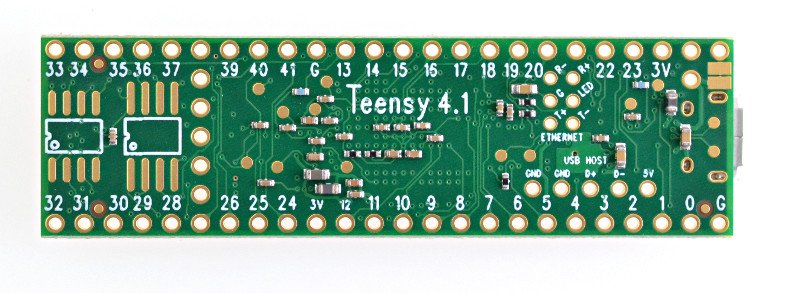
The bare Teensy 4.1 is the version you want when the board is going inside something. With no headers fitted you can surface-mount it flat onto a carrier PCB, solder ribbon directly to the pads, or fit low-profile right-angle headers of your own choosing — and you keep clear access to the bottom-side SMT pads, the two QSPI memory footprints for PSRAM, and the SD card signals. It’s the same 8 MB flash, 55-pin, Ethernet-and-SD board as our top pick, just left for you to finish. One honest caveat: this particular ASIN is often fulfilled by third-party marketplace sellers, and its price swings much more than the with-pins listing, so check it against PJRC’s own store before ordering.
✅ Pros: Full 4.1 feature set; lowest profile for embedded installs; free choice of headers; clean access to QSPI and SD pads.
❌ Cons: Soldering required; marketplace pricing on this listing is volatile — compare before you buy.
🎯 Verdict: The right 4.1 for a finished product or a custom carrier board — just verify the live price against pjrc.com first.
🌐 BEST NETWORKING ADD-ON · ⭐ 4.5/55. Ethernet Kit for Teensy 4.1
RJ45 MagJack board · 6-pin ribbon cable · header pins · 10/100 Mbit
Buy →

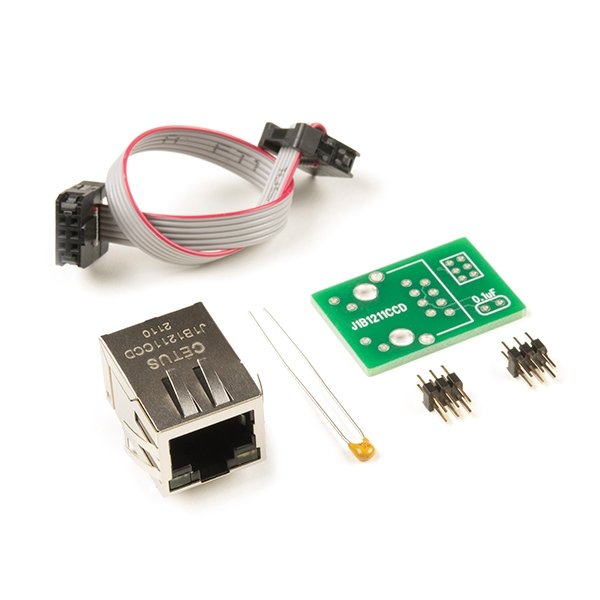
This is the piece most people don’t realise they need. The Teensy 4.1 has a DP83825 10/100 Mbit Ethernet PHY built into the board, but the RJ45 magnetics jack is not — the six Ethernet signals come out on a small pad group instead. This kit supplies the RJ45 MagJack adapter board, a 6-pin ribbon cable and the header pins to connect the two. Solder the 6-pin header to your Teensy, plug in the cable, and you have real wired networking with the NativeEthernet / QNEthernet libraries — ideal for OSC, Art-Net lighting, Modbus TCP and industrial data logging where Wi-Fi simply isn’t acceptable.
✅ Pros: The only official way to use the 4.1’s Ethernet; genuine 10/100 wired networking; well supported libraries.
❌ Cons: Requires soldering a 6-pin header; works only with Teensy 4.1; adds meaningfully to the total cost.
🎯 Verdict: Buy it in the same order as your 4.1 if networking is anywhere on the roadmap — it’s the cheapest wired Ethernet you’ll add to any MCU.
🎵 BEST FOR AUDIO & DSP · ⭐ 4.5/56. Teensy 4 Audio Shield (Rev D)
SGTL5000 codec · stereo line in/out · headphone amp · mic in · microSD
Buy →

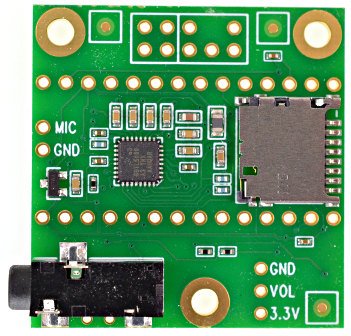
The single best reason to own a Teensy. The Rev D audio adaptor adds an SGTL5000 codec with stereo line in, stereo line out, a headphone amplifier, a microphone input and a microSD socket — and pairs with PJRC’s Teensy Audio Library and its drag-and-drop graphical Audio System Design Tool. Combined with the M7’s floating-point unit you get polyphonic synthesis, real-time reverb and filters, WAV playback from SD, FFT analysis and multi-channel mixing with CPU headroom to spare. Note that Rev D is the Teensy 4.0/4.1 version — the older Rev C is for Teensy 3.x and won’t line up correctly.
✅ Pros: Turns a Teensy into a proper synth/recorder; superb audio library and GUI design tool; microSD included.
❌ Cons: Needs headers soldered; make sure you buy Rev D, not Rev C; uses several pins for I2S and SPI.
🎯 Verdict: If audio is your project, buy the shield with the board. Nothing else in this price class does real-time DSP this easily.
🔒 BEST FOR COMMERCIAL PRODUCTS · ⭐ 4.8/57. PJRC Teensy 4.0 Lockable
600 MHz M7 · 2 MB flash · fuse-lockable encrypted (EHEX) firmware
Buy →
Electrically this is an ordinary Teensy 4.0, but it ships in the state that lets you use the i.MX RT1062’s secure boot fuses. You write your own AES key, compile your sketch to an encrypted EHEX file, and lock the chip so it will only ever run firmware signed with that key — nobody can read your code back out or flash their own onto the board. That matters if you’re selling a product, entering a competition, or shipping a client build you’d rather not see cloned. Treat it as one-way: once the fuses are blown the board is permanently locked to your key, and losing that key bricks your ability to update it.
✅ Pros: Real firmware IP protection; identical 600 MHz performance; officially supported by the Teensy toolchain.
❌ Cons: Locking is permanent and unforgiving; costs a little more; pointless for hobby projects; few Amazon reviews so far.
🎯 Verdict: Only buy this if you’re shipping a product. For everything else, the standard 4.0 is the same board with less risk of locking yourself out.
🏭 BEST FOR WIRING & INDUSTRIAL · ⭐ 4.8/58. Terminal Block Breakout for Teensy 4.1
Screw terminals on every pin · screw-mount version · Teensy not included
Buy →

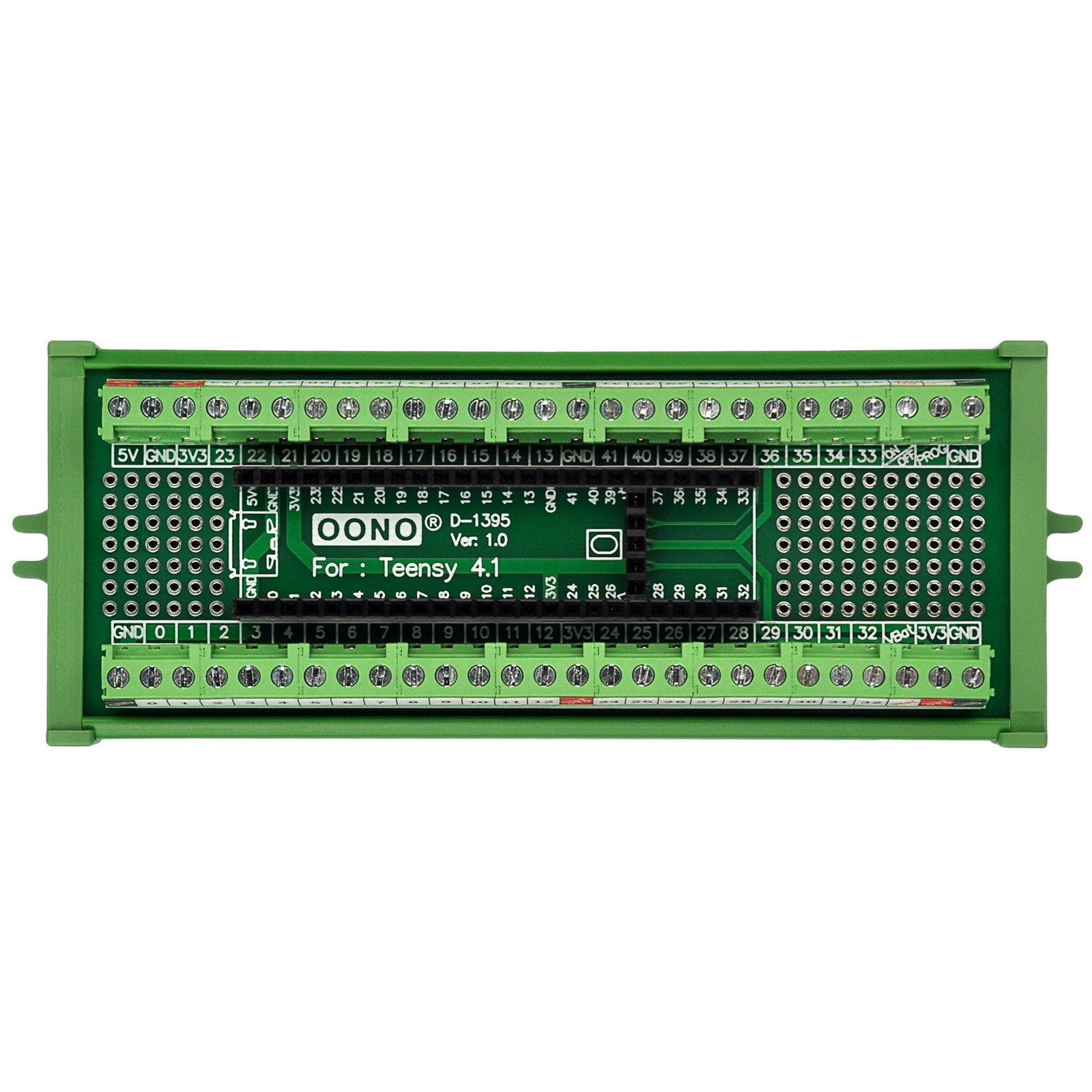
Dupont jumpers are fine on a bench and terrible in a machine. This carrier board takes a headered Teensy 4.1 and brings every pin out to a labelled screw terminal, with mounting holes so the whole assembly bolts into an enclosure or control panel. Field wiring goes in with a screwdriver and stays put through vibration — exactly what you want for CNC controllers, sensor cabinets, test rigs and anything that has to survive being moved. A DIN-rail version of the same board is also available if you’re building into a control cabinet. The Teensy itself is not included.
✅ Pros: Rock-solid field wiring; clearly labelled terminals; mounting holes; DIN-rail variant available.
❌ Cons: Teensy sold separately; needs a headered board; bulky compared with soldering direct; overkill for breadboard work.
🎯 Verdict: The finishing touch for a Teensy that’s going into a real installation rather than a project box on your desk.
🎯 How to Choose the Right Teensy for Your Project
🎛️
Building a synth, effects pedal or recorder?
Take a Teensy 4.1 plus the Rev D audio shield. The extra flash holds samples, the SD socket streams WAVs, and the QSPI pads let you add PSRAM for long delay lines.
📈
Logging fast sensor data?
The Teensy 4.1‘s native 4-bit SDIO micro SD socket is dramatically faster than SPI card modules — it’s the reason the 4.1 dominates data-logging and telemetry builds.
🤖
Driving motors, CNC or robotics?
Either board works — 31–35 PWM channels and 3 CAN buses are plenty. Choose the 4.1 if you need more than about 20 pins, and add the screw-terminal breakout for the finished machine.
🌐
Need wired networking?
Only the Teensy 4.1 has the Ethernet PHY — pair it with the Ethernet kit for Art-Net, OSC, Modbus TCP or plain HTTP over a cable that never drops.
🪶
Squeezing into a tiny enclosure?
The Teensy 4.0 is 35.6 × 17.8 mm and delivers identical compute. Buy the bare version and solder wires flat for wearables, drones and handheld builds.
🔒
Selling a finished product?
Use the Lockable Teensy 4.0 and encrypted EHEX firmware so your code can’t be read out or cloned — just guard the AES key like a private key.
📶
Need Wi-Fi or Bluetooth?
Then don’t buy a Teensy for that job. No Teensy 4.x has a radio — use an ESP32, or bolt one on over serial and let the Teensy do the real-time work.
⚙️ Key Specs Compared — Teensy vs the Usual Alternatives
| Spec | Teensy 4.1 | Teensy 4.0 | ESP32-S3 | Raspberry Pi Pico 2 | Arduino Uno R4 |
|---|
| CPU / Clock | Cortex-M7 @ 600 MHz ⭐ | Cortex-M7 @ 600 MHz ⭐ | Dual Xtensa LX7 @ 240 MHz | Dual Cortex-M33 @ 150 MHz | Cortex-M4 @ 48 MHz |
| RAM | 1024K (512K TCM) ⭐ | 1024K (512K TCM) ⭐ | 512K SRAM (+PSRAM) | 520K SRAM | 32K SRAM |
| Flash | 8 MB (7936K usable) ⭐ | 2 MB | 8 MB typical | 4 MB | 256 KB |
| I/O Pins | 55 total / 42 breadboard ⭐ | 40 total | ~45 GPIO | 26 GPIO | 14 digital + 6 analog |
| Analog Inputs | 18 ⭐ | 14 | ~20 (12-bit) | 4 (12-bit) | 6 (14-bit) |
| Wireless | None | None | Wi-Fi + BLE 5 ⭐ | None (W model has it) | None (WiFi model has it) |
| Ethernet / SD | 10/100 PHY + SDIO socket ⭐ | SMT pads only | No / SPI only | No / SPI only | No / SPI only |
| USB | 480 Mbit device + host ⭐ | 480 Mbit device + host ⭐ | 12 Mbit OTG | 12 Mbit device/host | 12 Mbit device |
| Logic Level | 3.3V (not 5V tolerant) | 3.3V (not 5V tolerant) | 3.3V | 3.3V | 5V tolerant ⭐ |
| Board Size | 61 × 17.8 mm | 35.6 × 17.8 mm ⭐ | Varies by module | 51 × 21 mm | 68.6 × 53.4 mm |
Teensy figures are from PJRC’s official specifications. ESP32-S3, Pico 2 and Uno R4 columns are included for context and vary by board variant — check the exact model before comparing.
❓ Frequently Asked Questions
Teensy 4.1 vs Teensy 4.0 — which one should I actually buy?
They run the identical 600 MHz Cortex-M7, so raw speed is a tie. Buy the 4.1 if you need any of: more than ~35 usable pins, a micro SD card socket, wired Ethernet, more than 2 MB of flash, expandable PSRAM, or a proper USB host header. Buy the 4.0 if none of those apply — it’s noticeably cheaper and half the length, which matters more than people expect once the board is inside an enclosure. As a rule of thumb: audio, data logging and networked builds want the 4.1; sensors, motor control and compact gadgets are perfectly happy on the 4.0.
Does the Teensy 4.1 have Wi-Fi or Bluetooth?
No — and neither does the Teensy 4.0. PJRC spent the silicon budget on compute and I/O rather than a radio. The 4.1 offers wired 10/100 Ethernet (with the add-on kit), which is more reliable for industrial and stage use anyway. If you need wireless, the usual pattern is to pair a Teensy with an ESP32 or an ESP8266 module over a serial port: the ESP handles the network stack while the Teensy does the hard real-time work. For a purely wireless project, buy an ESP32 instead — it will cost a fraction as much.
Are Teensy 4.x pins 5V tolerant?
No. Every I/O pin on Teensy 4.0 and 4.1 is 3.3V only and will be damaged by 5V — unlike the older Teensy 3.2, which was 5V tolerant. This is the number one cause of dead Teensy boards. Use a level shifter (or a simple resistor divider on inputs) for 5V sensors, character LCDs, older shields and RS-232 adapters. You can still power the board from 5V through the VIN pin or USB; it’s the signal pins that must stay at 3.3V. Note also that the 3.3V regulator has limited headroom for driving external peripherals, so budget your current.
Can I program a Teensy with the Arduino IDE?
Yes. Install Teensyduino, PJRC’s add-on for the Arduino IDE, and the Teensy appears as a normal board with the familiar setup()/loop() sketch model and most standard Arduino libraries. PlatformIO also supports the Teensy 4.x platform directly and is the better choice for larger projects. Uploads go over the same USB cable via the Teensy Loader — no external programmer needed. You also get Teensy-specific extras such as USB MIDI, USB keyboard/mouse/joystick modes, the Audio Library, TeensyThreads and easy clock-speed selection (including overclocking above 600 MHz, which needs a heatsink and is not guaranteed on every chip).
Do I need the Ethernet kit, and can I add PSRAM to a Teensy 4.1?
The Ethernet PHY is already on the Teensy 4.1, but the RJ45 magnetics jack is not — so yes, you need the Ethernet kit (or an equivalent MagJack breakout) plus a soldered 6-pin header before you can plug in a cable. Separately, the 4.1 has two QSPI footprints on its underside where you can solder extra memory: typically a PSRAM chip for large audio buffers, video frame buffers or big data arrays, and/or an extra flash chip for sample storage. Both are optional user-installed upgrades and need surface-mount soldering, so plan for them before you commit the board to an enclosure.
Why are Teensy boards so much more expensive than an ESP32 or a Pico?
Because you’re paying for a much larger microcontroller, a small-batch US-assembled board and a genuinely maintained software stack rather than a commodity module. The i.MX RT1062 is a crossover applications processor, not a low-cost MCU. Whether that’s worth it depends entirely on your project: if a 150 MHz Pico 2 finishes your workload with room to spare, buy the Pico. If you’re doing real-time floating-point audio, sampling at hundreds of kilohertz, or driving thousands of addressable LEDs, the Teensy will do it when nothing else in this price bracket can. One tip: Amazon prices on Teensy listings vary a lot by seller — always compare against pjrc.com and authorised distributors before ordering.
🏁 Final Verdict — Best Teensy for Every Build
The right Teensy 4.x board and add-on for every project and budget:
🥇 Best Overall — Teensy 4.1 (with Pins): 600 MHz M7, 8 MB flash, 55 I/O, Ethernet PHY, SD socket
Buy →🏅 Best Value — Teensy 4.0 (Without Pins): identical 600 MHz core in a 35.6 mm board
Buy →🔌 Best No-Solder Start — Teensy 4.0 (Headers): breadboard-ready the minute it arrives
Buy →🔧 Best for Permanent Builds — Teensy 4.1 (No Pins): full 4.1 spec, low profile, your own headers
Buy →🌐 Best Networking Add-On — Ethernet Kit for Teensy 4.1: RJ45 MagJack, ribbon cable and headers
Buy →🎵 Best for Audio & DSP — Teensy 4 Audio Shield (Rev D): SGTL5000 codec, line in/out, microSD
Buy →🔒 Best for Commercial Products — Teensy 4.0 Lockable: encrypted EHEX firmware, fuse-locked
Buy →🏭 Best for Wiring & Industrial — Terminal Block Breakout for Teensy 4.1: screw terminals on every pin
Buy →No single Teensy is right for every build, but every pick here earns its place. For most people the Teensy 4.1 with pins is the one to buy — it is the most capable board you can put on a breadboard, and you will not outgrow it. If your project doesn’t need Ethernet, an SD socket or 55 pins, the Teensy 4.0 gives you the same 600 MHz Cortex-M7 in half the space for meaningfully less money. Add the Ethernet kit for wired networking, the Rev D audio shield for synths and recorders, the lockable 4.0 if you’re shipping a product, and the screw-terminal breakout when the build moves out of the project box and into a machine. And be honest about wireless: if Wi-Fi is central to your idea, an ESP32 is the better tool. Pair your board with our Arduino, ESP32, STM32 and Raspberry Pi Pico tutorials and start building today.
💬 Not sure which Teensy fits your project? Tell us what you’re building — a polyphonic synth, a CNC controller, a high-rate data logger or an LED installation — in the comments below, and we’ll point you to the right pick.
All Amazon links above use our affiliate tag (microlab05-20). Purchasing through them supports microcontrollerslab.com at no extra cost to you. Prices and availability change frequently and Teensy listings are often sold by third-party marketplace sellers — always confirm the current price and seller on Amazon, and compare with pjrc.com, before buying.