⚠️ Affiliate Disclosure: This post contains Amazon affiliate links. If you purchase through our links, we may earn a small commission at no extra cost to you. We only recommend modules we have researched and whose listings we checked live on Amazon. Prices and pack sizes change constantly, so we deliberately do not print prices here. Tap through and check the current price on Amazon before you buy.
Ultimate Buying Guide
🔢 Best 7-Segment Display Modules for Arduino, ESP32 & Raspberry Pi
7 seven-segment displays ranked for clocks, counters, sensor readouts and scoreboards, from the two-wire TM1637 and eight-digit MAX7219 to the TM1638 button board and a 4-inch jumbo digit, with verified Amazon listings, real driver specs and honest verdicts.
✅ 7 Displays Reviewed
✅ Verified Amazon ASINs
✅ Real Driver & Pin Specs
✅ Honest Pros & Cons
An OLED or TFT looks impressive on the bench, but for a number that has to be read from across a room, in daylight, at a glance, nothing beats a 7-segment LED display. It is why ovens, fuel pumps, bench power supplies and lab timers still use them. For a maker the appeal is just as practical: a 7-segment module boots instantly, needs no font tables or frame buffer, draws very little RAM, and keeps working long after a cheap LCD has faded.
The catch is that a bare 4-digit display has 12 pins and needs constant multiplexing, which eats GPIO and CPU time. That is why driver-chip modules like the TM1637, MAX7219 and TM1638 took over: they handle the scanning for you over two or three wires. This guide ranks 7 displays that genuinely earn a place on a microcontroller bench, covering tiny 0.36-inch clock modules up to a 4-inch scoreboard digit, so you can match the driver, digit count and size to the project in front of you.
💡 Reality check before you buy: These are inexpensive generic modules, and you should expect some compromises. Most 0.36-inch TM1637 “clock” boards wire only the centre colon, not the decimal points, so they cannot show 23.5 °C without a workaround. The TM1637 also uses a two-wire protocol that looks like I2C but is not, so it cannot share an I2C bus or be addressed; every display needs its own DIO pin. The MAX7219 is officially a 4.0 V to 5.5 V part, so on a 3.3 V ESP32 or Pico it usually works but is out of spec. Brightness and colour can vary slightly between units in the same pack, and listings frequently mix up common-anode and common-cathode wording. Finally, plain red LEDs remain the brightest and most readable per milliamp; blue and white look great indoors but wash out sooner in sunlight.
🔢 Quick Comparison of All 7 Seven-Segment Displays
| Display | Digits | Digit Size | MCU Pins | Best For | Buy |
|---|
| 🥇 HiLetgo TM1637 | 4 + colon | 0.36″ | 2 (CLK, DIO) | Beginner clocks & counters | Buy Here → |
| 🏅 HiLetgo MAX7219 | 8 + DPs | 0.36″ | 3 (DIN, CS, CLK) | 8-digit readouts, cascading | Buy Here → |
| 🎨 Lonely Binary 0.56″ | 4 + DPs | 0.56″ | 2 (CLK, DIO) | Finished projects, 6 colours | Buy Here → |
| 🎛️ HiLetgo TM1638 | 8 + 8 LEDs | 0.36″ | 3 (STB, CLK, DIO) | Menus with buttons | Buy Here → |
| 🌈 TM1637 5-Color Pack | 4 + colon | 0.56″ | 2 (CLK, DIO) | Bulk colour builds | Buy Here → |
| 📣 Lonely Binary 4″ Jumbo | 1 per module | 4″ | 3 (DATA, CLK, LATCH) | Scoreboards, wall clocks | Buy Here → |
| 🔬 uxcell Bare 0.56″ | 4 + DPs | 0.56″ | 12 (direct drive) | Learning, custom PCBs | Buy Here → |
We do not list prices because Amazon changes them frequently and multi-pack bundles shift the figure. Tap any Buy button to see the live price and confirm the exact colour and pack size before ordering.
🔍 What to Look for in a 7-Segment Display Module
🧠
Driver Chip Decides Everything
The TM1637 needs just 2 pins and suits 4 digits. The MAX7219 drives 8 digits over SPI-style wiring and daisy-chains. The TM1638 adds key scanning for buttons. A bare display has no driver at all, so your MCU does the multiplexing.
📏
Digit Height vs Viewing Distance
0.36-inch digits are fine at arm’s length on a bench instrument. 0.56-inch digits are readable across a desk or small room. For a wall clock or scoreboard you need 1.8 inches or more, and jumbo 4-inch digits need a separate 12 V supply.
🔣
Colon vs Decimal Points
Clock-style boards light a centre colon for HH:MM. Number-style boards light a decimal point after each digit for 12.34 readings. Check the product photos carefully, because many cheap TM1637 boards have only one or the other wired.
⚡
3.3 V vs 5 V Logic
TM1637 and TM1638 modules run happily from 3.3 V or 5 V, just a little dimmer at 3.3 V. The MAX7219 is specified from 4.0 V, so power it from 5 V. On an ESP32 or Pico, its 3.3 V data lines usually work, but a level shifter is the clean fix.
🔗
Chaining & Digit Count
Need 8, 12 or 16 digits? MAX7219 modules cascade through DOUT on three shared pins. TM1637 boards can share CLK but need a separate DIO for each, and the jumbo 74HC595 digits chain through a shift register. Plan pin budget before you buy.
🏆 Detailed Reviews of All 7 Seven-Segment Displays
🥇 BEST OVERALL
1. HiLetgo TM1637 4-Digit Module (0.36″)
⭐ 4.7/5 · The Two-Wire Classic
Buy on Amazon →

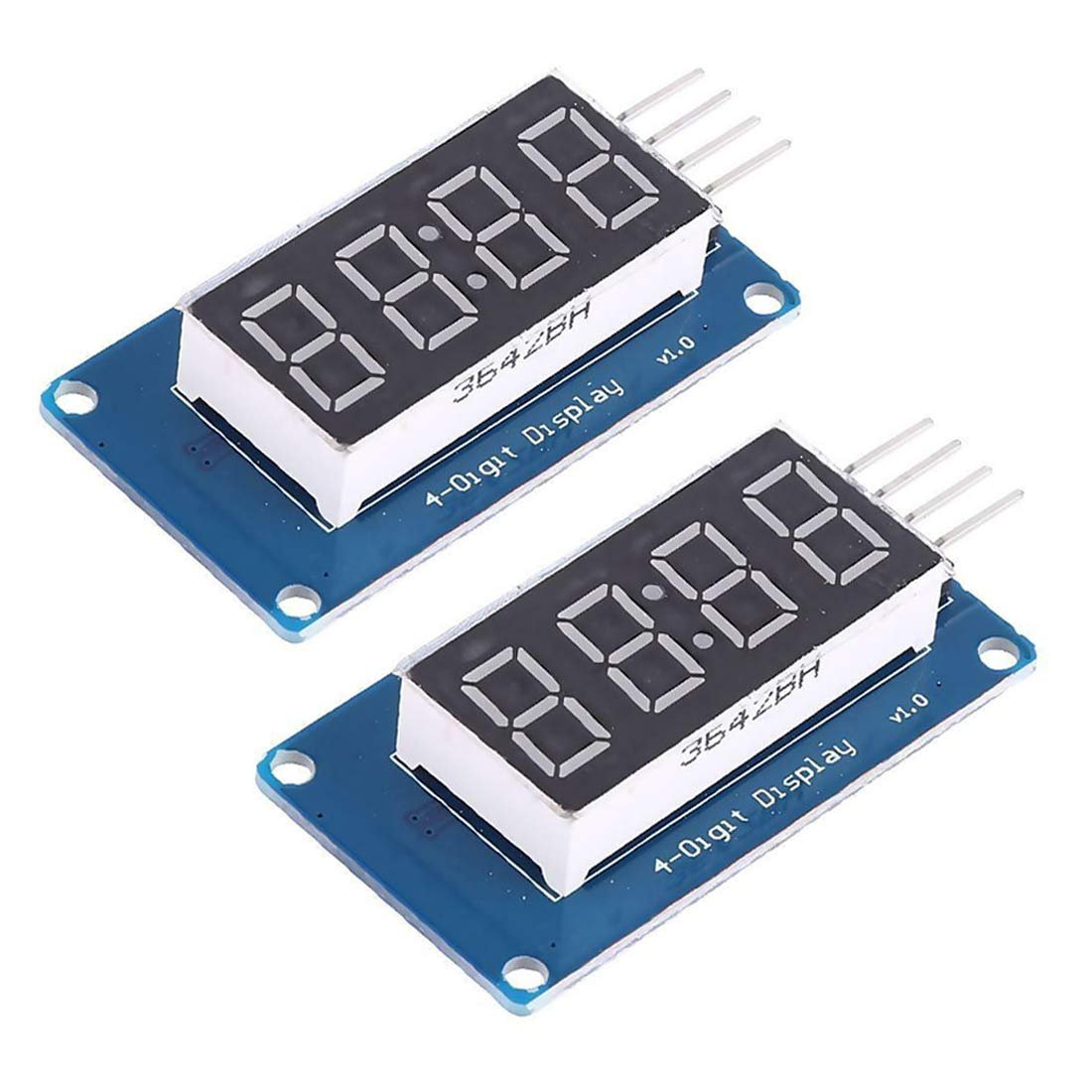
The HiLetgo TM1637 module is the 7-segment display most tutorials are written for, and for good reason. A 0.36-inch red, four-digit tube sits on a small blue board with the TM1637 driver on the back, and the whole thing connects with just four pins: VCC, GND, CLK and DIO. The chip handles all the multiplexing and current limiting, so your Arduino, ESP32, ESP8266, STM32 or Raspberry Pi Pico simply sends digits and a brightness level (eight steps). The centre colon makes it a natural HH:MM clock or MM:SS timer, and four M2 mounting holes let you bolt it behind a panel. HiLetgo’s listing has one of the longest review histories in this category, it ships as a two-pack, and libraries like TM1637Display get it running in five minutes.
✅ Pros- Only 2 GPIO pins, ideal for small boards
- Works at 3.3 V and 5 V
- Huge library and tutorial support
- Two modules per pack, M2 mounting holes
❌ Cons- Decimal points are not wired, colon only
- Small 0.36″ digits for close viewing
- Not a true I2C device, cannot share a bus
🎯 Verdict: The best first 7-segment display for almost any project. Cheap, two-wire, and supported by every major library.
👉 Check Price on Amazon →
🏅 BEST FOR 8 DIGITS
2. HiLetgo MAX7219 8-Digit Module
⭐ 4.6/5 · The Eight-Digit Workhorse
8 Digits
WITH DECIMAL POINTS

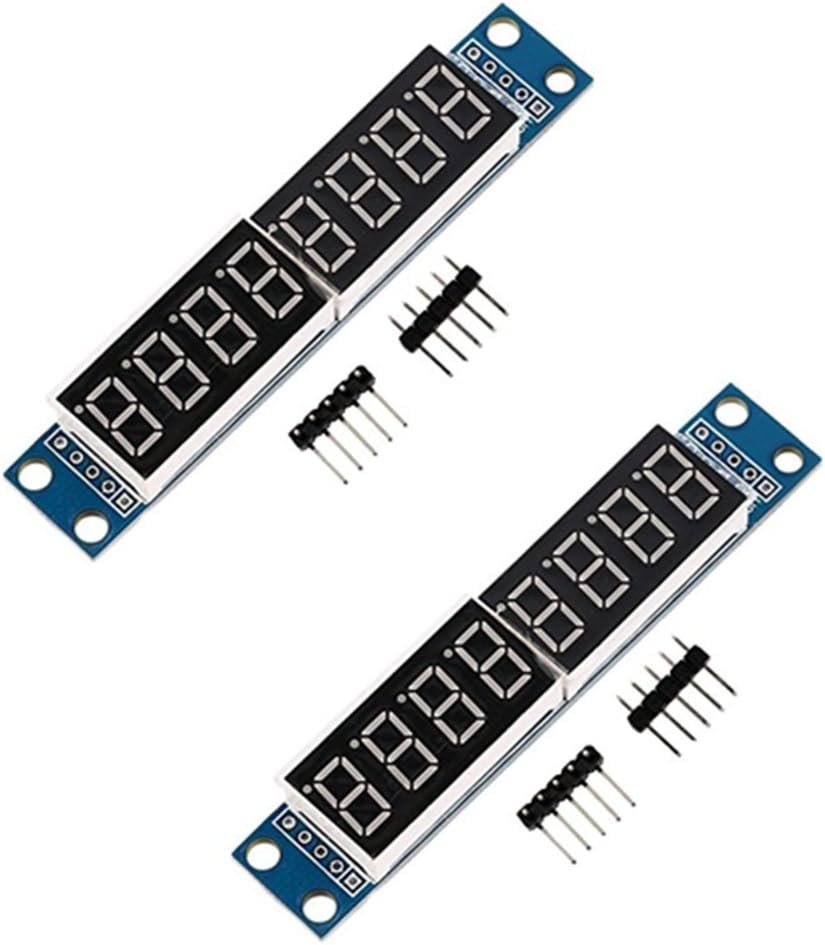
When four digits are not enough, the MAX7219 is the answer. This HiLetgo board pairs the Maxim (now Analog Devices) driver with two 0.36-inch four-digit tubes for a full eight-digit readout with a decimal point on every digit, perfect for frequency counters, voltmeters, odometers and full date or time strings. It talks over three SPI-style lines (DIN, CS, CLK), offers 16-step digital brightness and a BCD decode mode, and the DOUT pin lets you daisy-chain several modules on the same three wires. Because the driver keeps refreshing the display on its own, there is no flicker and no CPU time spent multiplexing. Use the LedControl library on Arduino or the max7219 driver in MicroPython.
✅ Pros- Eight digits plus decimal points
- Cascade multiple modules on 3 pins
- Flicker-free, zero CPU multiplexing
- Two modules per pack
❌ Cons- Officially 4.0 V to 5.5 V, not native 3.3 V
- Small 0.36″ digits
- Draws more current at full brightness
🎯 Verdict: The best pick for long numbers or multi-display builds. Power it from 5 V and it is rock solid.
👉 Check Price on Amazon →
🎨 BEST FINISHED LOOK · ⭐ 4.6/53. Lonely Binary TM1637 0.56″ 6-Pack
TM1637 · 0.56″ digits · decimal points · 6 colours (yellow, green, blue, white, orange, red) · film cover + 3D-printed enclosure
Buy Here →

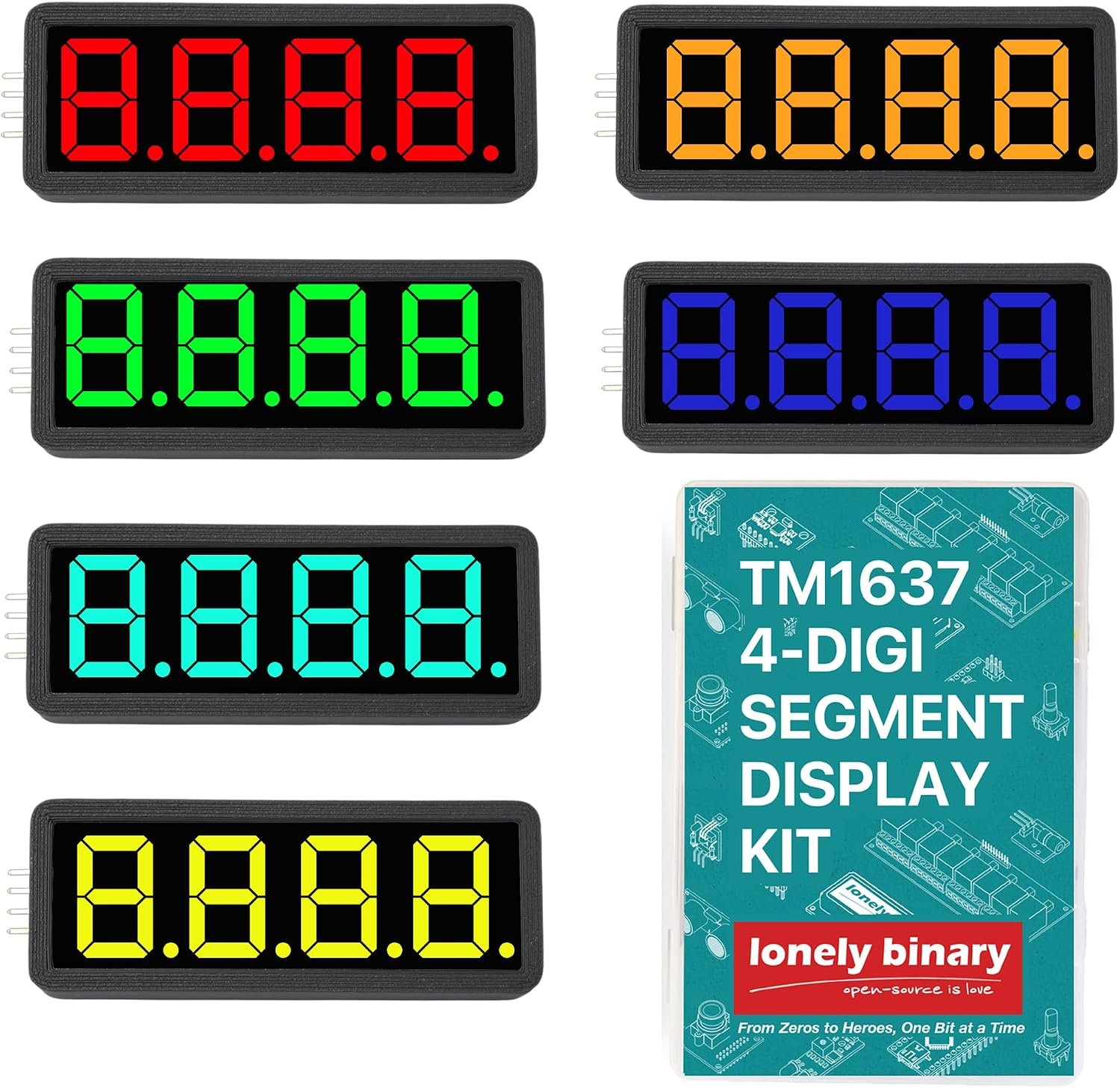
The Lonely Binary 6-pack is what you buy when the display is going into something people will actually look at. You get six 0.56-inch TM1637 four-digit displays, one each in yellow, green, blue, white, orange and red, and unlike most cheap clock boards these have decimal points, so temperature and voltage readings work without tricks. Each display ships with a tinted anti-glare film and a 3D-printed enclosure, which takes a breadboard experiment to a finished panel in minutes. Wiring is standard TM1637: two GPIO pins, and multiple displays can share CLK with a separate DIO each. It is a newer listing with fewer reviews than the HiLetgo boards, but feedback so far is excellent.
✅ Pros: Larger 0.56″ digits; decimal points included; six colours; enclosures and anti-glare film in the box.
❌ Cons: Costs more per display than generic packs; one of each colour, so not ideal if you need six reds; fewer long-term reviews.
🎯 Verdict: The nicest-looking TM1637 option here. Ideal for dashboards, desk clocks and colour-coded sensor panels.
👉 Check Price on Amazon →
🎛️ BEST WITH BUTTONS · ⭐ 4.4/54. HiLetgo TM1638 LED & KEY Module
TM1638 · 8 digits (0.36″) · 8 red LEDs · 8 push buttons · 3 pins (STB, CLK, DIO) · 8 brightness levels
Buy Here →

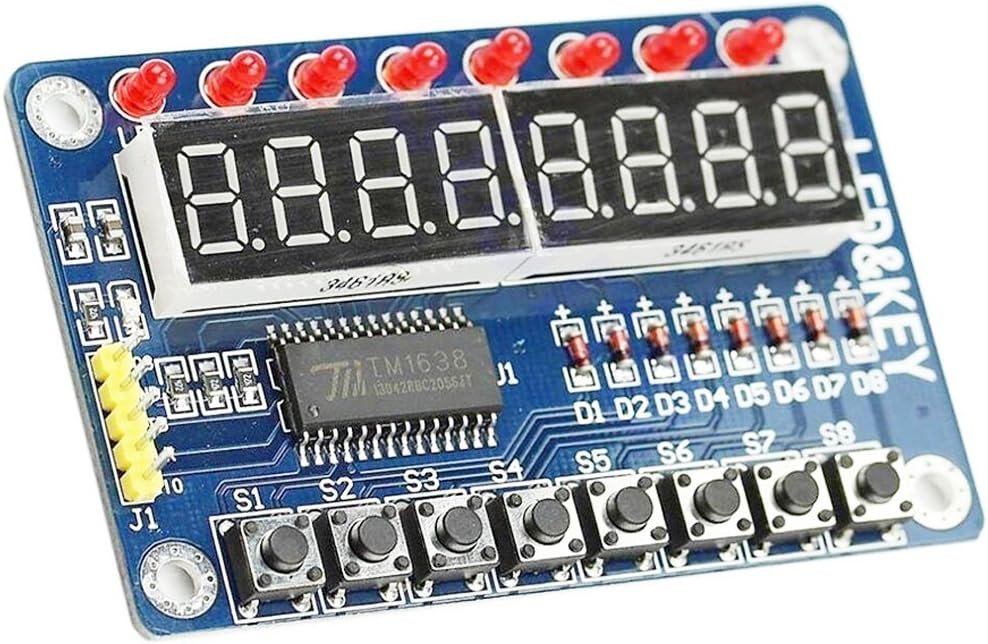
The TM1638 “LED & KEY” board is a complete front panel on one PCB: eight 7-segment digits, eight individual red LEDs and eight tactile buttons, all driven by a single TM1638 chip over three wires. The chip scans the keys for you, so reading button presses costs no extra GPIO, which makes this board a favourite for menu systems, kitchen timers, reaction games, test jigs and setting thresholds on a sensor project without a keypad. Libraries such as TM1638plus (Arduino) handle digits, LEDs and buttons together. Expect basic tactile switches and a modest 4.0-star average, so test every button when the board arrives.
✅ Pros: Display, LEDs and buttons on 3 pins; ideal user-interface board; very cheap for what it does.
❌ Cons: Single module, not a multi-pack; small 0.36″ digits; basic switches; listing text is mostly copied from the datasheet.
🎯 Verdict: The best choice when your project needs both a readout and user input without wiring a keypad.
👉 Check Price on Amazon →
🌈 BEST VALUE MULTI-PACK · ⭐ 4.3/55. TM1637 0.56″ 5-Color Value Pack
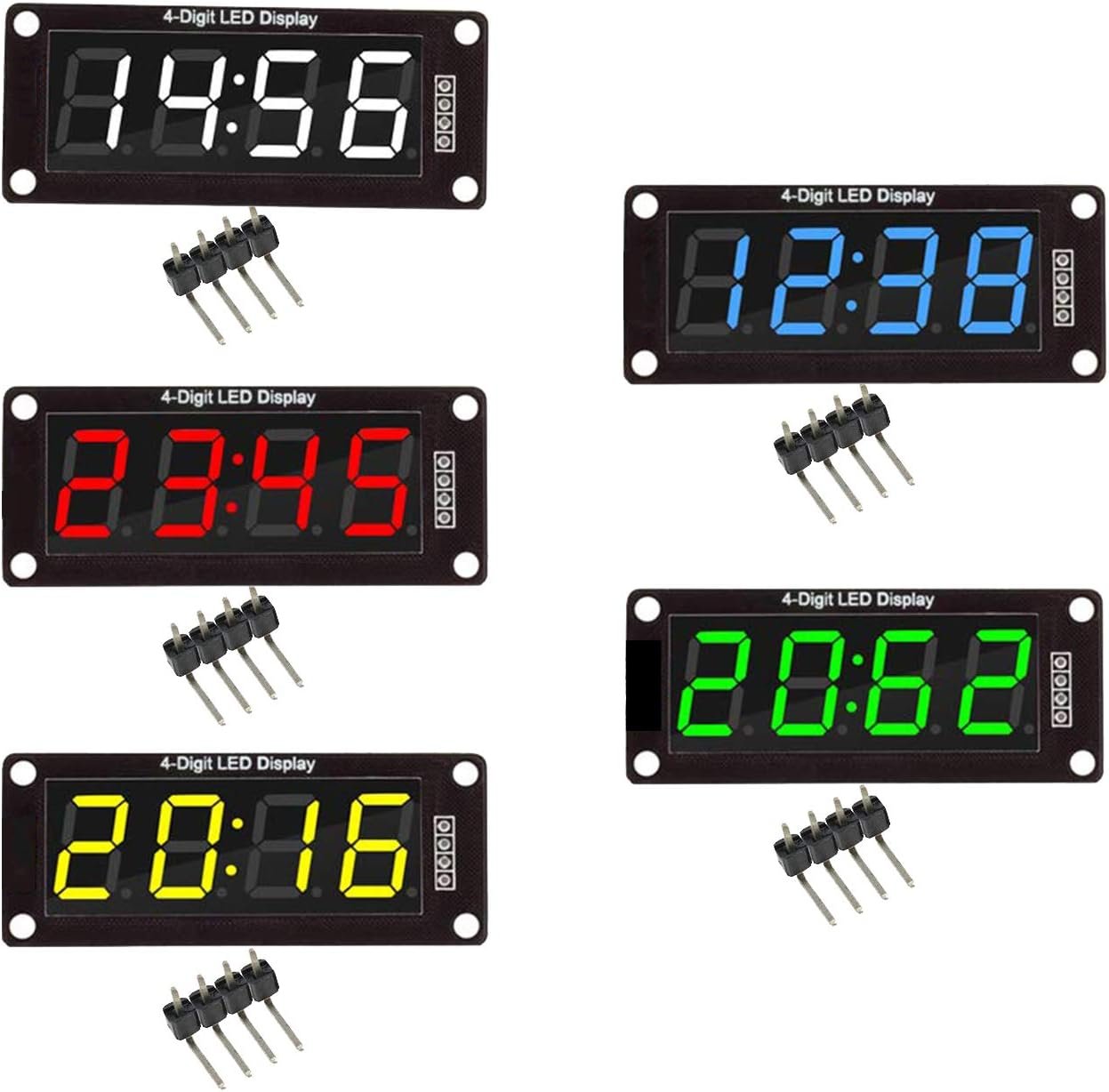
TM1637 · 0.56″ digits · clock colon · 5-pack in red, green, white, yellow, blue · 2 pins
Buy Here →

If you want bigger 0.56-inch digits in several colours but do not need enclosures, this five-pack is the budget route. It contains one TM1637 four-digit module each in red, green, white, yellow and blue, all using the same two-wire interface and eight-level brightness as the HiLetgo board, so the same code runs on every one. With nearly 150 ratings it is a well-proven listing. The modules are clock style with a centre colon, so check the photos if you need decimal points. It is a great pack for a classroom, a multi-zone temperature display, or simply finding out which colour reads best behind your enclosure window.
✅ Pros: Five 0.56″ modules in five colours; same code as any TM1637; strong review history.
❌ Cons: Colon only, no decimal points; one of each colour; listing specifies 5 V logic, dimmer at 3.3 V.
🎯 Verdict: The best value way to get large-digit TM1637 displays in multiple colours.
👉 Check Price on Amazon →
📣 BEST JUMBO / SCOREBOARD · ⭐ 4.4/56. Lonely Binary 4″ Jumbo 74HC595 Digit (2-Pack)
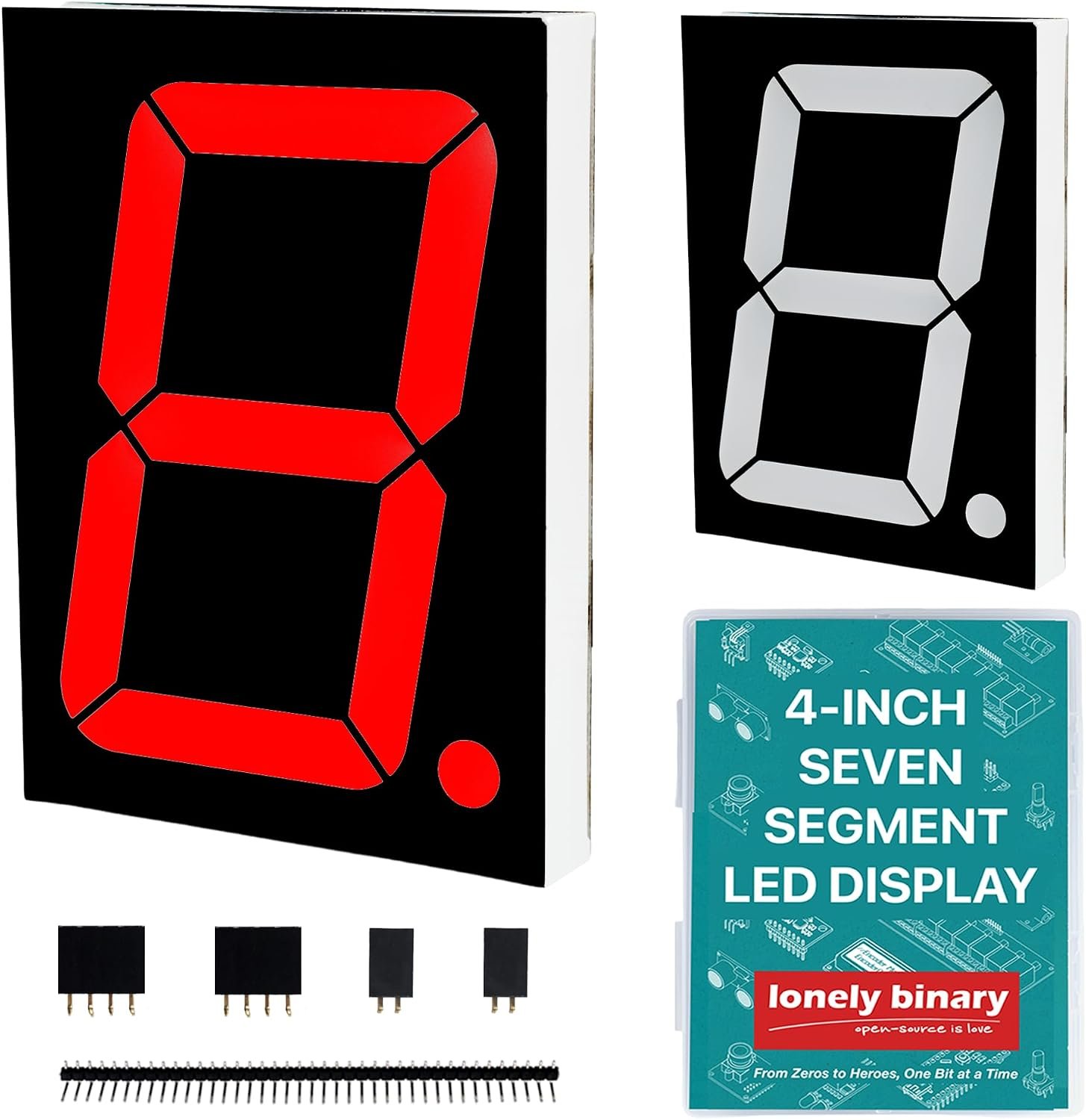
74HC595 driver PCB · 4″ (100 mm+) digit · 2-pack (2 digits) · 12 V segments, 3.3/5 V logic · 3 pins (DATA, CLK, LATCH)
Buy Here →

For anything read from across a hall, the Lonely Binary 4-inch digit is in a different league. Each module is a single 100 mm-plus red digit on a custom driver board built around a 74HC595 shift register that switches the 12 V segments while accepting 3.3 V or 5 V logic. The boards snap together and daisy-chain on three GPIO lines, so a two-pack gives you a two-digit counter and two packs make a four-digit wall clock or scoreboard. Note that this is one digit per module, not four, and you need a separate 12 V supply alongside your 5 V or 3.3 V logic rail. Lonely Binary provides GitHub examples for ESP32, Pico and STM32.
✅ Pros: Huge 4″ digits readable at long distance; drive board handles 12 V for you; chainable on 3 pins.
❌ Cons: One digit per module, so 4 digits means 2 packs; needs a 12 V supply; most expensive per digit here.
🎯 Verdict: The pick for scoreboards, gym timers, event counters and big wall clocks.
👉 Check Price on Amazon →
🔬 BEST FOR LEARNING MULTIPLEXING · ⭐ 4.1/57. uxcell 0.56″ 4-Digit Common Cathode (Bare, 5-Pack)
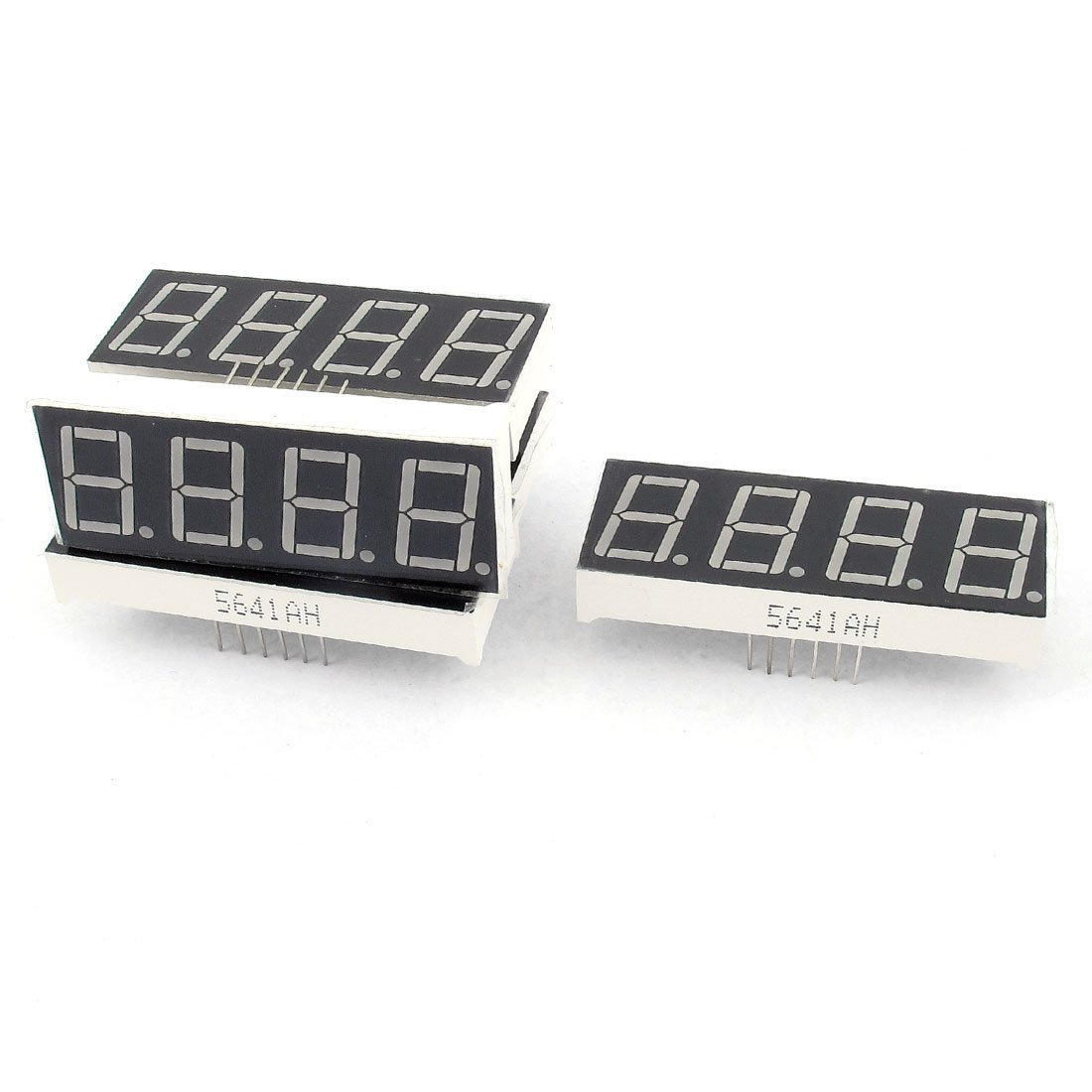
Bare 4-digit tube · 0.56″ · common cathode · 12 pins, 2.54 mm pitch · 51 x 19 x 7 mm · 5-pack
Buy Here →
Sometimes you do not want a driver chip doing the work. The uxcell 0.56-inch common-cathode tube is a bare four-digit display: 12 pins (eight segment lines plus four digit commons) on a breadboard-friendly 2.54 mm pitch, with a forward voltage around 1.8 to 2.2 V at 10 to 20 mA per segment. You add resistors and drive it directly from GPIO, or through a 74HC595, which is exactly how you learn multiplexing, persistence of vision and timer interrupts. It is also the right part when you are designing your own PCB around a MAX7219 or HT16K33. Review count is small, so treat it as a component, not a module.
✅ Pros: Teaches real multiplexing; drop into custom PCBs; 0.56″ digits with decimal points; 5 per pack.
❌ Cons: No driver, so 12 pins plus resistors needed; constant refresh uses CPU time; few reviews.
🎯 Verdict: The right choice for learning how 7-segment displays really work, or for your own driver PCB.
👉 Check Price on Amazon →
🧭 How to Choose the Right 7-Segment Display for Your Project
⏰
Building a clock or countdown timer?
Get the HiLetgo TM1637. The centre colon is made for HH:MM, and it needs only two pins on any board.
📟
Showing long numbers or a date string?
The MAX7219 8-digit module fits 12345678 or 2026.10.01 on one board, and cascades if you need more.
🌡️
Displaying temperature or voltage?
You need decimal points. Choose the Lonely Binary 0.56″ (or the MAX7219), not a colon-only clock board.
🎛️
Need buttons for menus or settings?
The TM1638 LED & KEY gives you 8 digits, 8 LEDs and 8 buttons on three wires.
🏟️
Readable from across a room or hall?
Go jumbo with the Lonely Binary 4″ digits, chained together for a scoreboard or wall clock.
🎓
Teaching or learning multiplexing?
Use the bare uxcell common-cathode tube with resistors or a 74HC595, then graduate to a TM1637.
⚙️ Key Specs Compared Side by Side
| Spec | HiLetgo TM1637 | HiLetgo MAX7219 | Lonely Binary 0.56″ | HiLetgo TM1638 | Lonely Binary 4″ Jumbo |
|---|
| Driver Chip | TM1637 | MAX7219 | TM1637 | TM1638 | 74HC595 |
| Digits per Module | 4 | 8 ⭐ | 4 | 8 ⭐ | 1 |
| Digit Height | 0.36″ | 0.36″ | 0.56″ | 0.36″ | 4″ ⭐ |
| MCU Pins | 2 ⭐ | 3 | 2 ⭐ | 3 | 3 |
| Decimal Points | No (colon) | Yes ⭐ | Yes ⭐ | Yes ⭐ | Yes ⭐ |
| Built-in Buttons | No | No | No | 8 keys ⭐ | No |
| Chaining | Shared CLK | DOUT cascade ⭐ | Shared CLK | No | Snap-chain |
| Logic Voltage | 3.3 / 5 V | 5 V (4.0-5.5 V) | 3.3 / 5 V | 3.3 / 5 V | 3.3 / 5 V + 12 V |
| Best Use | Clocks, timers | Long readouts | Finished panels | User interfaces | Scoreboards |
Specifications are taken from the live Amazon listings and the driver chip datasheets. Generic modules can change between production batches, so always confirm the current photos and description on the Amazon listing before ordering.
❓ Frequently Asked Questions
What is the difference between TM1637 and MAX7219 display modules?
The TM1637 is a low-cost driver for up to six digits that uses a two-wire serial protocol (CLK and DIO) and is almost always sold on four-digit boards. The MAX7219 drives up to eight digits, uses a three-wire SPI-style interface (DIN, CS, CLK), has 16 brightness steps and a cascade output for chaining many modules on the same pins. Pick the TM1637 for simple four-digit clocks and counters where pin count matters, and the MAX7219 when you need eight digits, decimal points on every digit, or several displays in a row. See our TM1637 Arduino tutorial to get started.
Is the TM1637 an I2C display?
No, although it looks similar. The TM1637 uses a two-wire clock and data protocol, but it has no device address and does not follow the I2C start and acknowledge rules exactly. That means it cannot share an I2C bus with sensors, and you cannot put two TM1637 displays on the same two pins. You can share the CLK line between several displays, but each one needs its own DIO pin. If you want a genuine I2C 7-segment display, look for an HT16K33-based backpack instead.
Can I use these 7-segment modules with an ESP32 or Raspberry Pi Pico at 3.3 V?
TM1637 and TM1638 modules work well at 3.3 V; the LEDs are just slightly dimmer than at 5 V. The MAX7219 is specified for a 4.0 V to 5.5 V supply, so power its VCC from the 5 V or VBUS pin. Its inputs often accept 3.3 V data lines in practice, but that is outside the datasheet guarantee, so add a 74AHCT125 or similar level shifter for a reliable build. Our TM1637 with Raspberry Pi Pico guide shows the wiring.
Common anode or common cathode: does it matter?
For driver modules like the TM1637, MAX7219 and TM1638 boards, no; the board is already wired to suit its chip and you never touch the segments directly. It only matters when you buy a bare display. Common cathode digits connect all the LED cathodes of a digit together, so you drive segments high and pull the digit low, which is what the MAX7219 expects. Common anode is the reverse. Mixing them up simply gives you an inverted or blank display, so match the bare tube to your driver or code.
How many 7-segment displays can I connect to one Arduino?
With MAX7219 modules the usual limit is eight chained displays per three-pin chain in the LedControl library, which is 64 digits, and you can run extra chains on other pins. With TM1637 boards you need one DIO pin per display plus a shared CLK, so an Uno can realistically run eight to ten. Jumbo 74HC595 digits chain indefinitely on three pins, limited only by refresh speed and your 12 V supply. Current is the real constraint: budget roughly 20 to 80 mA per four-digit module at full brightness and use an external 5 V supply for large builds.
🏁 Final Verdict: The Right 7-Segment Display for Every Project
Pick by digit count, size and how far away people will read it:
🥇 Best Overall · HiLetgo TM1637: 4-digit, 2-wire, the easiest 7-segment display to get running
Buy Here →🏅 Best for 8 Digits · HiLetgo MAX7219: 8 digits with decimal points, cascadable on 3 pins
Buy Here →🎨 Best Finished Look · Lonely Binary 0.56″: 0.56″ digits, 6 colours, decimal points and enclosures
Buy Here →🎛️ Best With Buttons · HiLetgo TM1638: 8 digits, 8 LEDs and 8 buttons on one board
Buy Here →🌈 Best Value Multi-Pack · TM1637 5-Color Pack: five 0.56″ TM1637 modules in five colours
Buy Here →📣 Best Jumbo / Scoreboard · Lonely Binary 4″ Jumbo: 4-inch digits for scoreboards and wall clocks
Buy Here →🔬 Best for Learning Multiplexing · uxcell Bare 0.56″: bare common-cathode tubes for learning and custom PCBs
Buy Here →A 7-segment display is one of the most satisfying upgrades you can give a project: suddenly your sensor node, timer or power monitor tells you what it is doing at a glance. For most people the HiLetgo TM1637 is the one to buy first, because it is cheap, needs two pins and has a library for every platform. Step up to the MAX7219 when you need eight digits or decimal points, add the TM1638 when you need buttons, and go jumbo when the audience is across the room. Once your display arrives, follow our TM1637 with Arduino, ESP32 with 74HC595 and a 4-digit display and STM32 Blue Pill 7-segment guides, or browse all our Arduino, ESP32, STM32 and Raspberry Pi tutorials.
💬 Not sure which display fits your build? Tell us what you are making, a clock, a counter, a sensor readout or a scoreboard, in the comments below and we will point you to the right module.
All Amazon links above use our affiliate tag (microlab05-20). Purchasing through them supports microcontrollerslab.com at no extra cost to you. We do not print prices because they change frequently, so always confirm the current price, colour and pack size on Amazon before buying.